2-15
Hardware Setup
Jumpers
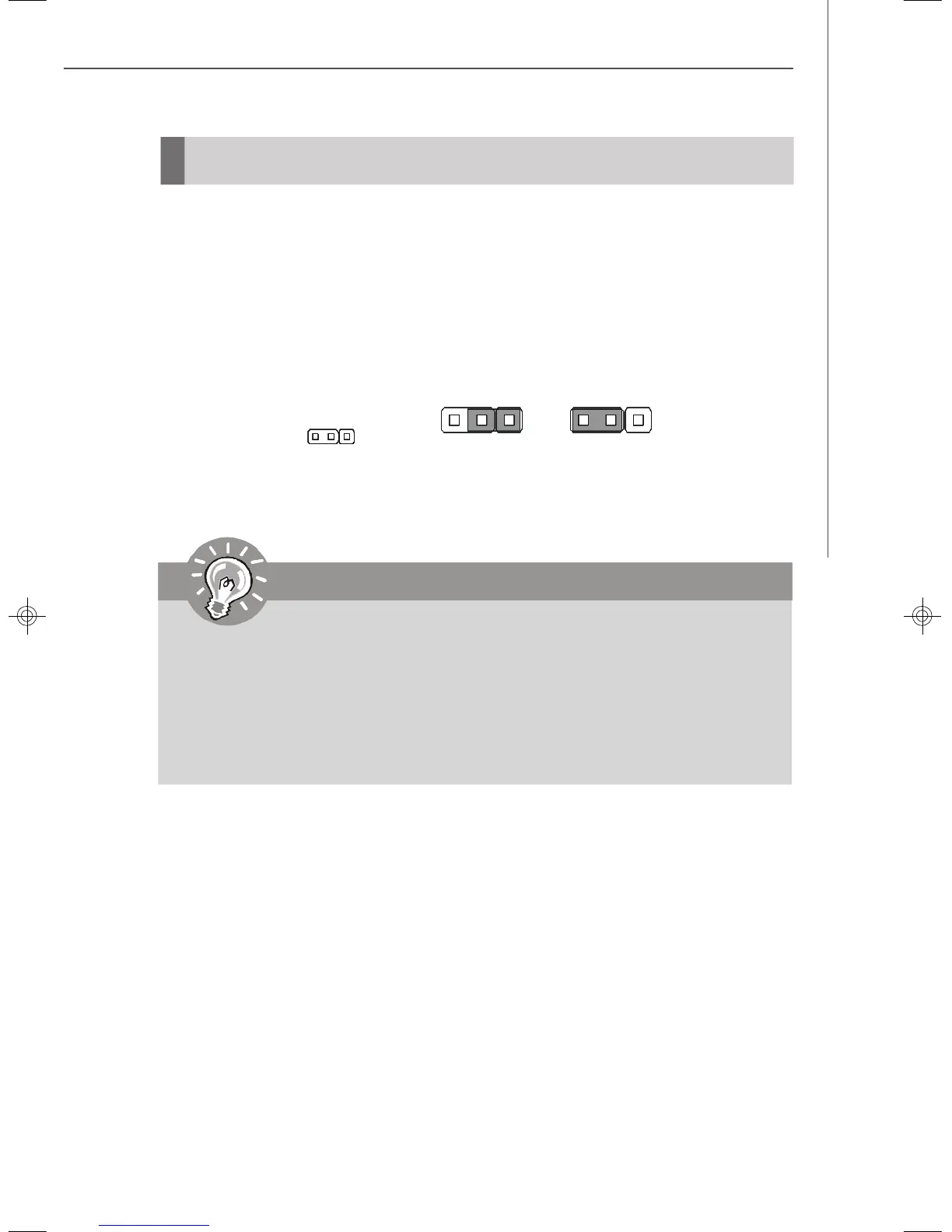
Clear CMOS Jumper: JBAT1
There is a CMOS RAM onboard that has a power supply from external battery to keep
the data of system configuration. With the CMOS RAM, the system can automatically
boot OS every time it is turned on. If you want to clear the system configuration, set
the JBAT1 (Clear CMOS Jumper ) to clear data.
Important
To clear CMOS you should:
1. Short 1-2 pin while the system is off. Restart the PC and press F2 to enter
the BIOS Setup Utility. Shut down the PC.
2. Short 2-3 pin while the system is off. Restart the PC and press F2 to enter
the BIOS Setup Utility. Shut down the PC.
3. Short 1-2 pin while the system is off. Restart the PC.
Avoid clearing the CMOS while the system is on; it will damage the mainboard.
JBAT1
1
Keep Data Clear Data
3
1
3
1
9638v3.0-2.p65 2007/5/8, 下午 01:5415



 To Next Page