EasyManua.ls Logo

MSI H67MA-E35 (B3) - Page 30

MSI H67MA-E35 (B3)
171 pages
Print Icon
To Next Page IconTo Next Page
To Previous Page IconTo Previous Page
Loading...
En-20
MS-7680 Manboard
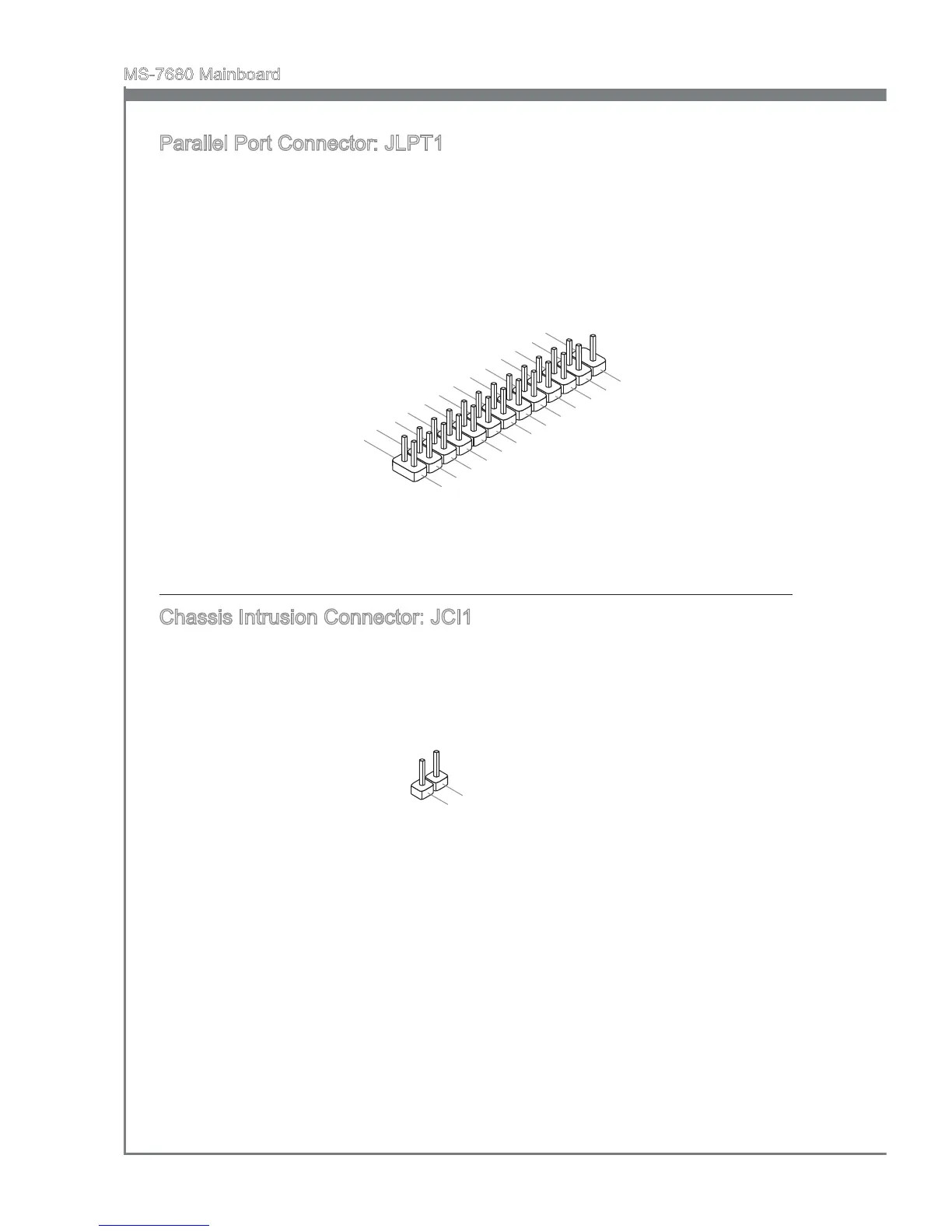
Parallel Port Connector: JLPT1
Ths connector s used to connect an optonal parallel port bracket. The parallel port s a
standard prnter port that supports Enhanced Parallel Port (EPP) and Extended Capa-
bltes Parallel Port (ECP) mode.
1
0
.
G
r
o
u
n
d
1
4
.
G
r
o
u
n
d
8
.
L
P
T
_
S
L
I
N
#
1
2
.
G
r
o
u
n
d
6
.
P
I
N
I
T
#
4
.
E
R
R
#
2
.
A
F
D
#
2
4
.
G
r
o
u
n
d
2
2
.
G
r
o
u
n
d
2
6
.
N
o
P
i
n
2
0
.
G
r
o
u
n
d
1
8
.
G
r
o
u
n
d
1
6
.
G
r
o
u
n
d
1
.
R
S
T
B
#
3
.
P
R
N
D
0
5
.
P
R
N
D
1
7
.
P
R
N
D
2
9
.
P
R
N
D
3
1
1
.
P
R
N
D
4
1
3
.
P
R
N
D
5
1
5
.
P
R
N
D
6
1
7
.
P
R
N
D
7
1
9
.
A
C
K
#
2
1
.
B
U
S
Y
2
3
.
P
E
2
5
.
S
L
C
T
Chasss Intruson Connector: JCI1
Ths connector connects to the chasss ntruson swtch cable. If the chasss s opened,
the chasss ntruson mechansm wll be actvated. The system wll record ths status
and show a warnng message on the screen. To clear the warnng, you must enter the
BIOS utlty and clear the record.
1
.
C
I
N
T
R
U
2
.
G
r
o
u
n
d

Related product manuals