B-5
ATi SATA RAID
• Stripe Block Size, the default 64KB is best for most applications. RAID 0 or
10 only.
• Gigabyte Boundary, allows use of slightly smaller replacement drives.
• Cache Mode, WriteThru or WriteBack.
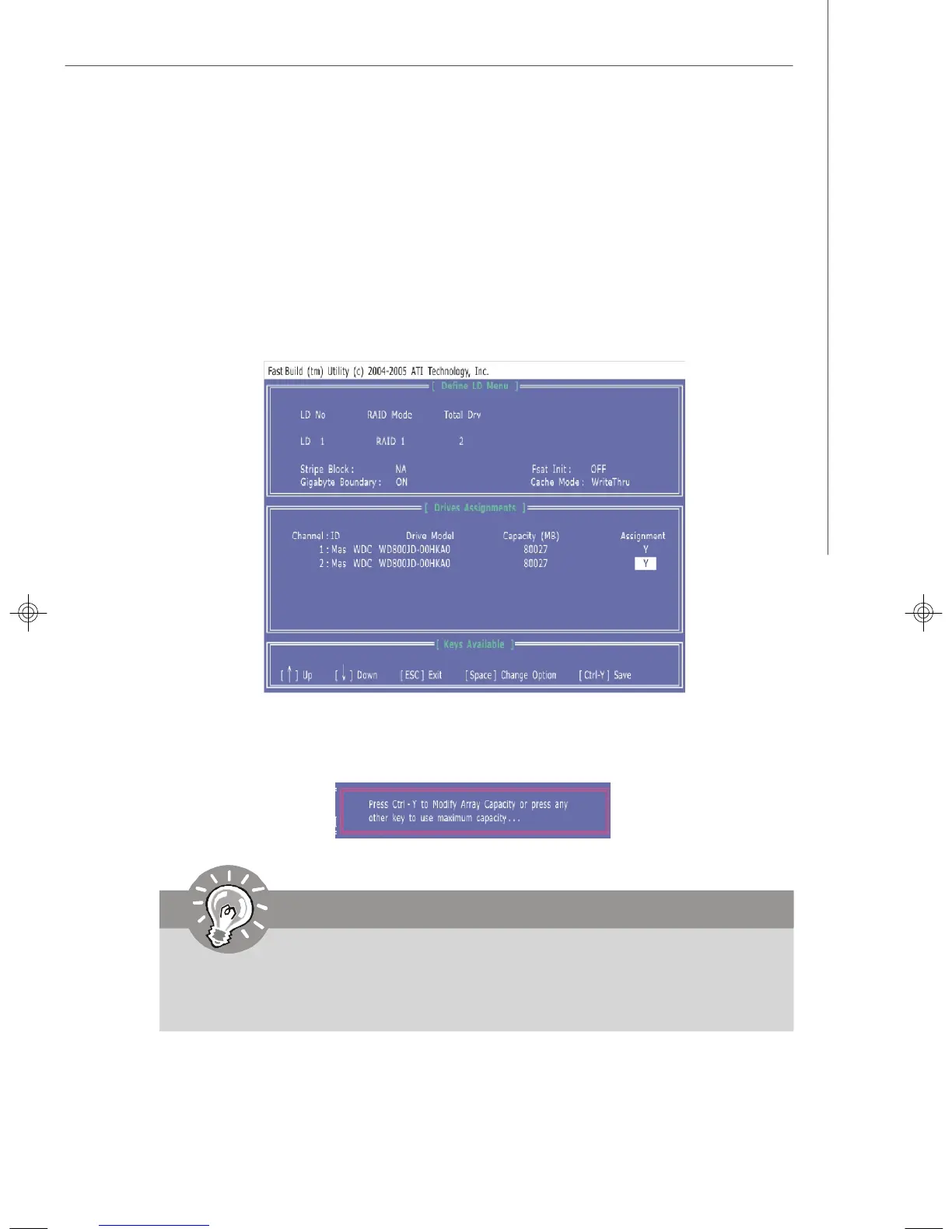
4. On the Drives Assignments window, use the arrow key to choose the hard
drives which you want to make part of the LD, use the space key to change
the assignment to “Y”. Then press [Ctrl+Y] to save the configuration.
5. A message will show up on the bottom, press any key to save the configuration
or press [Ctrl-Y] to allocate the RAID capacity manually.
6. The LD creation is done, the screen shows the LD information as below.
Important
1. The default capacity is the full capacity of the selected hard drives.
2. If you allocate the first LD capacity manually, you can create second LD
with remaining capacity of the selected hard drives.
7327v1.0-B_ATIRAID.p65 2007/4/13, 上午 10:415




 To Next Page