Overspeed Protecton
Overspeed Protecton functon can montor the current CPU draws as well as ts
power consumpton. If t exceeds a certan level, the processor automatcally re
-
duces ts clock speed. If you want to overclock your CPU, set t to [Dsabled].
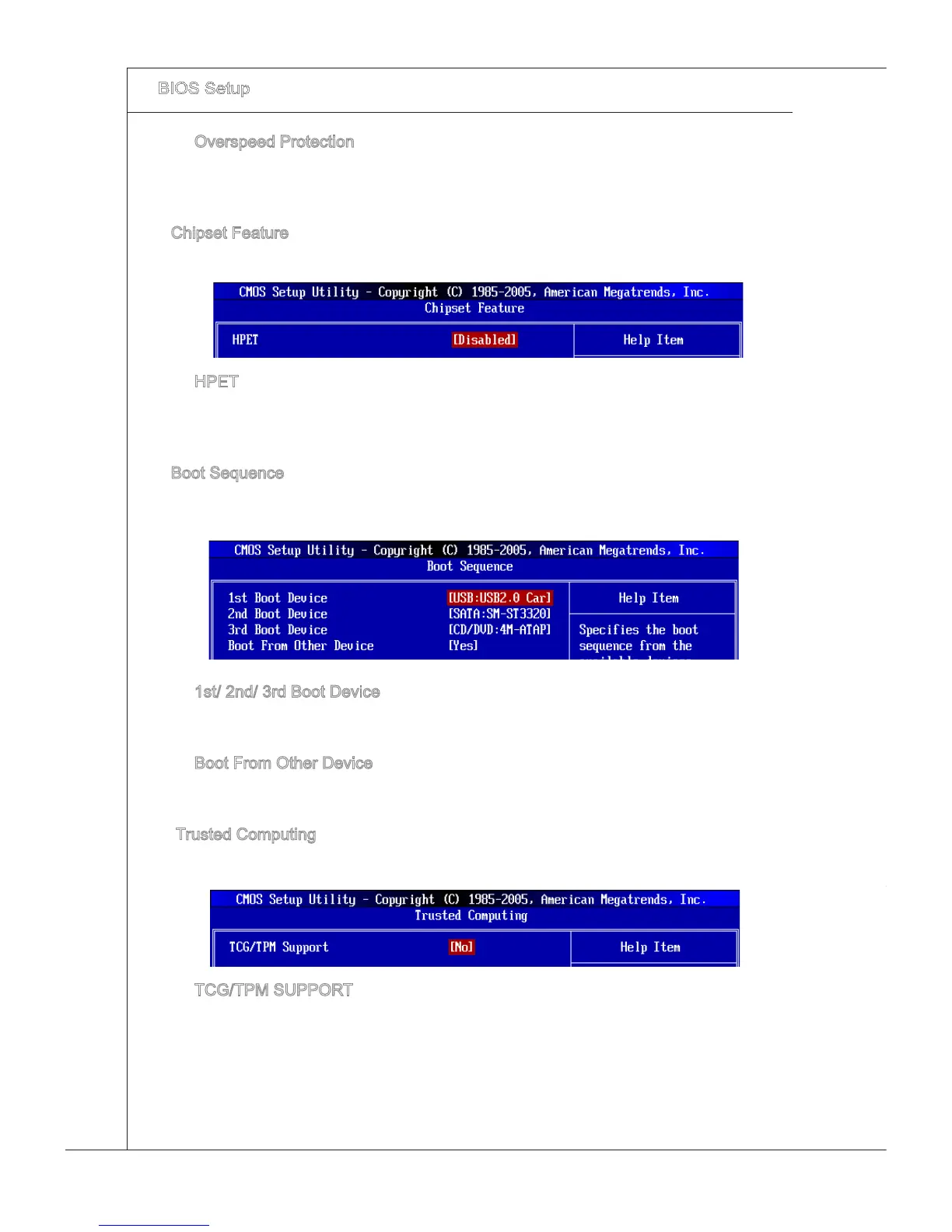
Chpset Feature
Press <Enter> to enter the sub-menu and the followng screen appears:
▶
▶
HPET
The HPET (Hgh Precson Event Tmers) s a component that s part of the chpset.
You can enable t, and t wll provde you wth the means to get to t va the varous
ACPI methods.
Boot Sequence
Press <Enter> to enter the sub-menu and the followng screen appears:
▶
▶
1st/ 2nd/ 3rd Boot Devce
The tem allows you to set the rst/ second/ thrd boot devce where BIOS attempts
to load the dsk operatng system.
Boot From Other Devce
Settng the opton to [Yes] allows the system to try to boot from other devce, f the
system fals to boot from 1st boot devce.
Trusted Computng
Press <Enter> to enter the sub-menu and the followng screen appears:
▶
▶
▶
TCG/TPM SUPPORT
Settng the opton to [Yes] enables TPM (Trusted Platform Module) to the system.
▶







 To Next Page