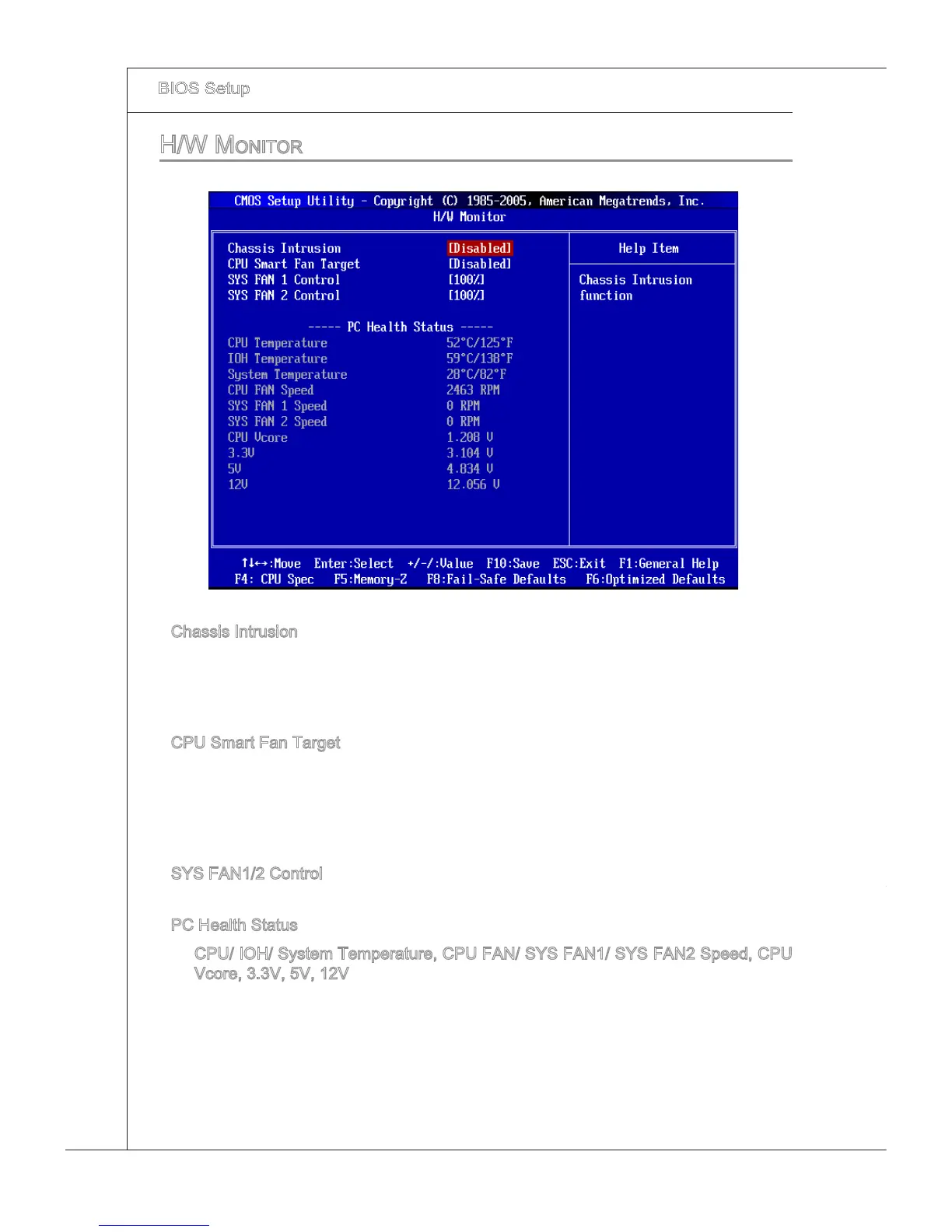
h/w Monitor
Chasss Intruson
The eld enables or dsables the feature of recordng the chasss ntruson status and
ssung a warnng message f the chasss s once opened. To clear the warnng mes
-
sage, set the eld to [Reset]. The settng of the eld wll automatcally return to [Enabled]
later.
CPU Smart Fan Target
The manboard provdes the Smart Fan functon whch can control the CPU fan speed
automatcally dependng on the current temperature to keep t wth n a specc range.
You can enable a fan target value here. If the current CPU fan temperature reaches to
the target value, the smart fan functon wll be actvated. It provdes several sectons to
speed up for coolng down automatcally.
SYS FAN1/2 Control
Ths tem allows users to select how percentage of speed for the SYS FAN1/2.
PC Health Status
CPU/ IOH/ System Temperature, CPU FAN/ SYS FAN1/ SYS FAN2 Speed, CPU
Vcore, 3.3V, 5V, 12V
These tems dsplay the current status of all of the montored hardware devces/com
-
ponents such as CPU voltage, temperatures and all fans’ speeds.
▶
▶
▶
▶
▶







 To Next Page