3-23
BIOS Setup
▍
MS-7522
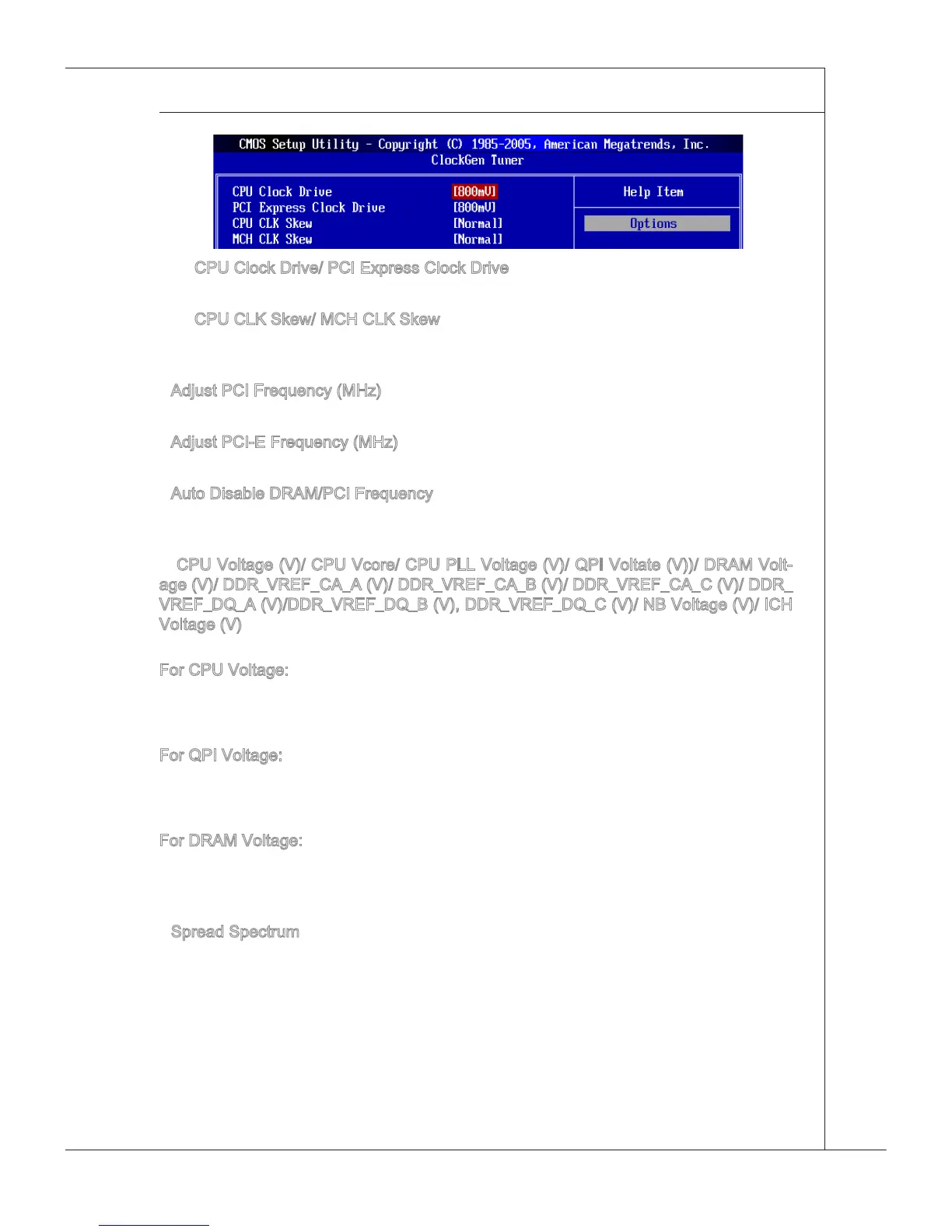
CPU Clock Drve/ PCI Express Clock Drve
These tems are used to select the CPU/ PCI Express clock ampltude.
CPU CLK Skew/ MCH CLK Skew
These tems are used to select the CPU/ North Brdge chpset clock skew. They can
help CPU to reach the hgher overclockng performace.
Adjust PCI Frequency (MHz)
Ths eld allows you to select the PCI frequency (n MHz).
Adjust PCI-E Frequency (MHz)
Ths eld allows you to select the PCIE frequency (n MHz).
Auto Dsable DRAM/PCI Frequency
When set to [Enabled], the system wll remove (turn o) clocks from empty DIMM and
PCI slots to mnmze the electromagnetc nterference (EMI).
CPU Voltage (V)/ CPU Vcore/ CPU PLL Voltage (V)/ QPI Voltate (V))/ DRAM Volt-
age (V)/ DDR_VREF_CA_A (V)/ DDR_VREF_CA_B (V)/ DDR_VREF_CA_C (V)/ DDR_
VREF_DQ_A (V)/DDR_VREF_DQ_B (V), DDR_VREF_DQ_C (V)/ NB Voltage (V)/ ICH
Voltage (V)
These tems are used to asjust the voltage of CPU, Memory, QPI and chpset.
For CPU Voltage:
The value here s the oset for you to adjust/add based on the current CPU voltage.
Please read the real-tme CPU voltage n “CPU Vcore” n the “H/W montor” page. Please
note the based CPU Voltage wll vary dependng on the derent CPU you nstall.
For QPI Voltage:
The value here s the oset for you to adjust/add based on the current QPI voltage. The
default based QPI Voltage s from 1.1V to 1.22V, and t wll vary dependng on the der
-
ent CPU you nstall. You can read the QPI voltage n GreenPower Center.
For DRAM Voltage:
Accordng to the Inte CPU spec, DRAM Voltage settng 1.65V may damage the CPU
permanently. It s strongly recommended that you nstall the DRAM wth the voltage set
-
tng below 1.65V. You can read the DRAM voltage n GreenPower Center.
Spread Spectrum
When the manboard’s clock generator pulses, the extreme values (spkes) of the pulses
create EMI (Electromagnetc Interference). The Spread Spectrum functon reduces the
EMI generated by modulatng the pulses so that the spkes of the pulses are reduced to
atter curves. If you do not have any EMI problem, leave the settng at Dsabled for opt
-
mal system stablty and performance. But f you are plagued by EMI, set to Enabled for
EMI reducton. Remember to dsable Spread Spectrum f you are overclockng because
even a slght jtter can ntroduce a temporary boost n clock speed whch may just cause
your overclocked processor to lock up.
▶
▶
▶
▶
▶
▶
▶







 To Next Page