EasyManua.ls Logo

MTD 310 - Page 8

MTD 310
21 pages
Print Icon
To Next Page IconTo Next Page
To Previous Page IconTo Previous Page
Loading...
I
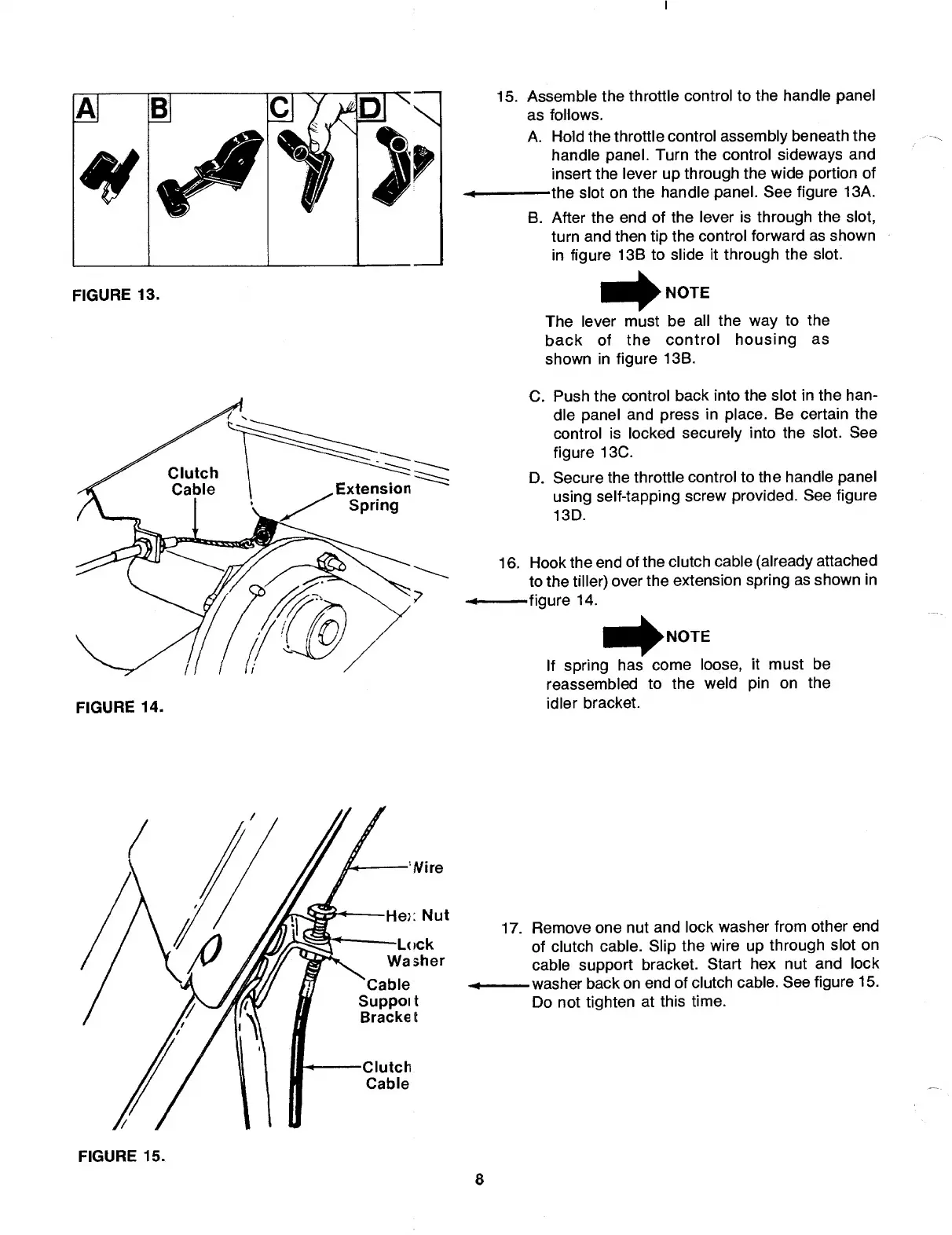
FIGURE
13.
FIGURE
14.
15.
A
ssemble
the
throttle
control
to
the
handle
panel
as
follows.
A.-Hold
the
throttle
control
assembly
beneath
the
handle
panel.
Turn
the
control
sideways
and
insert
the
lever
up
through
the
wide
portion
of
-the
slot
on
the
handle
panel.
See
figure
13A.
B.
A
fter
the
end
of
the
lever
is
through
the
slot,
turn
and
then
tip
the
control
forward
as
shown
in
figure
13B
to
slide
it
through
the
slot.
NOTE
The
lever
must
be
all
the
way
to
the
back
of
the
control
housing
as
shown
in
figure
13B.
C.
Push
the
control
back
into
the
slot
in
the
han¬
dle
panel
and
press
in
place.
Be
certain
the
control
is
locked
securely
into
the
slot.
See
figure
13C.
D.
Secure
the
throttle
control
to
the
handle
panel
using
self-tapping
screw
provided.
See
figure
13D.
16.-Hook
the
end
of
the
clutch
cable
(already
attached
to
the
tiller)
over
the
extension
spring
as
shown
in
-figure
14.
If
spring
has
come
loose,
it
must
be
reassembled
to
the
weld
pin
on
the
idler
bracket.
17.
R
emove
one
nut
and
lock
washer
from
other
end
of
clutch
cable.
Slip
the
wire
up
through
slot
on
cable
support
bracket.
Start
hex
nut
and
lock
-washer
back
on
end
of
clutch
cable.
See
figure
15.
Do
not
tighten
at
this
time.
FIGURE
15.
8

Related product manuals