Page 10 MTI Part Number 7001-0040
Revision 3.1 August 7, 2014
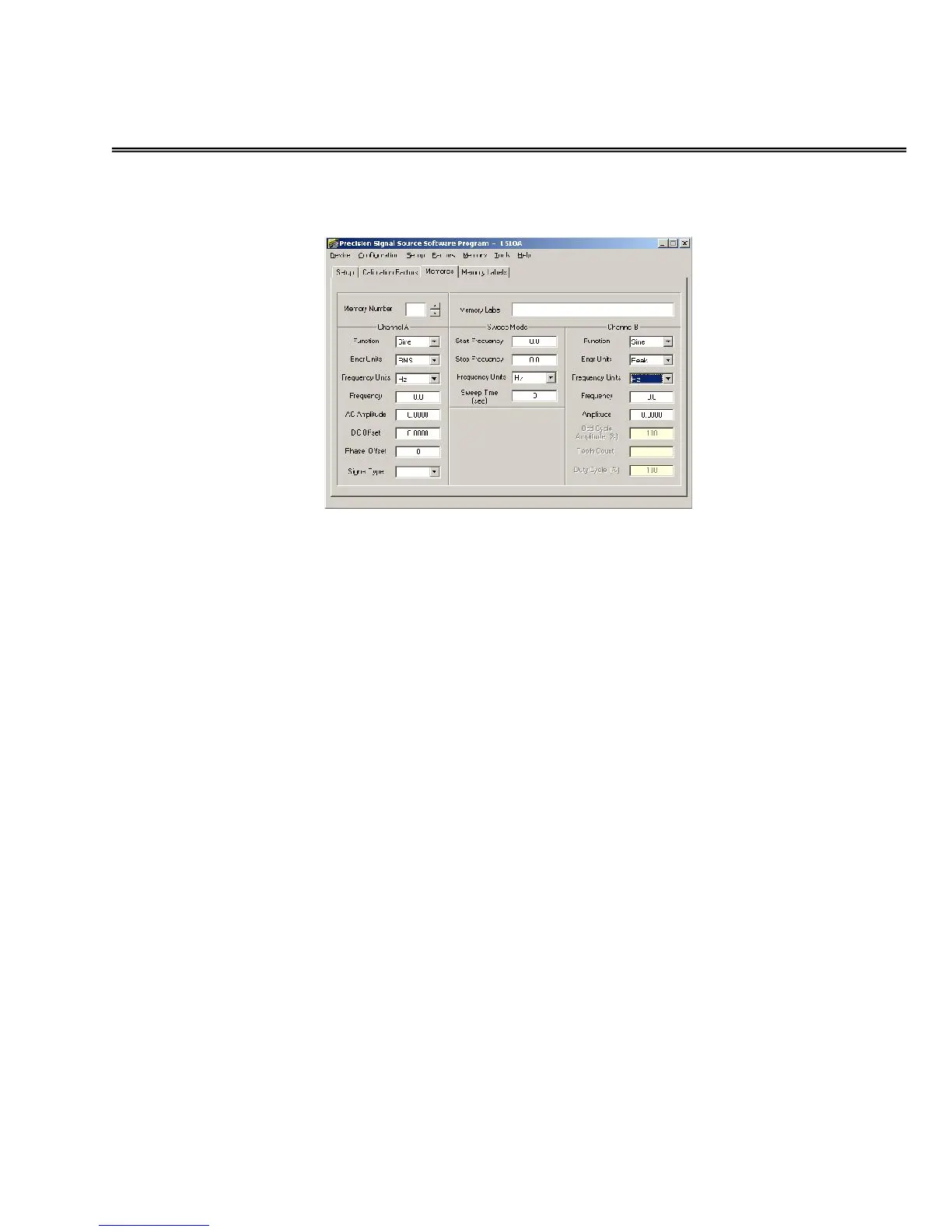
MEMORIES Tab
The MEMORIES Tab allows users to view and edit the settings saved in
each of the 40 individual memory locations of the 1500CS and 1510A.
MEMORY NUMBER – Indicates the specific Memory Location and
contents being displayed. Use the up and down pointers to index thru
all of the 40 locations.
MEMORY LABEL – Use this area to enter a unique name for the
signal being defined. The first 8 characters will be displayed on the
1500 Series unit display when the memory is selected. You may also
name memory locations using the Memory Label tab.
CHANNEL A SETTINGS:
FUNCTION – This may be set to SINE, TRIANGLE,
SAWTOOTH, or SQUARE wave signals using the drop down
menu selector.
ENGINEERING UNITS – The amplitude units of the signal
may be set to PEAK, PEAK to PEAK, or RMS using the drop
down menu selector.
FREQUENCY UNITS – Use the drop down tool to select either
Hz (hertz or cycles per second) or RPM (Revolutions per
Minute).
FREQUENCY – Enter the desired frequency setting for the
signal.
AC AMPLITUDE – Enter the desired amplitude value (see
ENGINEERING UNITS Above) of the signal.


 To Next Page