Page 23 MTI Part Number 7001-0040
Revision 3.1 August 7, 2014
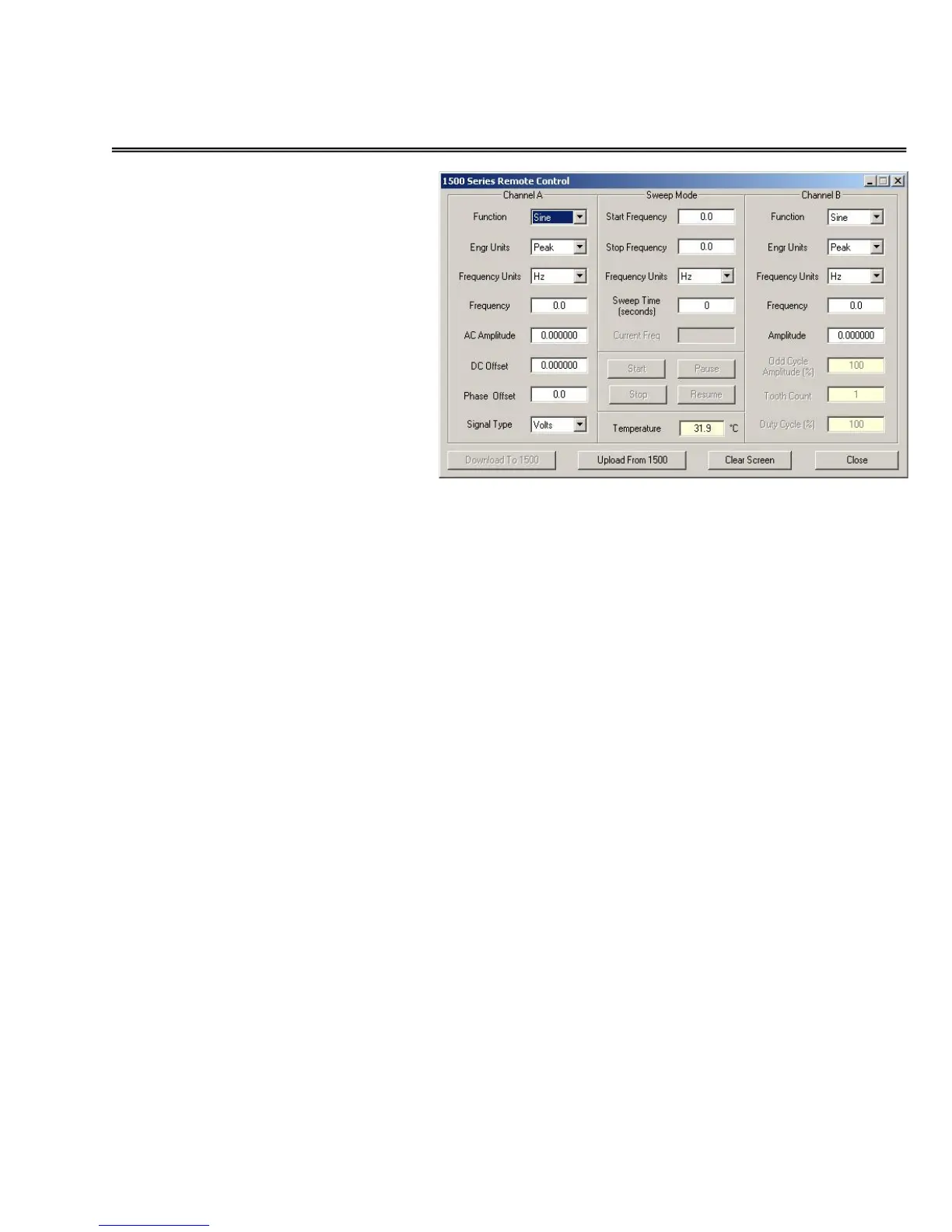
TOOLS Menu – Remote Control Panel
The REMOTE CONTROL
PANEL facilitates
complete control of the
outputs of the 1500CS and
1510A. Users may select
any controllable parameter
of the unit from the user
interface, and when the
set-up has been
completed, a click of the
DOWNLOAD to 1500
button will command the
1500 to generate the
selected signal(s).
Clicking on the UPLOAD from 1500 button will establish
communications with the unit and refresh all of the setting windows
with the current settings from the unit.
NOTE that even under this mode of operation, the 1500 keyboard
is active and keyboard entries can change settings.
CHANNEL A SETTINGS:
FUNCTION – This may be set to SINE, TRIANGLE,
SAWTOOTH, or SQUARE wave signals using the drop down
menu selector.
ENGINEERING UNITS – The amplitude units of the signal
may be set to PEAK, PEAK to PEAK, or RMS using the drop
down menu selector.
FREQUENCY UNITS – Use the drop down tool to select either
Hz (hertz or cycles per second) or RPM (Revolutions per
Minute).
FREQUENCY – Enter the desired frequency setting for the
signal.
AC AMPLITUDE – Enter the desired amplitude value (see
ENGINEERING UNITS Above) of the signal.


 To Next Page