Page 16 MTI Part Number 7001-0040
Revision 3.1 August 7, 2014
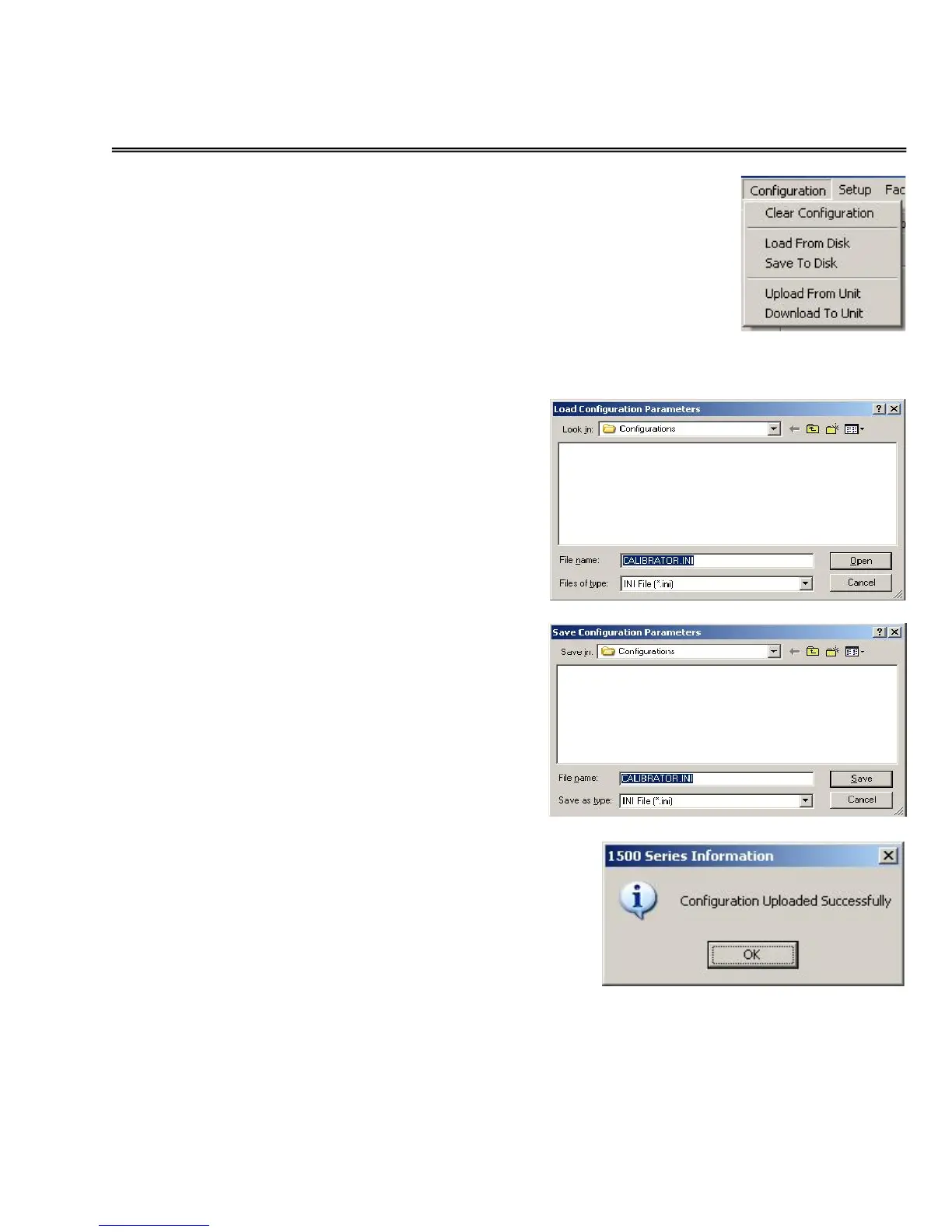
CONFIGURATION OPTIONS Menu
CLEAR CONFIGURATION – This
function clears all the information and
settings on all of the “Tab-Displays.”
This command does not alter any
settings within the 1500CS or 1510A.
LOAD from DISK – Selecting this
option enables the user to select a
configuration set-up from a file resident
on the user’s computer. As illustrated to
the right, a file identification dialog is
opened to allow selection of the desired
file name and location.
SAVE to DISK – Selecting this option
enables the user to save the current
1500 configuration to a file on the user’s
computer. As illustrated to the right, a
file identification dialog is opened to
allow definition of the desired file name
and location.
UPLOAD from UNIT –
Selecting this option
establishes communications
with the 1500 and updates
the values displayed on all
tab displays with those
currently in the 1500.
At the conclusion of the
“Upload,” a success
message will be displayed.


 To Next Page