CO2 Calculating Factor Setting ( Greenhouse Gas Emission)
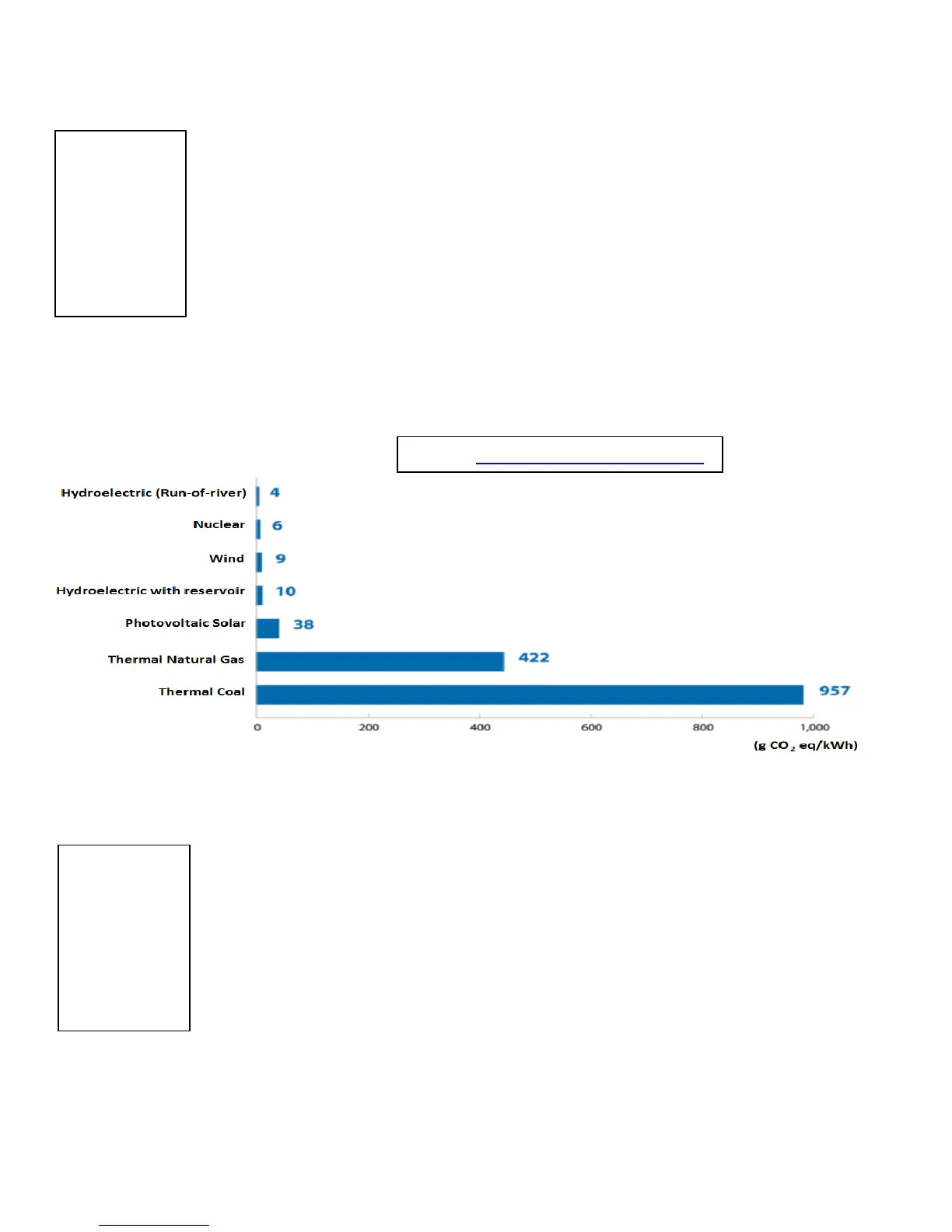
Please contact your local electricity provider to determine the Greenhouse Gas
Emission per kWh consumed. Depending on the electricity production method
(Hydro, Wind, Coal, Nuclear, etc.), the CO₂ emission will vary.
1. While kg co
2
is blinking, press MODE/ SET key to access the kg co
2
Setting Interface.
The first digit “0” will start flashing.
2. Press the ▲ or ▼ key to increase or decrease the value.
3. Press the MODE/ SET key to confirm this digit and move on to the next digit.
4. Repeat the same steps for the other digits.
5. After the last digit is validated, the general setting mode screen will show up.
NOTE : If you need to go back to kg co
2
setting, use ▲ or ▼ key to select kg co
2
symbol again.
Max. P. (Maximum Power Alarm)
When setting the Maximum Power Alarm, if the actual power is larger than the
maximum power value, the LED light (on the monitor) will quickly flash twice every 30
seconds. If the buzzer setting is ON, a beep sound will also be heard once every 60
seconds.
1. While Max. P. is blinking, press MODE/ SET key to access the Max. P. Setting
Interface.
The first digit “9” will start flashing.
2. Press the ▲ or ▼ key to increase or decrease the value.
3. Press the MODE/ SET key to confirm this digit and move on to the next digit.
4. After the last digit validation, press the ▲ or ▼ key to choose between ʺWʺ and
ʺkWʺ, then press MODE/ SET key to select. After doing so, the general setting mode
display will appear
NOTE : If you need to go back to Max. P. setting, use ▲ or ▼ key to select Max. P. symbol again.


 To Next Page