www.mtpinc.com 20
Retrieving History and Average Data (Past Consumption)
Retrieve and View History Data of the Last 7 Days
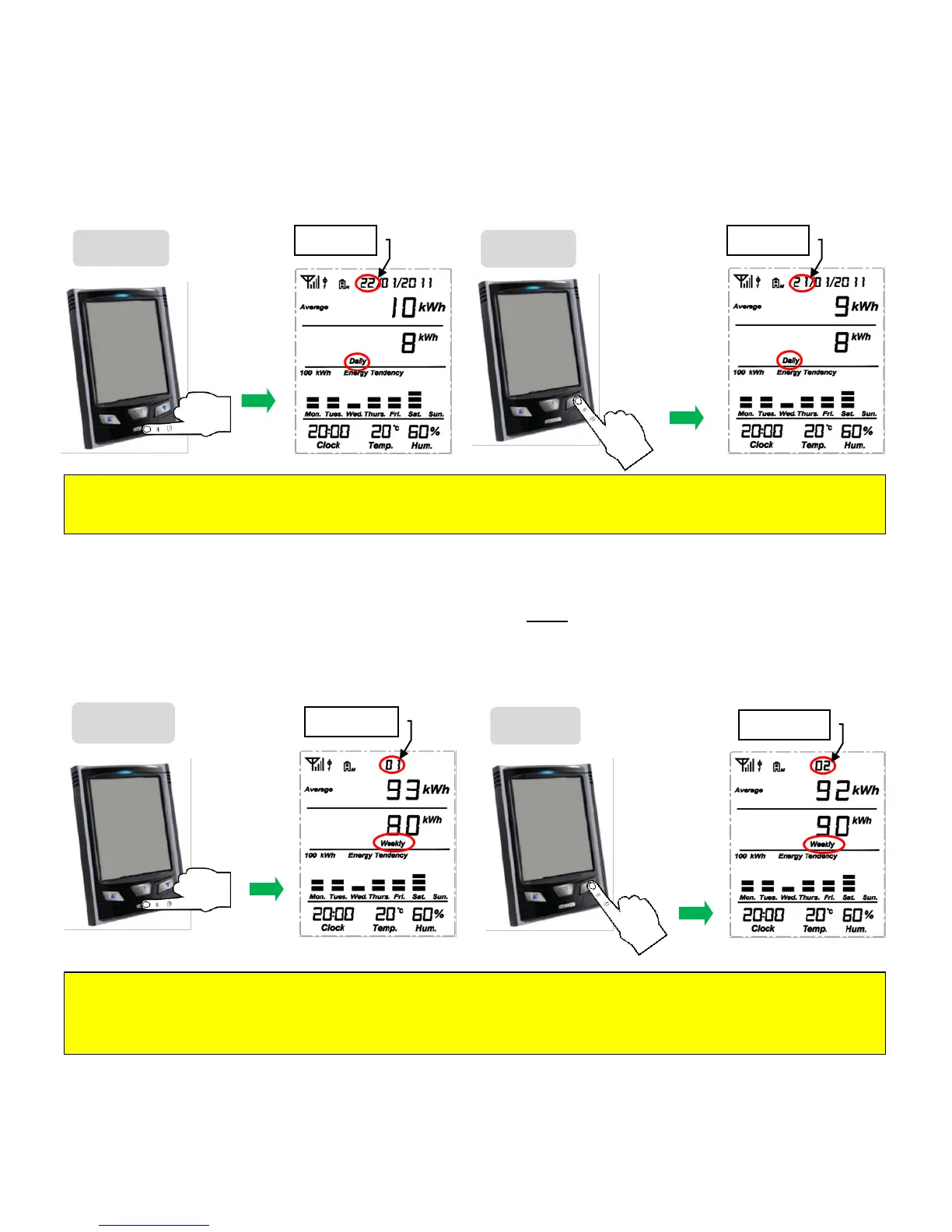
From the default display screen, click the HISTORY key one time and notice that the word "Daily" will
appear on the screen (See picture below). The "Daily" function stores the past 7 days of data, as well as
the accumulated data up to now, from 00:00 of today.
Retrieve and View the History Data of the Last 52 Weeks
From the default display screen, click on the HISTORY key twice and notice that "Weekly" will be displayed
on the screen (See picture below). The ʺWeeklyʺ function stores the past 52 weeks of data, as well as the
accumulated data up to now, from 00:00 Monday of current week.
Note : Repeat Step 2 to review the last 52 weeks of data. Press ▲ key to step back 1 week.
Average value = (This Week’s Average Data + All Past Weeks’ Real Data)/Number of Weeks (including this
week).
Note : Repeat Step 2 to review the last 7 days of data. Press ▲ key to step back 1 day.
Average Value = (Today’s Average Data + All Past Days’ Real Data)/Number of days (including today).


 To Next Page