www.mtpinc.com 21
Retrieve and View the History Data of the Last 24 Months
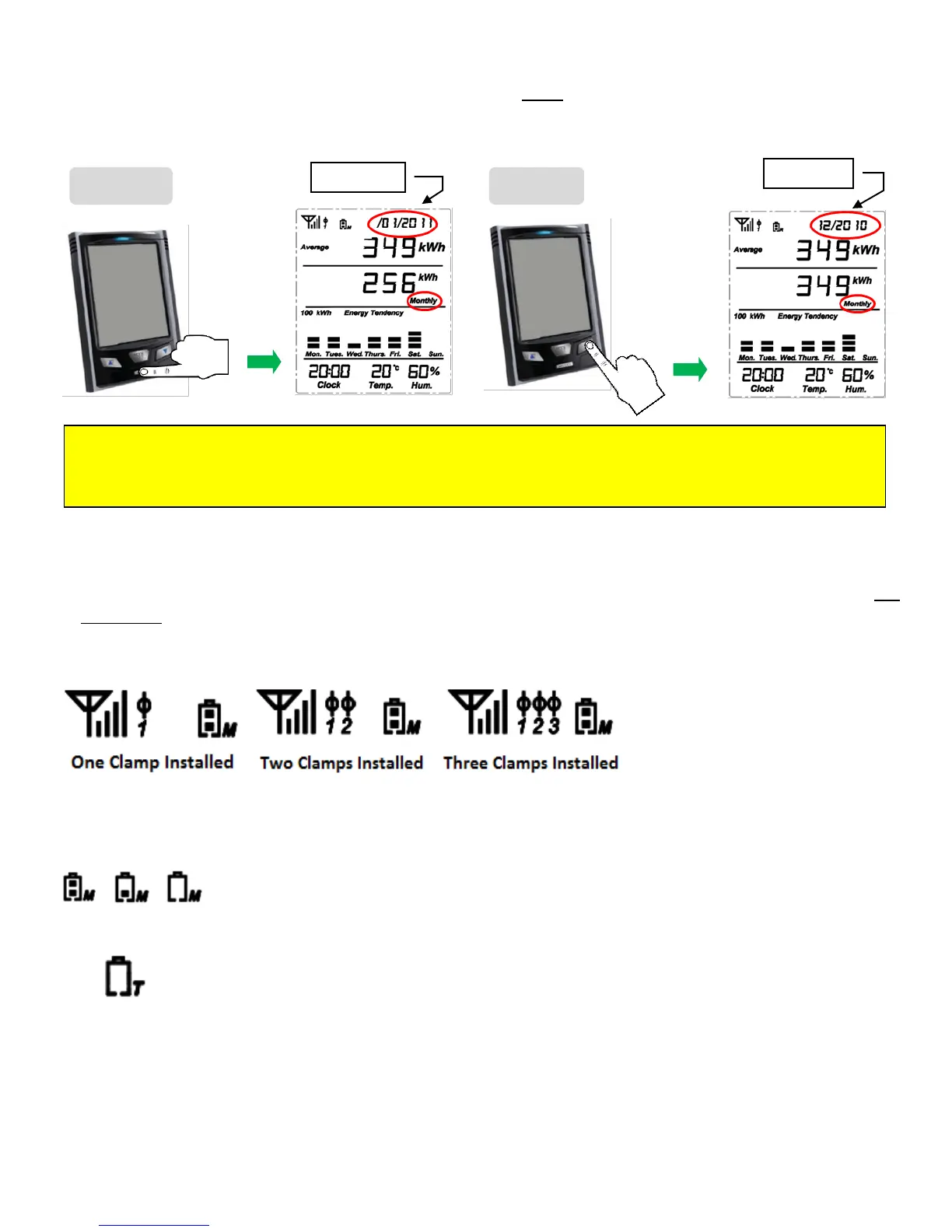
From the default display screen, click on the HISTORY key three times and notice that "Monthly" will be
displayed on the screen (See picture below).
Antenna Icon and Clamp on Sensor Icon on the Display
When the monitor successfully receives a signal from the transmitter, the antenna icon appears on the top
left corner of the display screen. Located beside the antenna icon on the display, is the clamp-on sensor
icon which indicates the number of clamp-on sensors connected to the transmitter.
7. Battery Status
The default screen also indicates the battery status of the Monitor (Battery icon with an
"M"), located at the top of the screen. The icon displays battery condition as full, half-full
and weak (corresponding to 3.9V, <3.9V and >3.1V, <3.1V respectively).
Only when the total battery power for the Transmitter / Sender is below 2.3V will the low
battery warning icon appear. The low battery indicator for the transmitter is represented by a
battery icon with a "T". The warning icon will flash once every second to remind the user to
replace the batteries
Note : Repeat Step 2 to review the last 24 months of data. Press ▲ key to step back 1 month.
The Average value = (This month’s Average Data + All Past Months’ Real Data)/Number of Months
(including this month).


 To Next Page