Alarm System (CPAP)
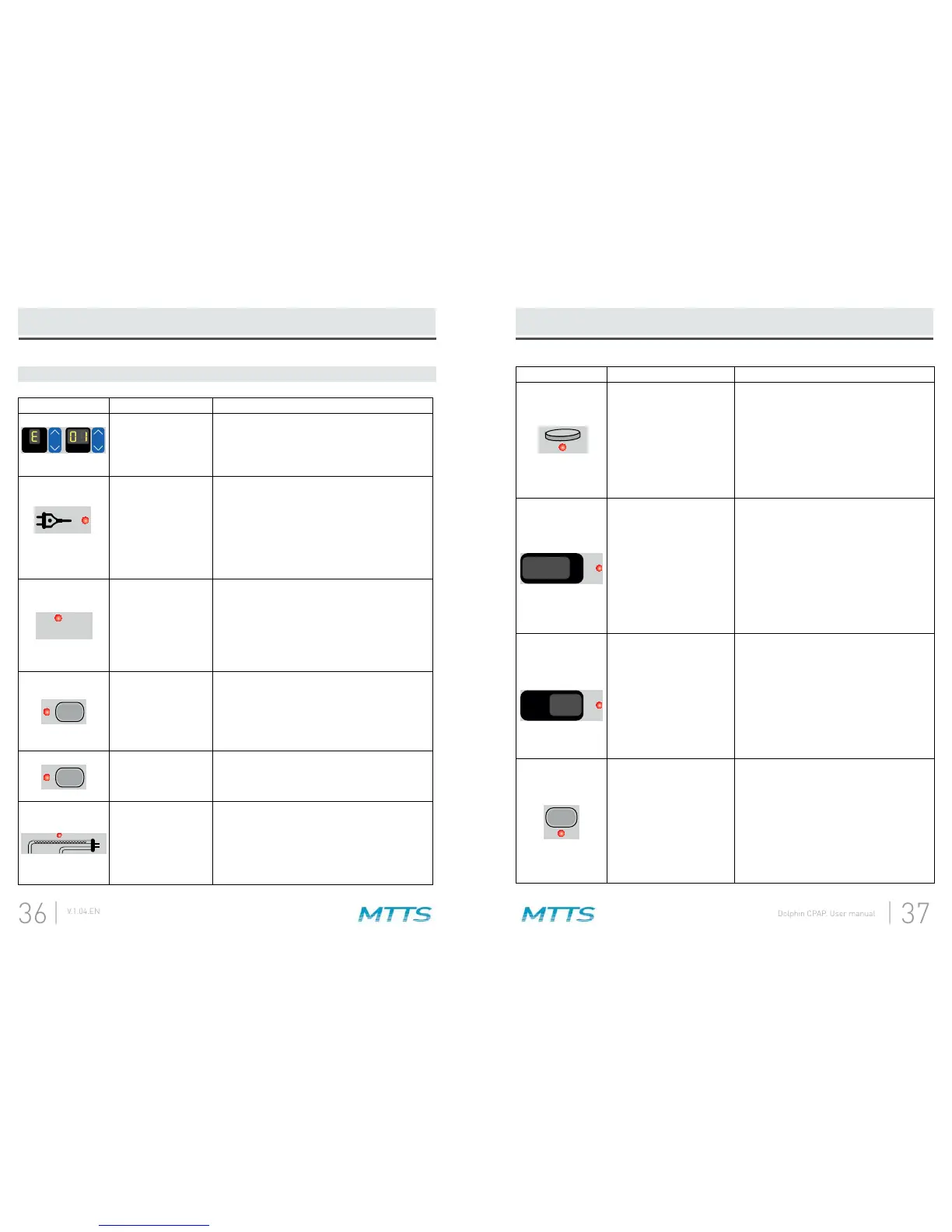
Symbol Description Solution
The machine has
detected a system
failure and has shut
itself down.
Turn the machine off and then on again. If
the error message is still present, note the
error number and contact your MTTS
representative.
The machine has
been disconnected
from the mains
power supply.
(1) Check that the power cable is connected
to the machine and the wall.
(2) Check that the rocker switch on the
back panel is in the ON position.
(3) Check that the mains power supply is
within the required power range for the
machine.
cm H O > 14
2
The pressure at the
patient interface is
>14 cmH
2
O.
(1) Check that there are no kinks or
compressions of the breathing tubes.
(2) Check that the water level in the PEEP
(3) If the alarm continues contact your
MTTS representative.
O
2
The input pressure
for oxygen is too
low (<10 psi) or too
high (>60 psi).
(1) Check that the compressed oxygen tank
is connected to the machine.
(2) If the tank is low on oxygen, replace it.
(3) If the alarm continues contact your
nearest MTTS representative.
AIR
The input pressure
for air is too low.
Maintenance
(CPAP)
section for details.
The heater wire has
been disconnected
or damaged.
(1) Check that the heater wire power and
temperature sensor cables are plugged in
securely at both ends.
(2) Check that the heater wire is not
damaged.
LPM
2
O
Fi
4. Alarm Signals
Alarm System (CPAP)
Symbol Description Solution
The heater plate has
overheated and turned
itself off momentarily.
(2) If the reservoir contains water, there
-
occlude the inspiratory circuit.
The actual temperature
of T1 or T2 is not within
± of the set point.
(1) Check that the heater wire power
and temperature sensor cables are
connected at both ends.
(2) Make sure the temperature sensors
are completely inserted. If the sensors
are loose, they may be inaccurate.
(3) Check that there no leaks in the
breathing circuit.
(4) Check that no external heat source
is heating the patient circuit.
The measured FiO
2
average over the past
30 seconds is not within
2
of the set
value. This alarm cannot
activate for the 30
seconds following a
rate or FiO
2
.
(1) If the alarm light for air or oxygen
input pressure is on, troubleshoot that
(2) Verify that O
2
(3) Recalibrate or replace the oxygen
sensor. See the
Maintenance (CPAP)
section for details.
(4) After all steps, if measured FiO
2
is
still higher than set FiO
2
contact MTTS
LPM
average over the past 10
seconds is ±0.5 L/min
different than the set
cannot activate for the
10 seconds following
rate or FiO
2
.
(1) Check expiratory tube for conden-
sation rain-out. Drain it out if needed.
(2) If any other alarm light is on,
(3) Turn the machine off and on again.
If an error message is present, note
the error number and contact your
MTTS representative.
2
O
Fi
°C


 To Next Page