OPERATING THE DISHWASHER
• To operate the dishwasher, load the basket as described in previous instruc-
tions, add the detergent and rinse aid based on the wash cycle being chosen, close
the door and press the On/Off button.
• Press the Program Select button to filter through wash cycles and choose the
one you want: INTENSIVE >> NORMAL >> ECO >> GLASS >> RAPID
• Press the Start/Pause button, and the dishwasher will start.
NOTE: When you press the Start/Pause button to pause the wash cycle, all the
lights on the display will illuminate, and the program will pause until you restart it.
NOTE: If you open the door while the dishwasher is running, the unit will pause the
wash cycle. When you close the door, the wash cycle will continue.
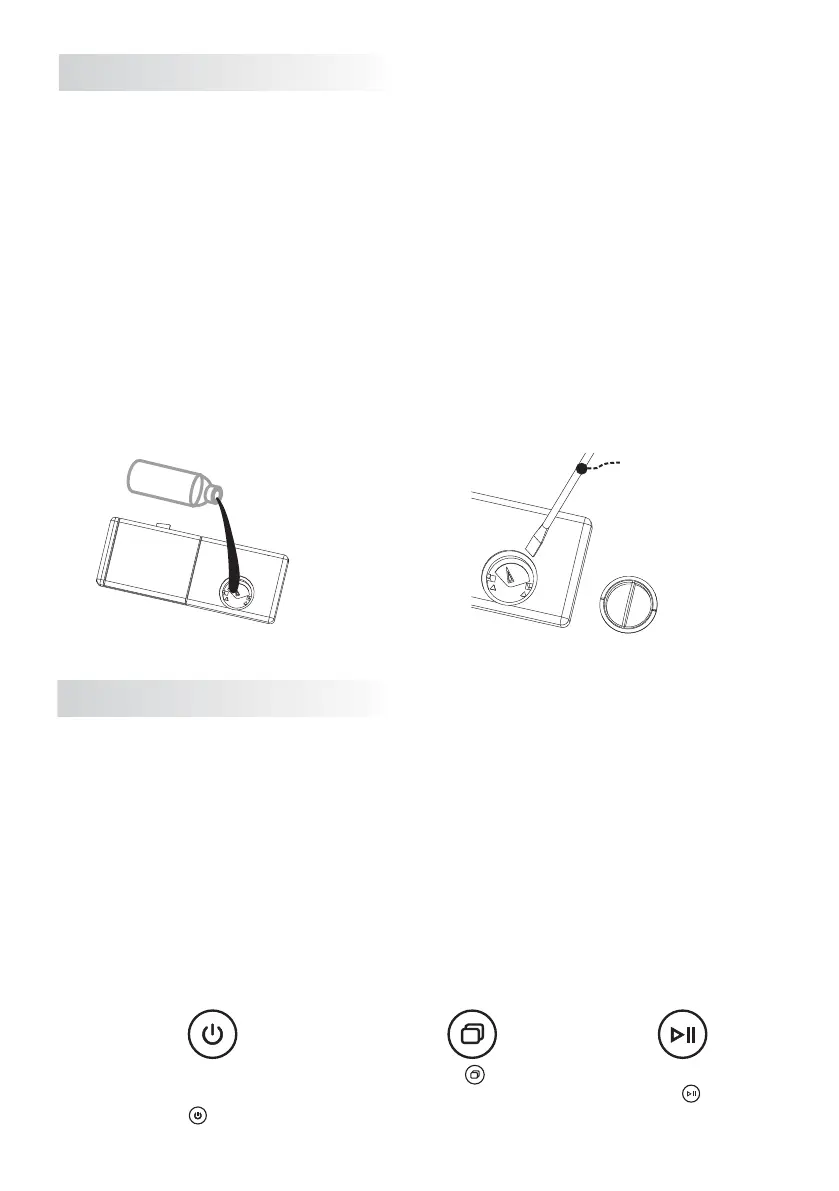
FILLING THE RINSE AID DISPENSER:
The rinse aid is released during the final rinse to prevent water droplets that can
leave spots and streaks from forming on your dishes. It also improves drying by
allowing water to ‘sheet’ and drain off the dishes. Your dishwasher is designed to
use liquid rinse aids. The rinse aid dispenser is located on the inside surface of the
door next to the detergent dispenser.
When the Rinse Aid compartment needs refilling, the indicator light will illuminate
on the display panel.
The amount of rinse aid released can be adjusted. The default settings is 3.
Larger value means increasing the dosage, and vice versa. Turn the arrow adjuster
inside the dispenser to the desired setting by either using your fingers or inserting
a flat-blade screwdriver into the center of the arrow and turning.
Wipe up any spills
with a cloth
slot type screwdriver
NOTE: If the surface of the dishes feel greasy after a cycle, lower the rinse aid
settings and wash again.
Press the button
to select the desired
program
Start wash cycle by
pressing button
Close the door of the
dishwasher and start the appliance
by pressing for one second
14


 To Next Page