GPS tracker TV 7”
39
Chapter 9 Technical Specifications
The specification of this product is subject to change without
previous notice.
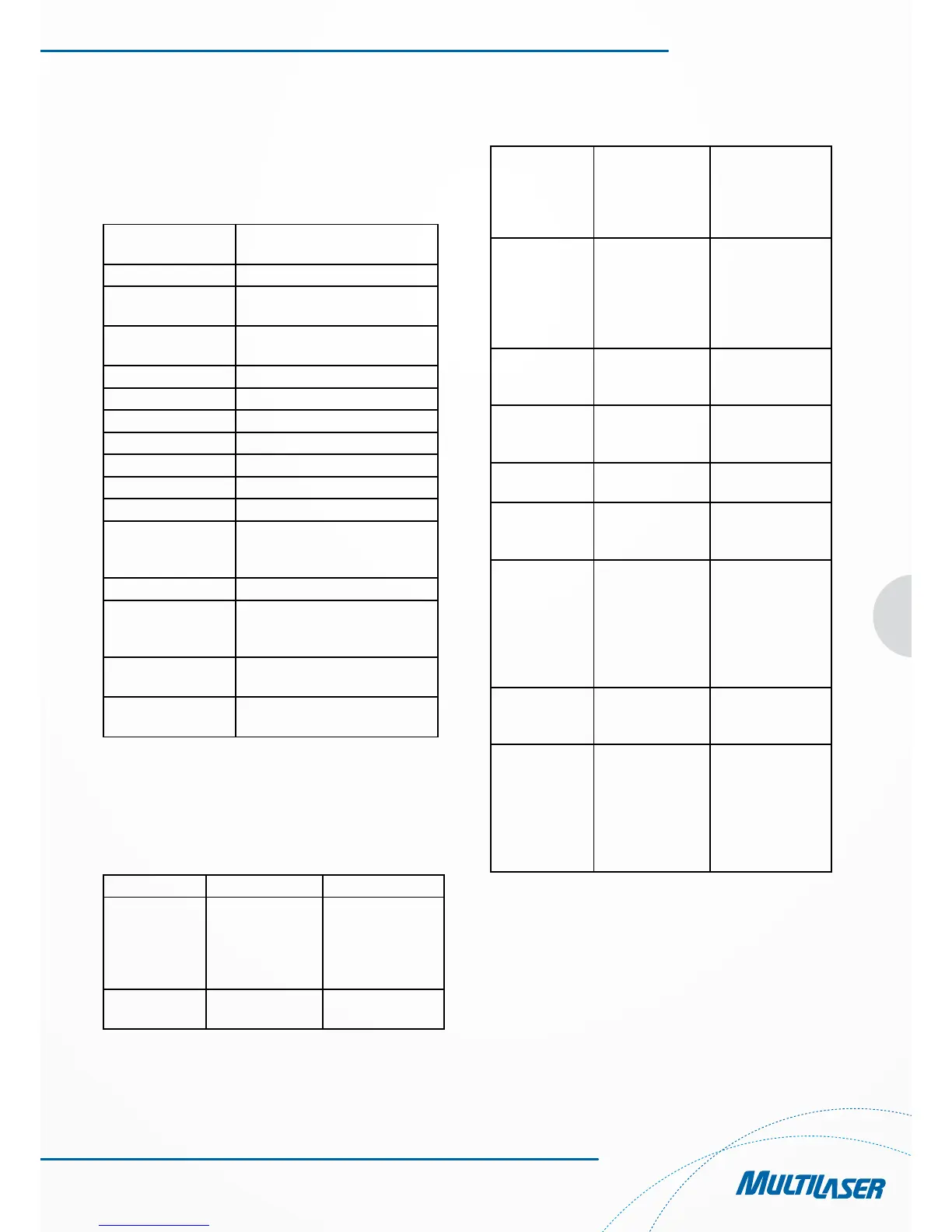
Dimensions L(mm)188.23 x W(mm)116 x
T(mm)17.75
Weight About 317 g
Supported memory
card and capacity
64MB/128MB/256MB/512MB
1GB/2GB/4GB/8GB (Optional)
Battery Rechargeable lithium battery
2400mAh/3.7V
Loudspeaker 1.5W@8Ω
Earphone 25MW@4Ω
Audio WMA/MP3/WAV
Video AVI/MPEG/MPG
Images JPG/BMP/PNG
E-book .txt
Working temperature -10°C ~ 60°C
Temperature for
storage and transpor-
tation
-20°C ~ 70°C
Permissible RH 35% ~ 70%(40°C)
Permissible RH for
storage and transpor-
tation
30% ~ 85% (40°C)
Atmospheric
pressure
86 kPa ~ 106 kPa
Language Simplified & Traditional Chine-
se+21 foreign languages(Optional)
Chapter 10 Troubleshooting
If your GPS navigator fails to work, please check it following
the solutions below. If the problem still exists, please contact
our customer service center.
Failures Causes Solutions
The device does
not turn on
The battery energy
is insufficient
Power the system
with external power
source and charge
the battery at the
same time
The batter switch
is off
Switch upward the
battery switch
The device turns
off during use
The battery energy
is insufficient
Power the system
with external power
source and charge
the battery at the
same time
The device fails
to display; The
display contents
are not clear
The back light
brightness is too
low, The back
light is turned off
automatically
Adjust the bright-
ness using the
touch pen to click
the LCD screen. The
back light will be on
again.
No right actions
occur on clicking
the button
The touch screen
is not calibrated.
Calibrate the touch
screen again
There is no
sound while
playing
The volume is set
too low
Increase the volume
The earphone is in
poor contact
Plug the earphone
properly
The device can
not access a
computer
The USB cable fails
to connect
Connect the USB
cable properly
The device can
not receive the
GPS signals
It depends on
whether local GPS
satellite signals are
strong or weak.
Wait for three minu-
tes above to receive
signals
The map data is
missing inadver-
tently
1. There are map
files stored in the
disk.
2. Contact your
agent or dealer to
ask for a password
that is required
when the navigation
function is activated
again.
Do not allow water or foreign objects to enter the player.



 To Next Page