PAGE 38 — MAYCO LS450 CONCRETE PUMP • OPERATION MANUAL — REV. #2 (02/23/21)
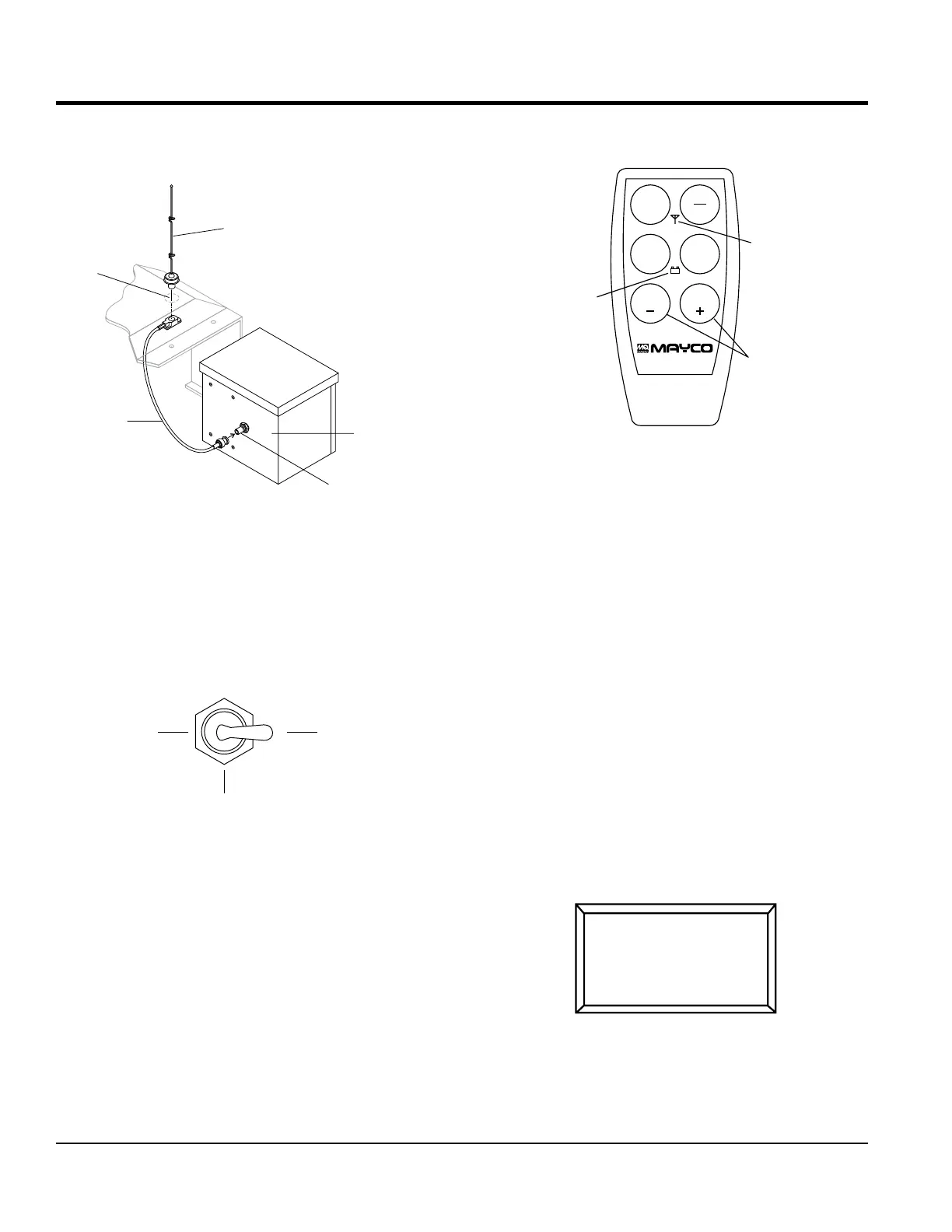
5. On the top of the unit, to the right of the control box
(Figure 38), hammer out the knock-out hole and install
the remote antenna.
Figure 38. Antenna Installation
6. Connect the antenna cable to the connector (Figure 38)
on the rear of the control box.
Radio Remote Control Operation
Before the remote control hand-held module can be used,
the pumping control switch on the control box must be
placed in the REMOTE position (Figure 39).
Figure 39. Pumping Control Switch (Remote)
ANTENNA
KNOCK-OUT
HOLE
ANTENNA
CONNECTOR
CABLE
CONTROLBOX
REAR OF
CONTROLB
LOCAL
CENTER
Remote pumping operation can be performed using the
hand-held radio remote control (Figure 40).
Figure 40. Radio Remote Control
The buttons on the hand-held remote control module have
the following functions:
ON/OFF — Turns the power on or off. When power is on
the power LED lights red. If the battery LED turns red,
the 9-volt battery needs to be replaced.
E-STOP — Turns off the pump completely in an
emergency.
PUMP ON/OFF — Starts and stops the forward pumping.
PUMP REV — Momentarily pumps in reverse direction.
VOLUME (+) — Increases the pumping volume.
VOLUME (–) — Decreases the pumping volume.
Radio Remote Control Programming
Before starting operation of the hand-held radio remote
control, go to Screen 9 of the digital readout screen:
Screen 9
E-STOP
ON
OFF
PUMP
REV
VOLUME VOLUME
PUMP
ON/OFF
POWER
NOTE: OLDER MODELS
MAY INDICATE
INSTEAD OF
FLOW
VOLUME
TTERY LED
RADIO ADDRESS
NO RADIO
PRESS RESET TO
LEARN A NEW ONE
9
OPERATION


 To Next Page