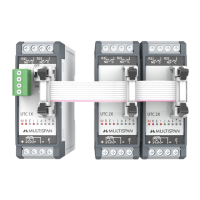
UTC-1X & 2X
OUTPUT SPECIFICATION
AUXILIARY SUPPLY
BlindTemperatureController
Relay
Supply voltage
Relay Type
Rating
2 nos.
1 C/O (NO-C)
5A, 230V AC
ENVIRONMENT CONDITION
Relative Humidity
Operating Temp.
0°C to 55°C
UP to 95% RH
(non-condensing)
24V DC
Input Types
Input Range
0 to 600°C
0 to 1200°C
-99 to 400°C
-99.9 to 400.0°C
J
K
PT-100
PT.1
Size
76 (H) x 27 (W) x 85 (D) mm
TECHNICAL SPECIFICATION
INPUT SPECIFICATION:
DIMENSION:
Relay Output
Page -1
E
E
RS-485
Modbus Communication
+24
GND
Connector
Earthing
D-
D+
Relay ON/OFF
Switch
‘J’
‘PT’
‘PT.1’
Sensor:
‘K’
Made in India
www.multispanindia.com
Connector
Earthing
‘J’
‘PT’
‘PT.1’
Sensor:
‘K’
Made in India
www.multispanindia.com
MAINTENANCE
1. The equipment should be cleaned regularly to avoid blockage
of ventilating parts.
2. Clean the equipment with a clean soft cloth. Do not use
isopropyl alcohol or any other cleaning agent.
3. Fusible resistor must not be replaced by operator.
INSTALLATION GUIDELINES
1. This equipment, being built-in-type, normally becomes a part of main
control panel and in such case the terminals do not remain accessible to
the end user after installation and internal wiring.
2. Do not allow pieces of metal, wire clippings, or fine metallic fillings from
installation to enter the product or else it may lead to a safety hazard that
may in turn endanger life or cause electrical shock to the operator.
3. Circuit breaker or mains switch must be installed between power source
and supply terminal to facilitate power ‘ON’ or ‘OFF’ function. However this
mains switch or circuit breaker must be installed at convenient place
normally accessible to the operator.
4. Use and store the instrument within the specified ambient temperature
and humidity ranges as mentioned in this manual.
WARNING GUIDELINES
WARNING : Risk of electric shock.
1. To prevent the risk of electric shock, power supply to the equipment must be
kept OFF while doing the wiring arrangement. Do not touch the terminals while
power is being supplied.
2. To reduce electro magnetic interference, use wire with adequate rating and
twists of the same of equal size shall be made with shortest connection.
3. Cable used for connection to power source, must have a cross section of
1mm or greater. These wires should have insulations capacity made of at least
1.5kV.
4. When extending the thermocouple lead wires, always use thermocouple
compensation wires for wiring for the RTD type, use a wiring material with a
small lead resistance (5 max per line) and no resistance differentials among
three wires should be present.
5. A better anti-noise effect can be expected by using standard power supply
cable for the instrument.
Ω
MECHANICAL INSTALLATION GUIDELINES
1. Prepare the panel cutout with proper dimensions as shown above.
2. Fit the unit into the panel with the help of clamp given.
3.The equipment in its installed state must not come in close proximity
to any heating source, caustic vapors, oils steam, or other unwanted
process byproducts.
4. Use the specified size of crimp terminal (M3.5 screws) to wire the
terminal block. Tightening the screws on the terminal block using the
tightening torque of the range of 1.2 N.m.
5. Do not connect anything to unused terminals.
Read complete instructions prior to installation
and operation of the unit.
WARNING : Risk of electric shock.
SAFETY PRECAUTION
!
All safety related codifications, symbols and instructions
that appear in this operating manual or on the equipment
must be strictly followed to ensure the safety of the operating
personnel as well as the instrument.
If all the equipment is not handled in a manner specified
by the manufacturer, it might impair the protection provided
by the equipment.
TERMINAL CONNECTION
MECHANICAL INSTALLATION
Outline Dimension (mm) Panel Cutout
Dimension (mm)
UTC1X
UTC2X
UTC2XUTC1X
76
E
E
76
27.5 27.5
76
85
Din rail Mounting Distance
52.5mm-2.067inches
25mm
EverytimetheinstrumentisturnON,FollowingpatternwillbeLEDIndication
(AllLedisON)
(AllLedisOFF)
Main
Run R1 RX
TX
R2
Error
Modbus
Auto
Tune
Sensor
Break
Blind
PowerONInstrument
Time(Sec)
DTC-1X/DTC-1A
1
2
5
6
9
10
3
4
ALLLEDON
1
0/
1 1 1 1 1 11 1
ThisLED
Continue
ON/OFF
(AddressValueBinaryFormat)
(e.g6=00000110,11=00001011)
1
0/
ThisLED
Continue
ON/OFF
0=OFF
1=ON
ThisLED
Continue
ON/OFF
(Baudrate)
(Parity)
(DataType)
(ReadFunc.
Register)
(WriteFunc.
Register)
0/1
7
8
0 0 0 = 2400 bps
0 0= None
0 = Sign
Integer
0 = 0 x 03
0 = 0 x 10
1 = 0 x 04
1 = 0 x 06
0 0 1 = 4800 bps
0 1 = Even
1 = Float
1 0 = Odd
0 1 0 = 9600 bps
0 1 1 = 19200 bps
1 0 0 = 38400 bps
(InputFrame)
1
0/
0 0 0 0 0
ThisLED
Continue
ON/OFF
0 0 0 = J
0 0 1 = K
0 1 0 =
PT-100
Main
EverytimetheinstrumentisturnON,FollowingpatternwillbeLEDIndication
Run 1 RX
TX
2
Error Auto
Tune
Sensor
Break
Blind
PowerONInstrument
Time(Sec)
UTC-1X/UTC-2X
1
5
6
9
10
11
12
2
3
4
ALLLEDON
1
0/
1 1 1 1 1 11 1
ThisLED
Continue
ON/OFF
(AddressValueBinaryFormat)
(e.g6=00000110,11=00001011)
1
0/
ThisLED
Continue
ON/OFF
0=OFF
1=ON
7
8
(InputFrame)
1
0/
0 0 0 0
ThisLED
Continue
ON/OFF
J
K
PT-100 PT.1
0=RTU
1=ASCIT
0=8 bit
1=7 bit
0=1 bit
1=2 bit
odd Even None 38400 19200 9600 4800 2400
Float0x06 0x10
W
0x04 0x3
R
Integer
(AllLedisOFF)
(AllLedisON)
UTC1X
UTC2X
UTC-1X
UTC-1X UTC-2X
UTC-2X

 Need help?
 General


 To Next Page