EasyManua.ls Logo

MULTISPAN UTC-122 - User Manual

MULTISPAN UTC-122
4 pages
Print Icon
To Next Page IconTo Next Page
Loading...
All digit segment will be turned ON for 3 sec
Previous or default sensor input will be displayed for 2 sec
Process Value
Set Value
POWER ON
ENT
SET
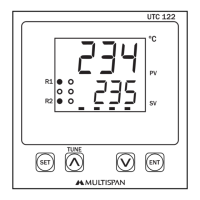
UTC 122
TUNE
ºC
PV
SV
1
7 8 9
12
1314
10
11
1617181920
15
2
3
4
5
6
NC NC
C C
NO NO
TC
+
-
+
-
RELAY-1 RELAY-2
100
250V AC
~
50/60 Hz
4VA
!
L
N
O/P
S.S.R
RTD
www.multispanindia.com
Page - 1
UTC-122,222
Note:
1) If Sensor Connection is reversed, Display will show “” message.
2) If Sensor is not connected, Display will show  message.
3) Every time the instrument is turned ON, Following pattern will be displayed
J: 0 to 600°C / K: 0 to 1200°C /
PT-100: -99 to 400ºC /PT.1: -99.0 to 400.0°C
PID/ ON-OFF (selectable)
Output
Power Supply
Protection Level
Operating
Relative
(As per request)
Temperature
Humidity
1st Output for Heating : 1Relay 1C/O,230V AC ,5A Or SSR,12V DC Approx,30mA
2nd Output for Cooling : 1Relay 1C/O,230V AC ,5A
100 to 250V AC, 50 / 60 Hz, Approx 4VA
IP-65(Front side) AS per IS/IEC 60529:2001
0°C To 55°C
Up to 95% RH Non Condensing
Model
Display
Size(HXWXD)
Panel Cutout
Input
Temperature
Range
Control Action
UTC 122
96 X 96 X 50 mm
92 X 92 mm
68 X 68 mm
72 X 72 X 85 mm
UPPER:- 4 Digit 7 seg 0.70”,red LED Display
LOWER:- 4 Digit 7 seg 0.50”,green LED Display
UTC 222
J, K, PT-100 (selectable)
Technical Specification
Connection Diagram
OPERATING MANUAL
PID TEMPERATURE CONTROLLER
UTC-121P,221P & 421P
Technical Specification
Connection Diagram
OPERATING MANUAL
UNIVERSAL TEMPERATURE CONTROLLER
UTC-122, 222
TC
+
RTD
-
!
L
N
1
2
3
4
5
6
7
-
+
O/P
S.S.R
RELAY-1
RELAY-2
100
250V AC
~
50/60 Hz
4VA
NC
NO
NO
NC
C
C
8
9
10
11
12
13
14
SET
ENT
UTC 222
R1
R2
TUNE
PV
SV
ºC
Question and Answer IconNeed help?

Do you have a question about the MULTISPAN UTC-122 and is the answer not in the manual?

Summary

Technical Specifications

Display Notes and Behavior

Details error messages for reversed or disconnected sensors and power-on display patterns.

Connection Diagram

Illustrates the terminal layout and wiring for power, sensor inputs, and outputs.

Operating the Controller

Key Operation and Navigation

Explains how to navigate menus, change settings, and perform basic operations.

Set Point Adjustment

Guides on how to set and modify the desired process value (Set Value).

Basic Configuration Settings

Covers initial setup for input type, control action, and relay modes.

Advanced Control Features

PID Auto-Tuning Procedure

Instructions for initiating, starting, and stopping the PID auto-tuning process.

Control Parameter Configuration

Details on setting Proportional Band, Integral Time, Derivative Time, and Cycle Time.

Factory Setting Management

Information on applying or reverting to factory default parameter values.

Safety, Installation, and Maintenance

General Safety Precautions

Essential safety advice regarding electrical shock and proper handling.

Wiring and Installation Guidelines

Recommendations for safe wiring, power supply connection, and panel installation.

Mechanical Installation Details

Specifications for panel cutouts and physical mounting of the controller.

Instrument Maintenance

Instructions for cleaning, care, and replacement of components.

Summary

Technical Specifications

Display Notes and Behavior

Details error messages for reversed or disconnected sensors and power-on display patterns.

Connection Diagram

Illustrates the terminal layout and wiring for power, sensor inputs, and outputs.

Operating the Controller

Key Operation and Navigation

Explains how to navigate menus, change settings, and perform basic operations.

Set Point Adjustment

Guides on how to set and modify the desired process value (Set Value).

Basic Configuration Settings

Covers initial setup for input type, control action, and relay modes.

Advanced Control Features

PID Auto-Tuning Procedure

Instructions for initiating, starting, and stopping the PID auto-tuning process.

Control Parameter Configuration

Details on setting Proportional Band, Integral Time, Derivative Time, and Cycle Time.

Factory Setting Management

Information on applying or reverting to factory default parameter values.

Safety, Installation, and Maintenance

General Safety Precautions

Essential safety advice regarding electrical shock and proper handling.

Wiring and Installation Guidelines

Recommendations for safe wiring, power supply connection, and panel installation.

Mechanical Installation Details

Specifications for panel cutouts and physical mounting of the controller.

Instrument Maintenance

Instructions for cleaning, care, and replacement of components.

MULTISPAN UTC-122 Specifications

General IconGeneral
BrandMULTISPAN
ModelUTC-122
CategoryTemperature Controller
LanguageEnglish

Related product manuals