Page 11 | ModTable | vs 5.0
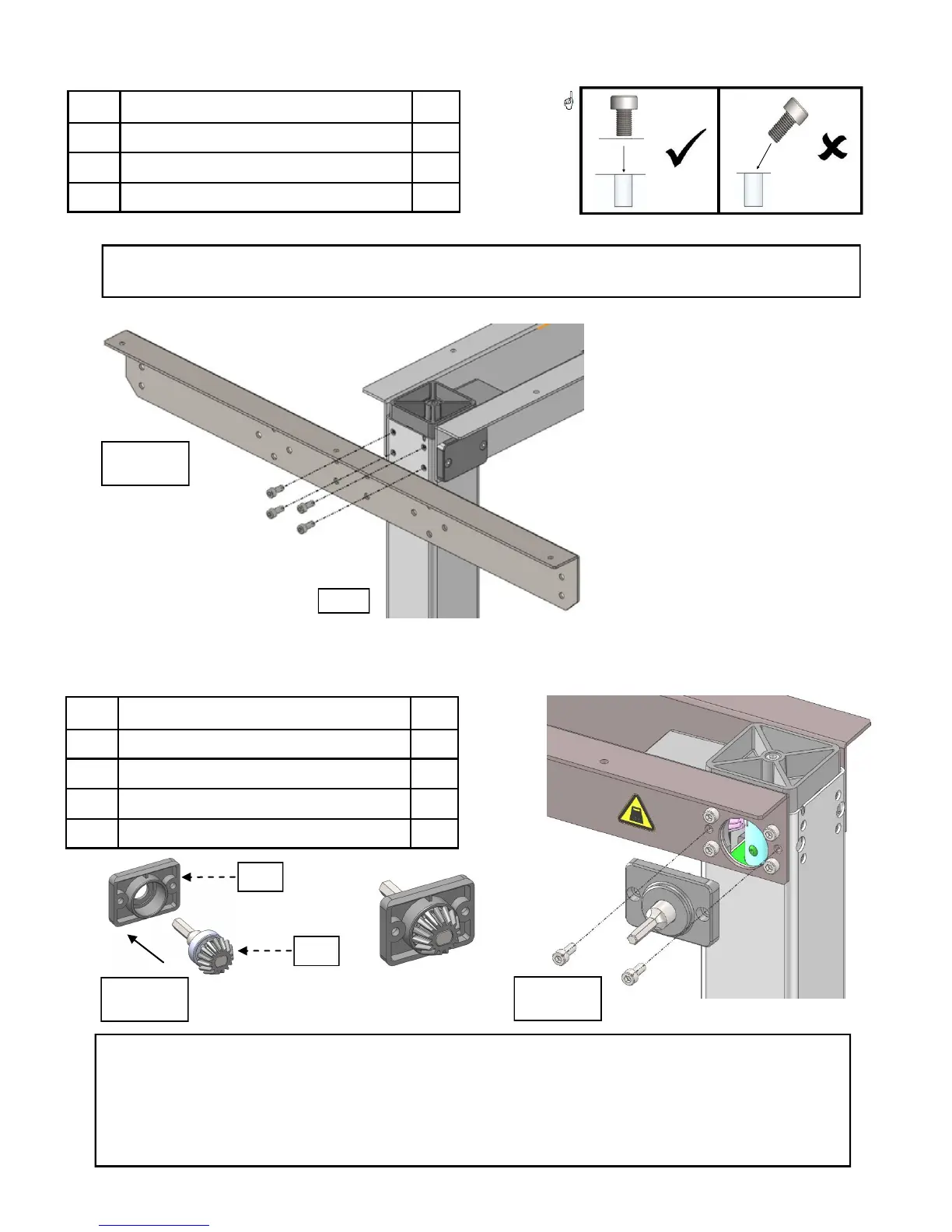
3.4.5 Mounting the Left Top Support
# Part Name Qty
04 Left top support 1
16 Bolts 4
20 Large Allen wrench 1
7
L
In Photo 7:
Using the bolts,
mount left top
support to left (L)
leg.
If you purchased a left-handed Base, the left top support will be attached to the right (R)
leg, opposite of what the picture below depicts.
3.4.6 Mounting the HC Gear to Right Leg
# Part Name Qty
10 HC (handle) cover 1
11 HC (handle) gear 1
16 Bolts 2
20 Large Allen wrench 1
IMPORTANT!
Photos 8 & 9:
Left-handed Bases - This step is completed on the Left (L) Leg.
Once the HC gear has meshed properly with the leg gears, attach the HC cover plate
with the beveled edge up. If the HC cover does not lay flat against the leg, the HC gear
has not been properly installed.
8
9
#10
#11



 To Next Page