SETTING UP HARDWARE
Conduit
®
AP MTCAP2-L4E1-868-002 and MTCAP2-868-002 User Guide 19
Chapter 5 – Setting Up Hardware
Installing a SIM Card
Models with cellular capability have a micro SIM slot, you'll need a micro (3FF) SIM card from your network
provider.
To install the SIM card:
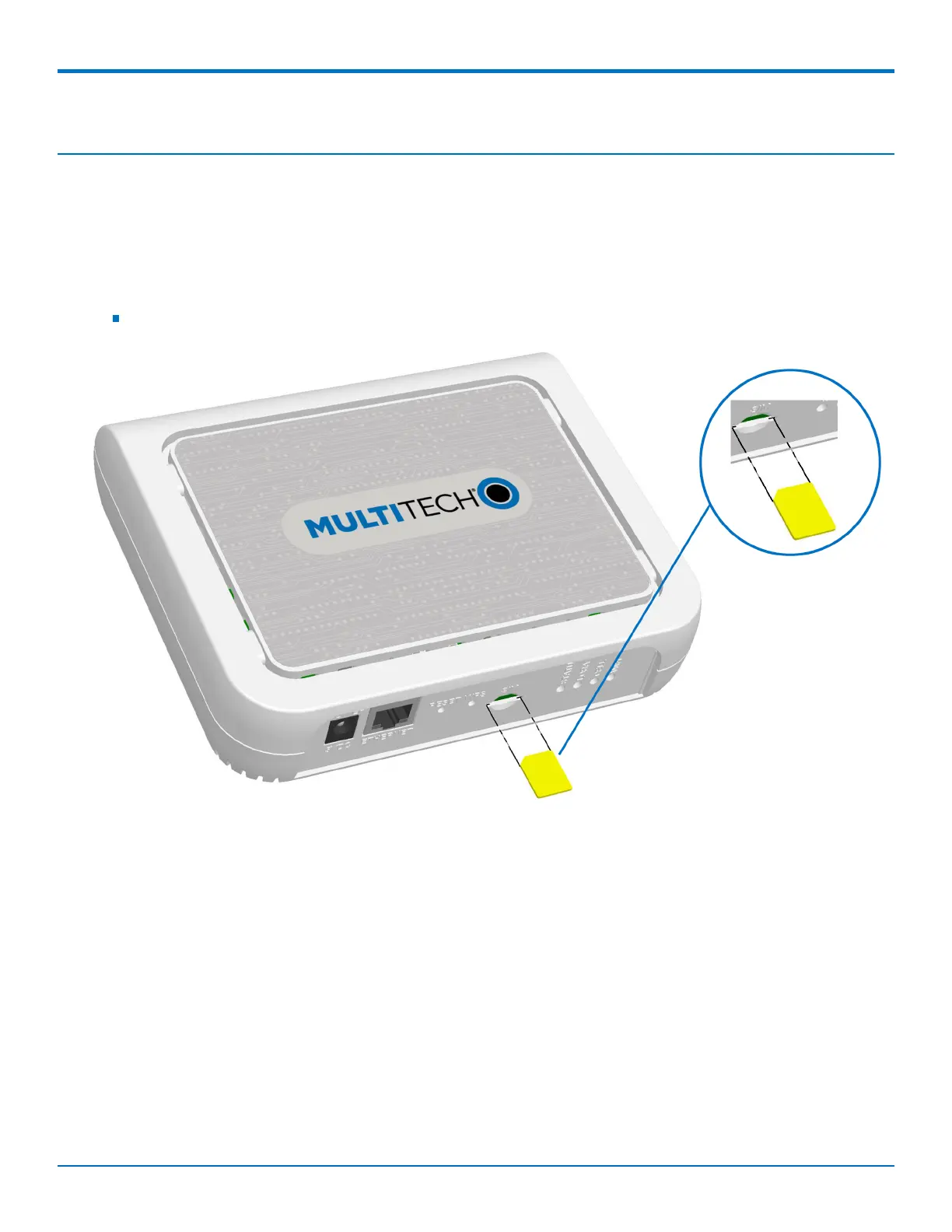
With the contact side facing down, align the notched edge as shown on the following image and slide the
SIM card completely into the SIM holder.
Removing a SIM Card
To remove the SIM card, push the SIM card in. The device ejects the SIM card.
Cabling the Device
To cable the device:
Note: If using PoE to power your device, refer to Power over Ethernet (PoE) for additional information and skip
Step 2.
1. Connect the Ethernet cable to the Ethernet port on the device.
2. Connect the power supply to the MTCAP's power jack and plug it into an electrical outlet.
When the operating system is fully loaded, the STATUS LED blinks.


 To Next Page