Chapter 13 – Specific AT Commands
Multi-Tech Systems, Inc. Wireless GSM/GPRS AT Commands (Document Number S000293I) 125
Lock +WLCK
Description: This command allows the modem to be locked on a specific network operator.
Note: Test SIM cards (with MCC=001 & MNC=01) doesn’t check these locks.
Values: <fac>
“PS” SIM lock facility with a 8 digits password (PCK).
“PN” Network lock with a 8 digits password (NCK).
“PU” Network subset lock with a 8 digits password (NSCK).
“PP” Service provider lock with a 8 digits password (SPCK).
“PC” Corporate lock with a 8 digits password (CCK).
<psswd> password code, 8 digits
<NetId> IMSI for SIM lock (<fac>)=”PS”), operator in numeric format (MCC and MNC) for other
locks (other <fac> values).
<GID1> Group Identifier level 1, mandatory for Service provider lock (<fac>)=”PP”) and for
Corporate lock (<fac>="PC").
<GID2> Group Identifier level 2, mandatory for Corporate lock (<fac>="PC").
<CnlType> Type of lock for co-operative network list (CNL)
0 Automatic (co-operative network list retrieved from EFCNL SIM file)
Note: EFCNL file must be present in SIM to use automatic mode.
1 Manual (co-operative network list is given in the <CnlData> parameter)
<CnlData> Co-operative network list (hexa string type) using same format as in EFCNL SIM file (ETSI
GSM 11.11 or 3GPP 04.08).
Note: Only if <CnlType> = 1
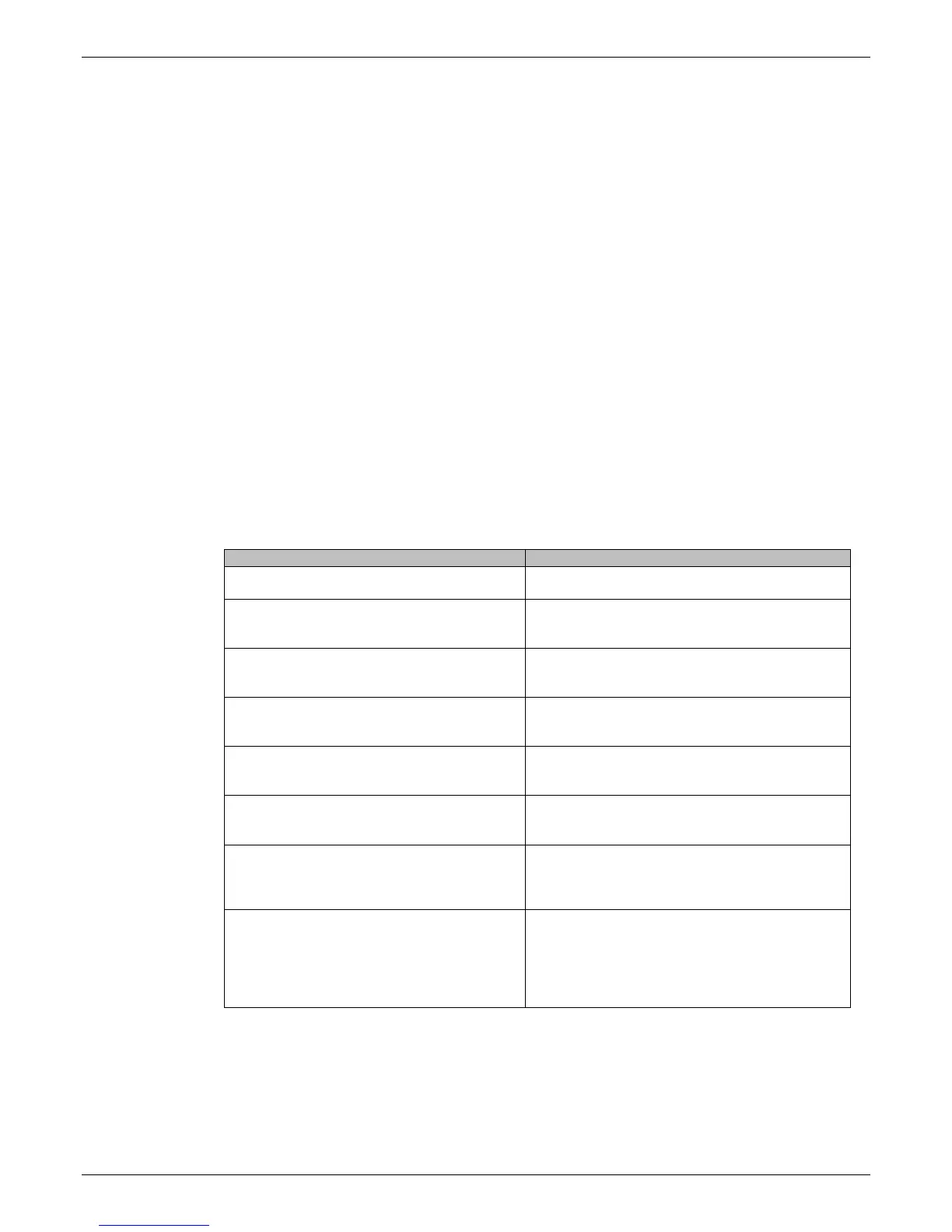
Syntax: Command syntax: AT+WLCK=<fac>,<passwd>,<NetId>[,<GID1>[,GID2]] [,<CnlType>[,<CnlData>]]
Response syntax: +WLCK: <status>
Command Possible responses
AT+WLCK="PN",12345678,20810
Note: Activate network lock on SFR (208,10)
OK
Note: Network lock activated
AT+WLCK="PS",12345678,20810592356897
4
Note: Activate SIM lock
OK
Note: SIM lock activated
AT+WLCK="PU",12345678,2081035
Note: Activate Network Subset lock on SFR
(208, 10, 35).
OK
Note: Network Subset lock activated
AT+WLCK="PU",12345678,20810
+CME ERROR: 3
Note: Need 7 digits of IMSI to perform a service
provider lock
AT+WLCK=”PP”,12345678,20810,”E5”
Note: Activate Service Provider lock on SFR
(208, 10) and GID1 (0xE5).
OK
Note: Service Provider lock activated.
AT+WLCK=”PC”,12345678,20810,”E5”,”10”
Note: Activate Corporate lock on SFR (208,
10), GID1 (0xE5) and GID2 (0x10).
OK
Note: Corporate lock activated.
AT+WLCK=”PN”,12345678,20810,0
Note: Activate Network lock on SFR (208, 10)
using co-operative network list from SIM file
EFCNL (must be present in SIM)
OK
Note: Network lock activated on SFR and co-
operative network list present in SIM
AT+WLCK=”PN”,12345678,20801,1,”02F802
FFFFFF02F801FFFFFF”
Note: Activate Network lock on F ORANGE
(208, 01) with manual co-operative network
list including SFR (208, 10) and Bouygues
Telecom (208, 20)
OK
Note: Network lock activated on F ORANGE
(primary network), SFR and Bouygues Telecom
(co-operative networks)














 To Next Page