Chapter 13 – Specific AT Commands
Multi-Tech Systems, Inc. Wireless GSM/GPRS AT Commands (Document Number S000293I) 131
CPHS Mail Box Number +WMBN
Description: This command sets the different mailbox numbers in SIM. The +CPHS command can be used to know
which mailbox numbers can be updated.
Values: <LineId>
1 Line 1
2 Line 2
3 Data
<number> Phone number in ASCII format
<type> TON/NPI (Type of address byte in integer format)
<name> name of mailbox
Notes:
• For the <name> parameter, all strings starting with “80”, “81”, or “82” are considered in
UCS2 format. See the Appendix G - Coding of Alpha Fields in the SIM for UCS2. If a
wrong UCS2 format is entered, the string is considered as an ASCII string.
• The AT command +WPCS affects the format of the Mailbox <name> entry.
<status> When checked with “AT+CPHS=2,2”, it indicates if the number can be updated or not:
0 Update is not possible
1 Update is possible
Syntax: Command syntax: AT+WMBN = <LineId>,<number>,<type>,<name>
Response syntax to AT+CPHS=2,2:
+WMBN = <LineId>,<number>,<type>,<name>,<status>
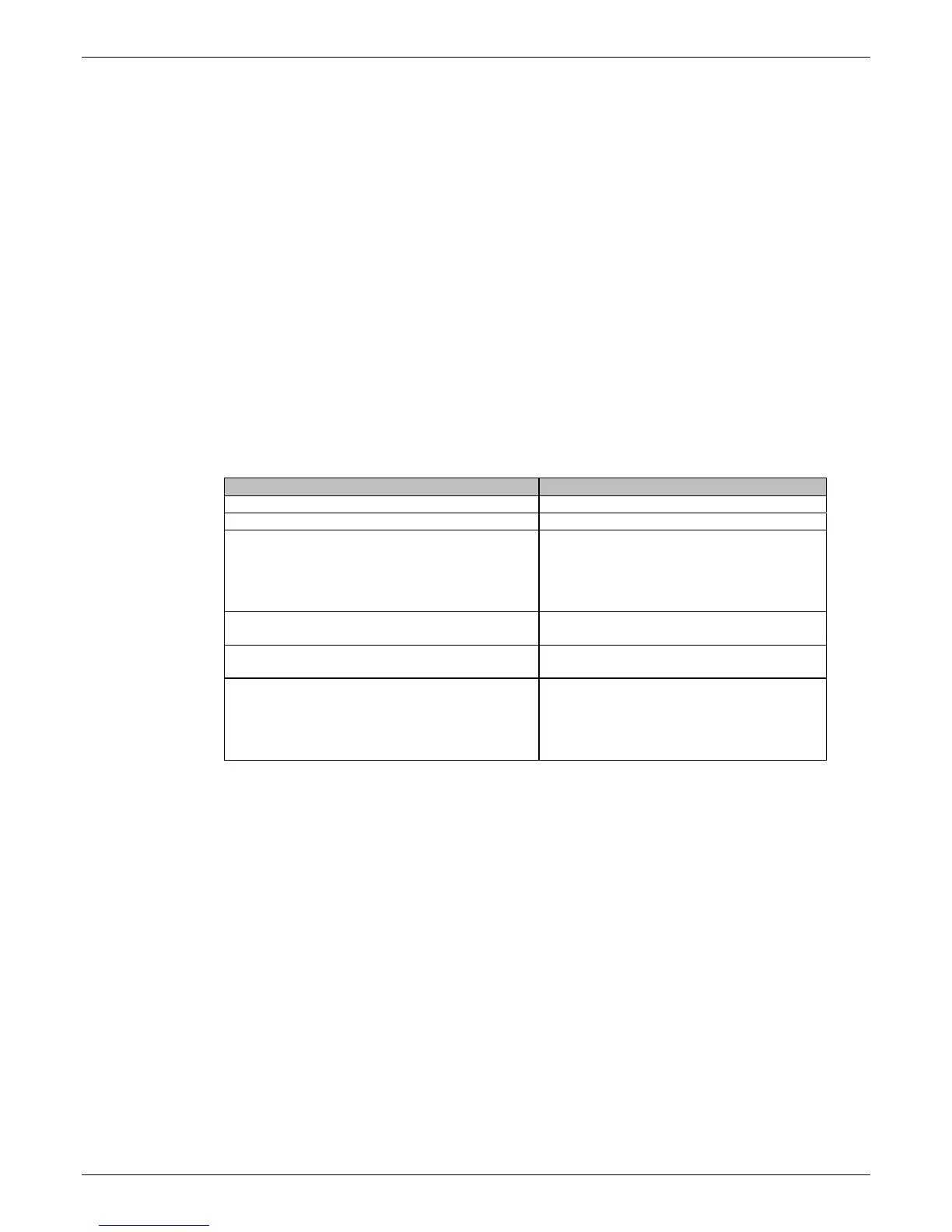
Command Possible responses
AT+WMBN=? OK
AT+WMBN? OK
AT+CPHS=2,2
Note: Get the current Mail Box Numbers in SIM
+WMBN: 1,"0123456789",129,”Maison” , 1
+WMBN: 2,”9876543210”,129,”Travail” , 1
+WMBN: 3,,,,1
+WMBN: 4,,,,1
OK
AT+WMBN=1,”+33122334455”,145
Note: Set mailbox number for line.
OK
Note: Mailbox number for Line 1 is set.
AT+WMBN=2
Note: Erase mailbox number & name for line 2
OK
AT+CPHS=2,2
Note: Get current Mail Box Numbers again
+WMBN: 1,"+ 33122334455",145,1
+WMBN: 2,,,,1
+WMBN: 3,,,,1
+WMBN: 4,,,,1
OK














 To Next Page