MT5600ZDX Owner's Manual
26
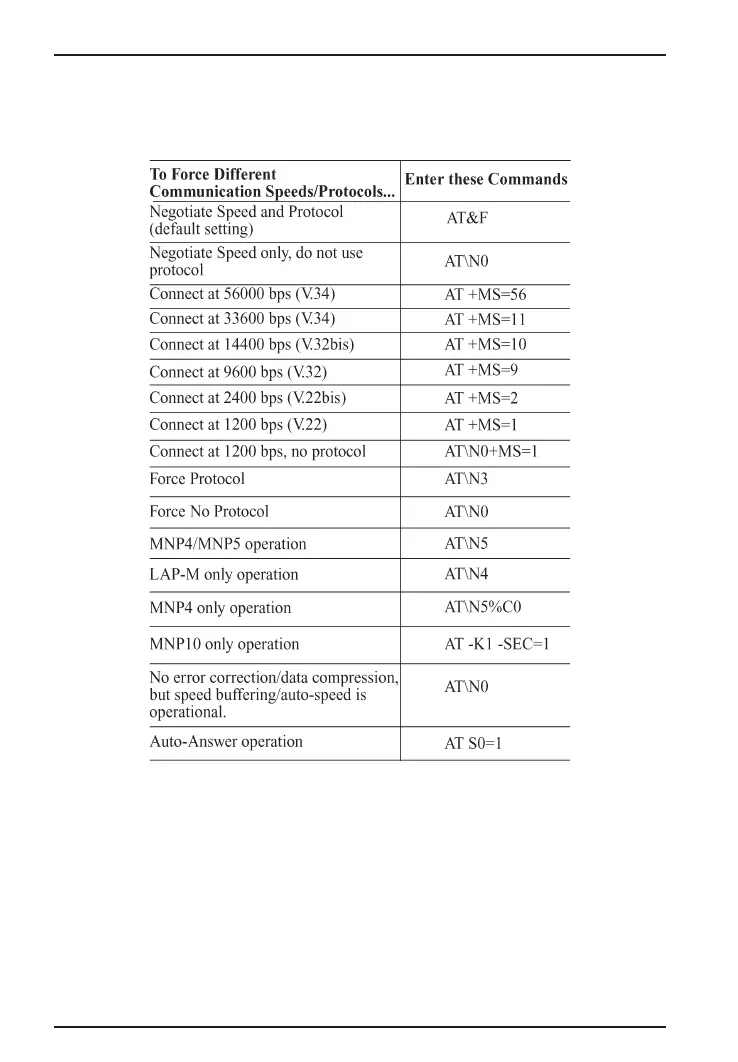
Table 2-1. Setting Up Protocols via AT Command Strings
• If the modem reports
NO DIALTONE
, check that the modem’s
telephone line cable is connected to both the modem’s LINE jack
(not the PHONE jack) and the telephone wall jack. If the cable
looks secure, try replacing it. If that doesn’t work, the problem may
be in your building’s telephone installation. To test the building
installation, plug a telephone into your modem’s telephone wall
jack and listen for a dial tone. If you hear a dial tone, your modem














 To Next Page