-- 9 --
bh36d1ea
7 CONTROL PANEL
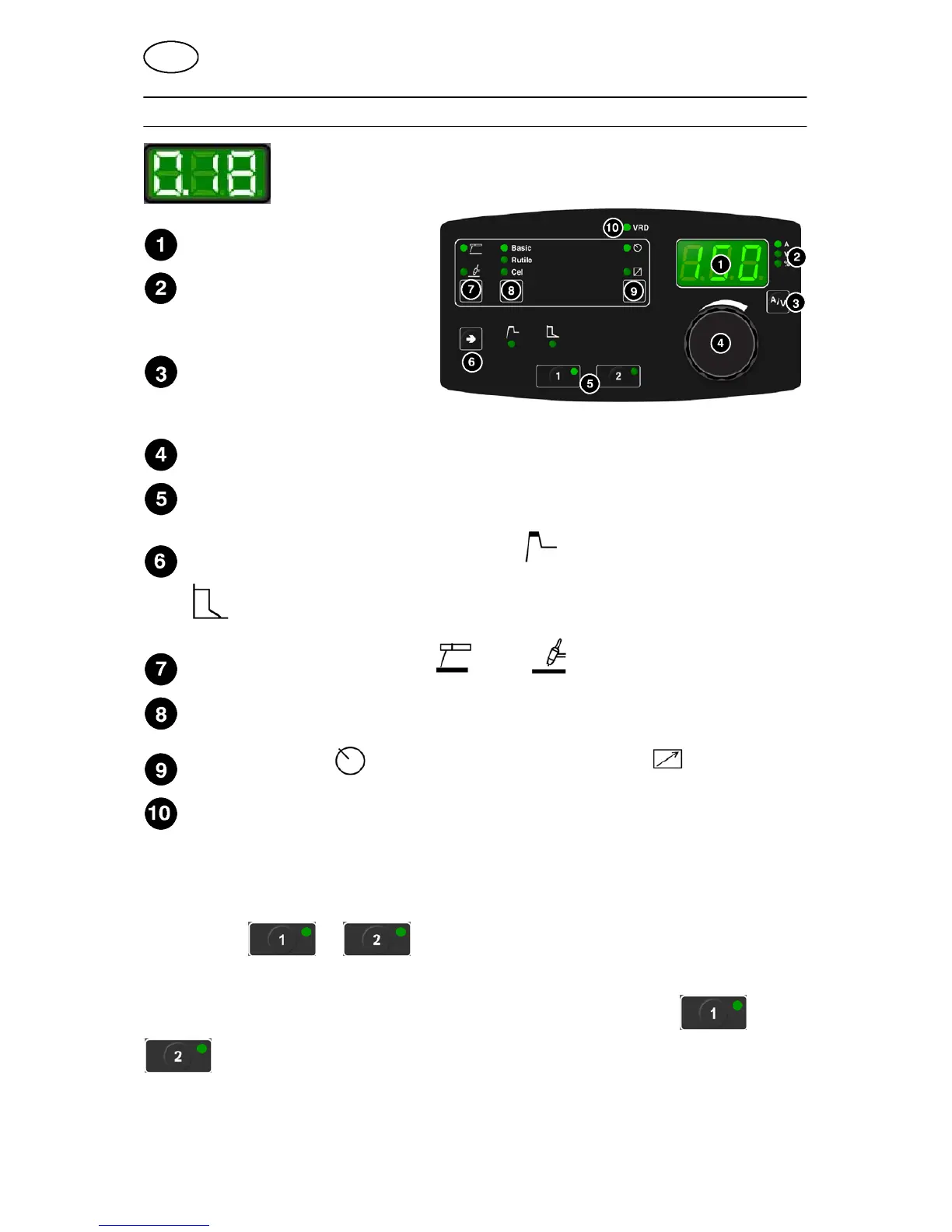
When mains power is supplied the unit runs a self diagnosis of the
LEDs and the display, the program version is displayed and in this
example the program version is 0.18.
Display
Indication of which parameter is
shown in the display
(current, voltage or percent)
Choice of current indication (A)
or voltage indication (V) during
welding, in the display
Knob for setting data ( current or percent)
Buttons for settings in welding data m emory. See title 7.1 .
Button for choosing parameters ”Hot start” or arc pressure ”Arc force”
when MMA welding
Choice of welding method MMA or TIG
Choice of electrode type ”Basic”, ”Rutile” or ”Cellulose” when MMA welding
Setting from panel and connecting remote control unit
Display of VRD function (reduced open--circuit voltage).
7.1 Welding data memory
Two different welding data programs can be stored in the control panel memory.
Press button
or for 5 seconds to store the welding data in the
memory. T he welding data is stored when the green indicator lamp starts to flash.
To switch between the different welding data memories press button or
.
The welding data m emory has a back--up so that the settings remain even if the
machine has been switched off.
GB




 To Next Page