VJ-1638UH OPERATION MANUAL 5 Panel setup menu
5.3 Setup menu 261
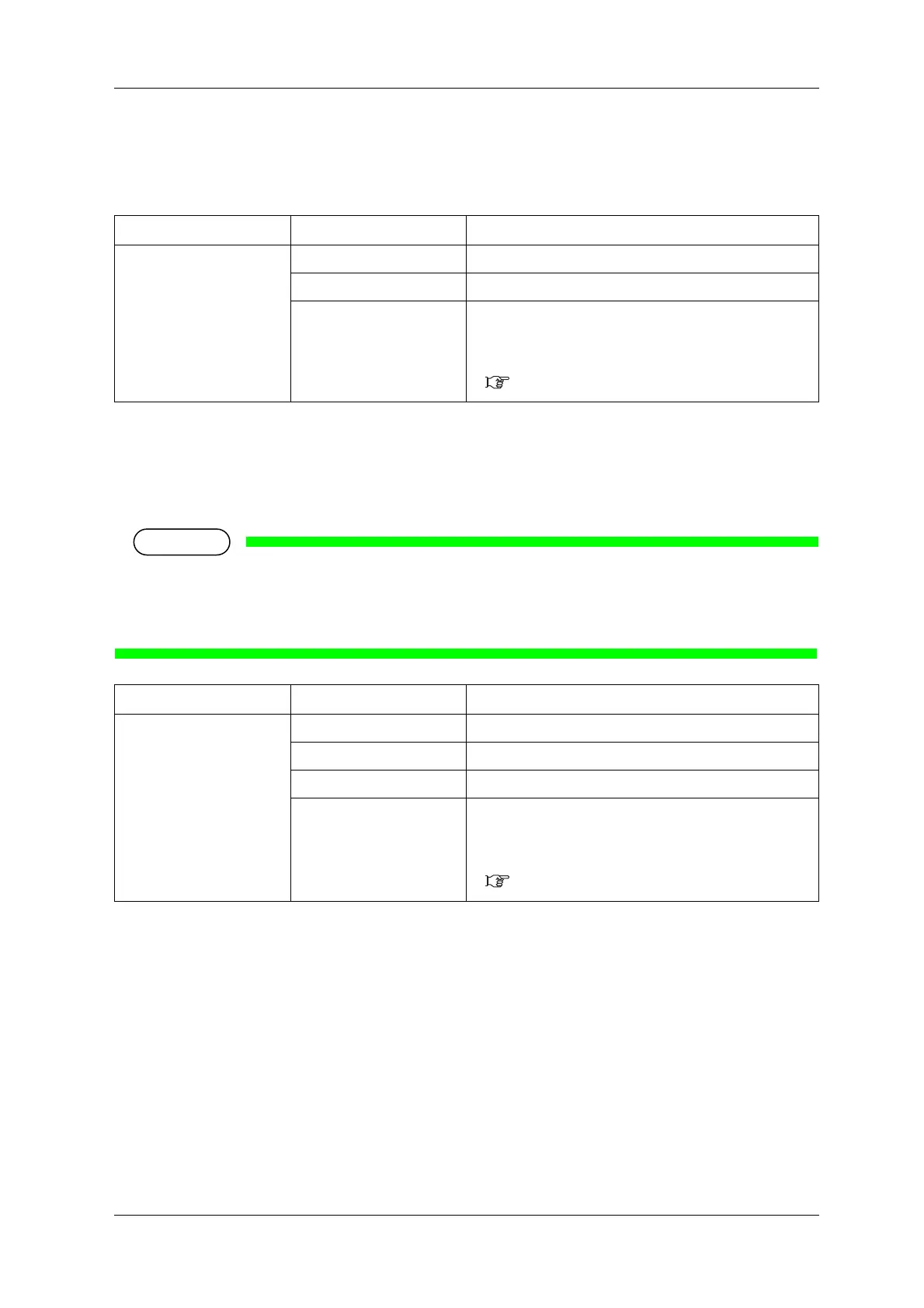
5.3.7 Slant Check menu
Sets up slanting detection during media loading.
5.3.8 Single Head menu
You can set whether or not to perform printing using only one Print head.
• This printer has 2 Print heads inside Print head unit.
• Even if “Head 1” or “Head 2” is set, when performing the Test print menu, the both Print heads are
used for printing.
Setup item Setting Description
Media Slant <Off> Slant Check is not performed.
On Slant Check is performed.
— • [Enter] key: saves the setting and shifts to the previous
menu.
• [Cancel] key: cancels the setting and shifts to the previous
menu.
5.3 Setup menu
Setup item Setting Description
Single head <Off> Both Print heads are used for printing.
Head1 Only left Print head is used for printing
Head2 Only right Print head is used for printing.
— • [Enter] key: saves the setting and shifts to the previous
menu.
• [Cancel] key: cancels the setting value and shifts to the
previous menu.
5.3 Setup menu















 To Next Page