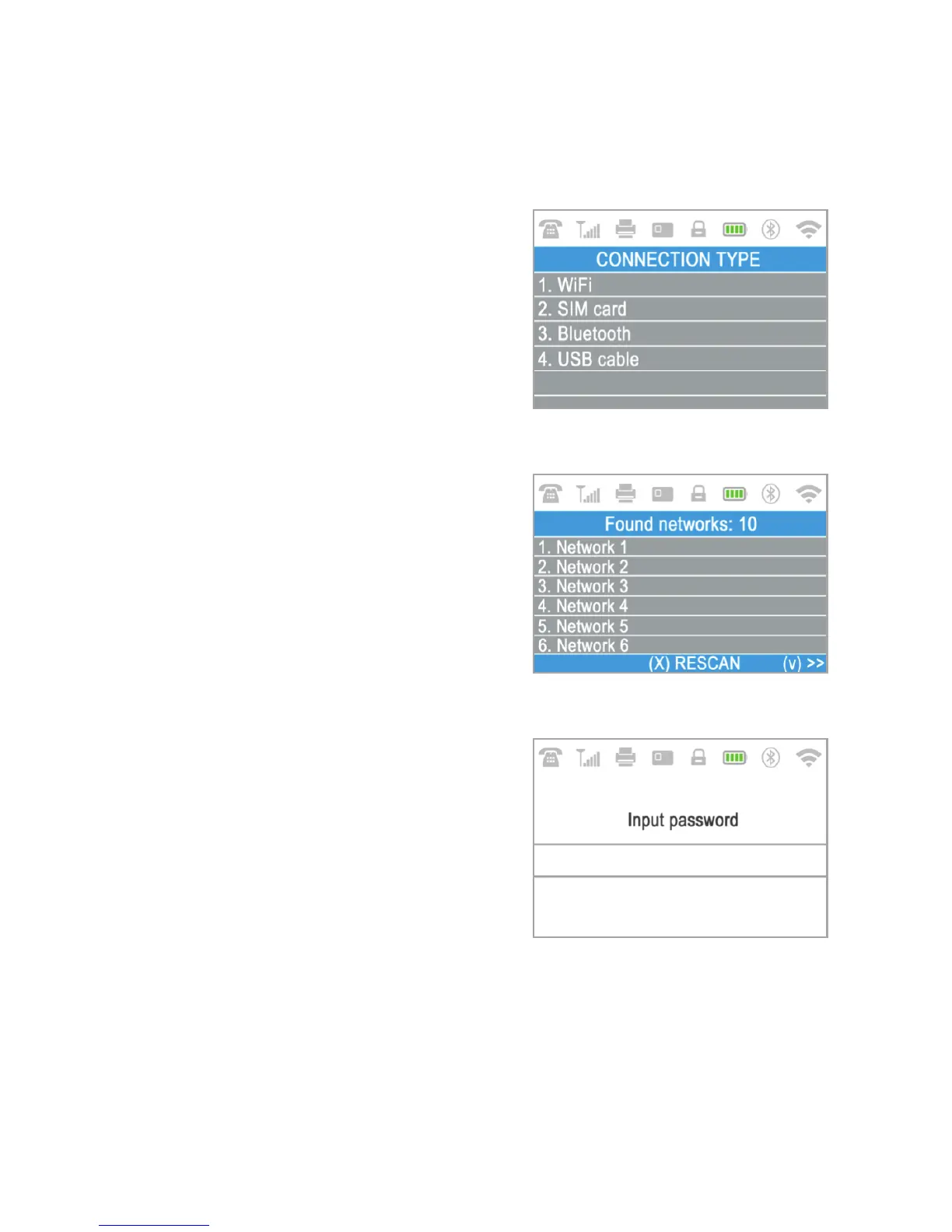
How to connect your D210c with Wi-Fi
Step 1:
Step 2:
џStep 3:
Make sure the D210c is in the range of your Wi-Fi network. Switch ON your
D210c and wait for a few seconds until it completes the initialization.
The D210c will scan for available
Wi-Fi networks within its range and will
display a list of their names on the screen.
Find the Wi-Fi network you would
like to use and select it by pressing its
number (from 1 to 6) on the keyboard. If
there are more than 6 available networks
on the list, you can switch to the next page
of the list by pressing the up and down
arrow buttons from the keyboard.
If you cannot find your Wi-Fi network on
the list, press (X) and D210c will rescan
(search again) for available Wi-Fi
networks. Make sure your D210c is in the
range of your network.
If your Wi-Fi network requires a
password, D210c will display the Wi-Fi
Password screen, where you can enter the
network password. In case your password
contains digits , press the relevant
number key. In case your password
contains letters, press the relevant
number key and then switch to letters by
pressing (ALPHA) button from the
keyboard several times in order to select
the required character. If you make a
mistake, press the yellow key ( CLEAR) to
delete the last entry. When you have
entered the password, press the green key
( ENTER) in order to complete the
operation
<
O
EN 8|



 To Next Page