EasyManua.ls Logo

NAD 7155 - AM Alignments; Oscillator Alignment; Antenna and IF Alignment; Whistle Filters

NAD 7155
22 pages
Print Icon
To Next Page IconTo Next Page
To Previous Page IconTo Previous Page
Loading...
AM
ALIGNMENTS
A
wn
aR
won
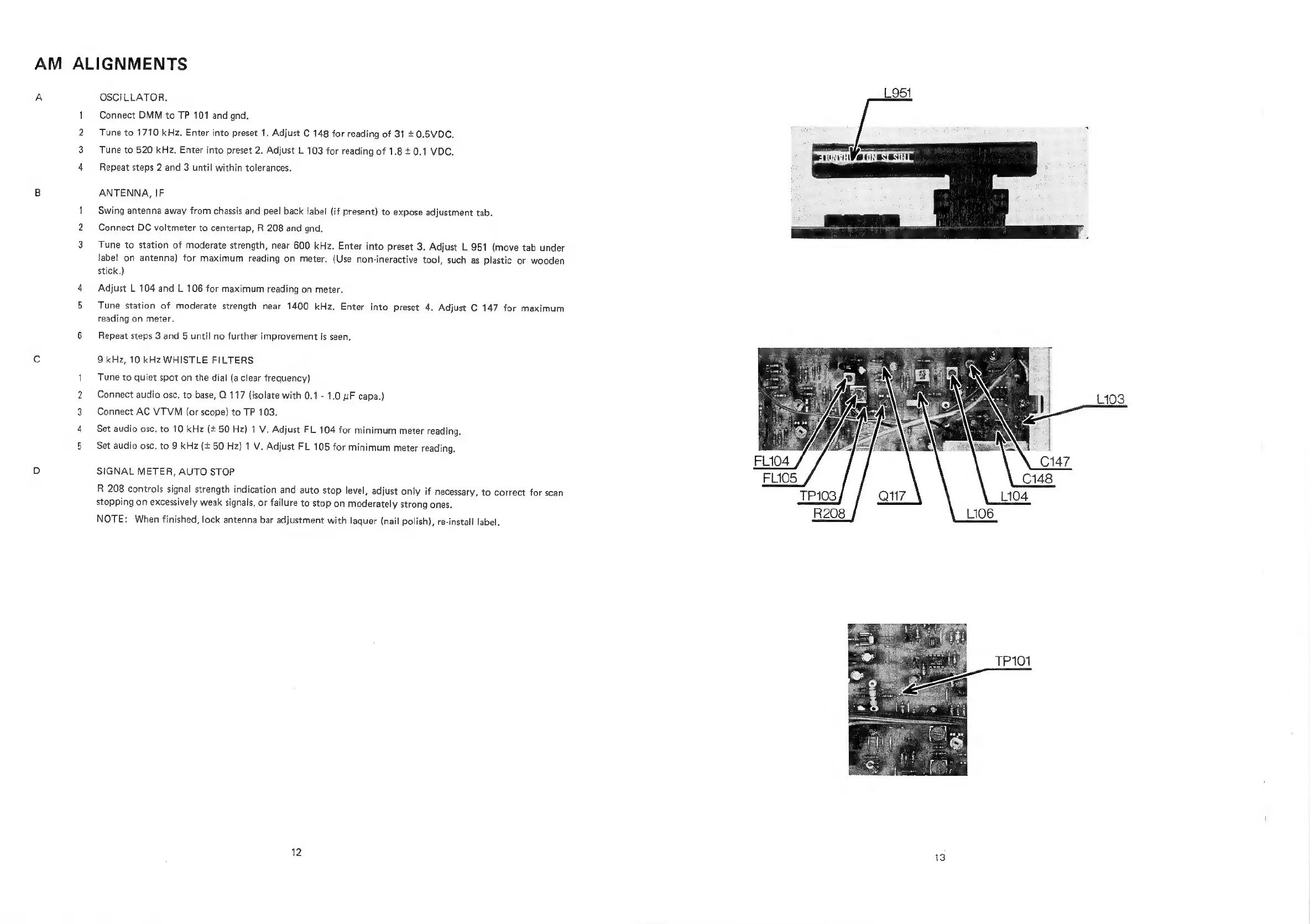
OSCILLATOR.
Connect
DMM
to
TP
101
and
gnd.
Tune
to
1710
kHz,
Enter
into
preset
1.
Adjust
C
148
for
reading
of
31
+
0.5VDC,
Tune
to
520
kHz.
Enter
into
preset
2.
Adjust
L
103
for
reading
of
1.8
+
0.1
VDC.
Repeat
steps
2
and
3
until
within
tolerances.
ANTENNA,
IF
Swing
antenna
away
from
chassis
and
peel
back
label
(if
present)
to
expose
adjustment
tab.
Connect
DC
voltmeter
to
centertap,
R
208
and
gnd.
Tune
to
station
of
moderate
strength,
near
600
kHz.
Enter
into
preset
3.
Adjust
L
951
(move
tab
under
label
on
antenna)
for
maximum
reading
on
meter.
(Use
non-ineractive
tool,
such
as
plastic
or
wooden
stick.)
Adjust
L
104 and
L
106
for
maximum
reading
on
meter.
Tune
station
of
moderate
strength
near
1400
kHz.
Enter
into
preset
4.
Adjust
C
147
for
maximum
reading
on
meter.
Repeat
steps
3
and
5
until
no
further
improvement
is
seen.
9
kHz,
10
kHz
WHISTLE
FILTERS
Tune
to
quiet
spot
on
the
dial
(a
clear
frequency)
Connect
audio
osc.
to
base,
Q
117
(isolate
with
0.1
-
1.0
uF
capa.)
Connect
AC
VTVM
(or
scope)
to
TP
103.
Set
audio
osc.
to
10
kHz
(+
50
Hz)
1
V.
Adjust
FL
104
for
minimum
meter
reading.
Set
audio
osc.
to
9
kHz
(+
50
Hz)
1
V.
Adjust
FL
105
for
minimum
meter
reading.
SIGNAL
METER,
AUTO
STOP
R
208
controls
signal
strength
indication
and
auto
stop
level,
adjust
only
if
necessary,
to
correct
for
scan
stopping
on
excessively
weak
signals,
or
failure
to
stop
on
moderately
strong
ones.
NOTE:
When
finished,
lock
antenna
bar
adjustment
with
laquer
(nail
polish),
re-install
label.
12
TP101

Related product manuals