6 SPEAKERS
• The C 388 has two sets of SPEAKER connections which are identical
in function (parallel connection).
• Connect C 388’s Right speaker terminals marked “R +” and “R-” to
the corresponding “+” and “-“ terminals of your designated right
speaker. Repeat the same for C 388’s Left speaker terminals and
corresponding left speaker.
• Double check the speaker connections before powering up the
C 388.
IMPORTANT NOTES
• The blue terminals must never be connected to ground (earth).
• Never connect the blue terminals together or to any common ground
device.
• Do not connect the output of this amplier to any headphone adapter,
speaker switch or any device that uses common ground for left and
right channels.
NOTE
• Use 16 gauge (American Wire Gauge or AWG) or lower stranded wire.
Connections to the C 388 can be made with banana-type plugs.
• Bare wire or pins can also be used by loosening the terminal’s plastic
nut, making a clean, neat connection and re-tightening. To minimize
the danger of a short circuit, ensure that only 1/2-inch of exposed wire
or pin is used to connect and no loose strands of speaker wire.
7 POWER
• Supplies the AC mains power to the C 388.
• When the POWER switch is set to ON position, the C 388 goes to
standby mode as shown by the amber status condition of the front
panel Power indicator.
• Press the front panel Standby button or SR 9’s remote control’s [ON]
button to switch ON the C 388 from standby mode.
• If you do not intend to use the C 388 for long periods of time (such
as when on vacation), switch o the POWER switch.
• With POWER switched o, neither the front panel Standby button
nor SR 9 remote control’s [ON] button can activate the C 388.
8 FUSE HOLDER
• Only qualied NAD service technicians can have access to this fuse
holder. Opening this fuse holder may cause damage thus voiding
the warranty of your C 388.
9 AC MAINS INPUT
• The C 388 comes supplied with two separate mains power cords.
Select the mains power cord appropriate for your region.
• Before connecting the plug to the mains power source, ensure that
it is rmly connected to the C 388’s AC Mains input socket.
• Always disconnect the mains power plug from the mains power
source before disconnecting the cable from the C 388’s AC Mains
input socket.
10 SERVICE
• Use for servicing purposes only. Not for consumer use.
11 BLUETOOTH ANTENNA TERMINAL
• Install supplied Bluetooth antenna to this Bluetooth antenna
terminal.
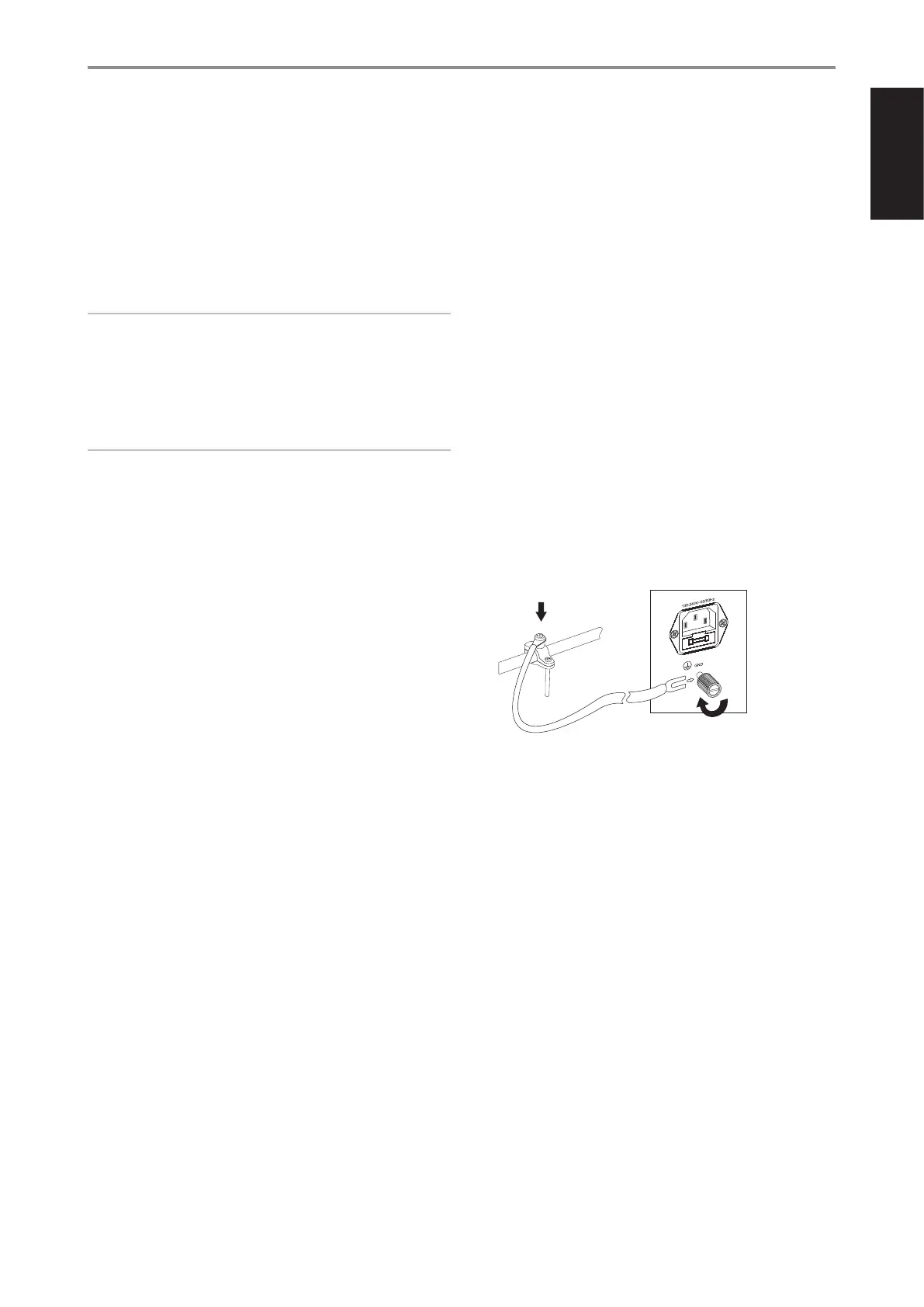
12 GROUND TERMINAL
• Ensure that the C 388 is plugged-in to a grounded AC wall outlet.
• If necessary, use this ground terminal to connect to ground a
phono or turntable source for PHONO input.
• If a separate earth ground is necessary, use this terminal to ground
your C 388. The C 388 can be connected to ground by connecting
a ground lead wire or similar to this terminal. After insertion, tighten
the terminal to secure the lead.
EXAMPLE ILLUSTRATION OF GROUNDING THE C 388 VIA THE
REAR PANEL GROUND TERMINAL
13 RS 232
NAD is a certied partner of AMX and Crestron and fully supports
these external devices. Check out the NAD website for information
about AMX and Crestron compatibility with NAD. See your NAD audio
specialist for more information.
• Connect this interface using RS-232 serial cable (not supplied) to
any Windows compatible PC to allow remote control of the C 388
via compatible external controllers.
• Refer to the NAD website for information about RS232 Protocol
documents and PC interface program.
IDENTIFICATION OF CONTROLS
REAR PANEL
7
ENGLISHFRANÇAISESPAÑOLITALIANODEUTSCHNEDERLANDSSVENSKAРУССКИЙ



 To Next Page