ENGLISH
7
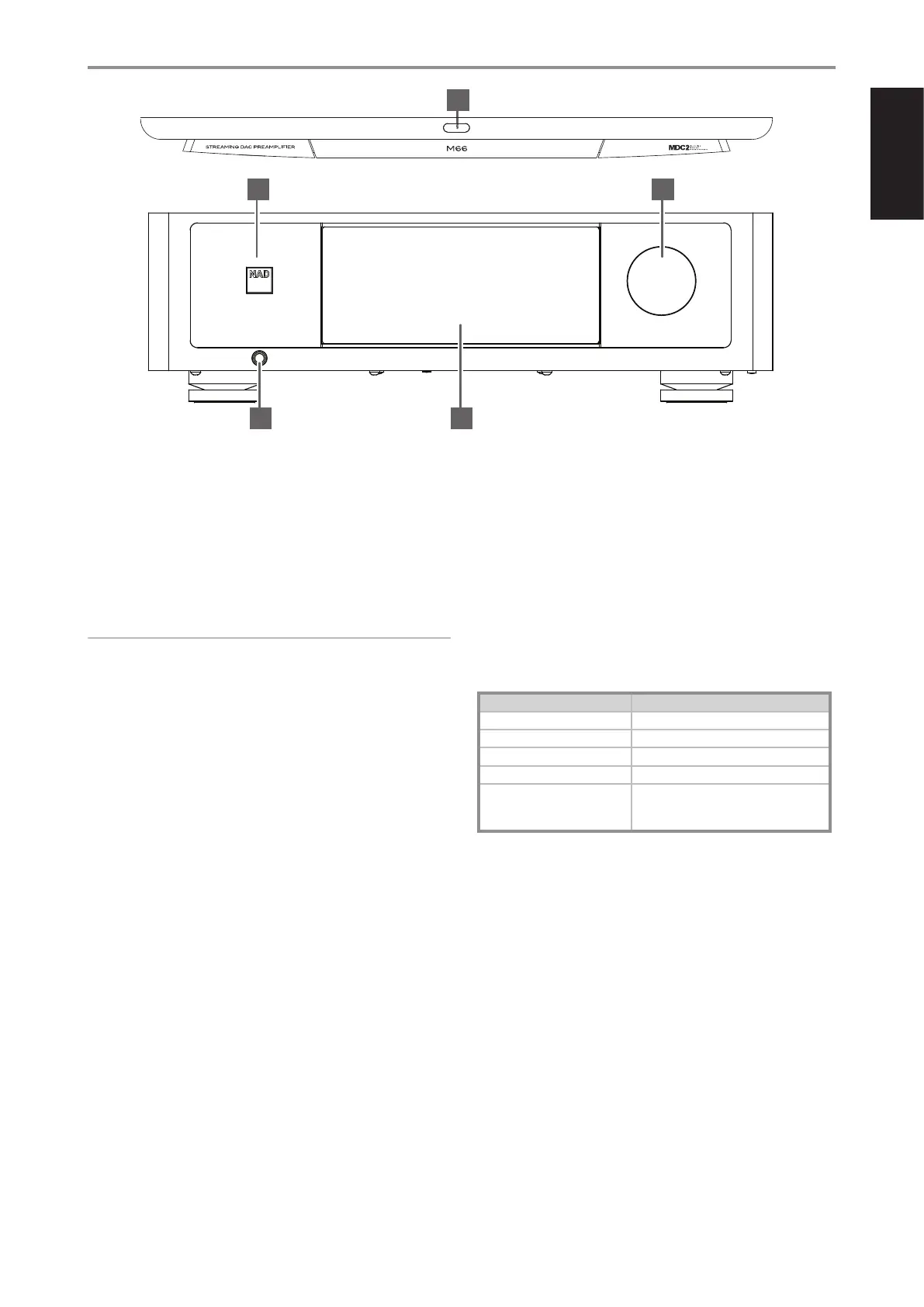
1 o(STANDBY)
• Press and hold o(Standby) button to switch M66 from operating
mode to standby mode. The STATUS INDICATOR (NAD logo) will
illuminate amber at standby mode.
• Press o(Standby) button to switch ON the M66 from standby mode
to operating mode. The STATUS INDICATOR (NAD logo) will turn
from amber to white color.
• The o(Standby) button cannot activate the M66 with the rear
panel POWER switched off.
IMPORTANT NOTES
• For the o(Standby) button to activate, two conditions must be
completed.
a Plug-in the supplied mains power cord to mains power source.
Connect corresponding end of the mains power cord to the AC
mains input of M66 and the plug connected to mains power source.
b The rear panel POWER switch must be set to ON position.
• When the rear panel POWER switch is switched ON, the unit will
automatically turn ON (operating mode) - Status Indicator (NAD logo) will
turn red, touch panel display will activate and then Status Indicator (NAD
logo) will turn white. It is not necessary to press the o(Standby) button.
AUTO STANDBY MODES
There are two types of auto standby mode with Amplifier Standby enabled
– Network Standby mode and Deep Standby mode.
Network Standby Mode
• If there is no playback or user interface at the current Source within
15 minutes, the unit switches to Network Standby mode at reduced
system performance level (less than 8W).
• Network and Bluetooth connections are maintained at Network
Standby mode.
• At Network Standby mode, the M66 can be switched back to
operating mode using any of the following methods.
- Touch o(Standby) button
- Touch front panel display
- Rotate Volume knob
- Activate or play network connected App
- Play paired Bluetooth source
- Press o button from SRM1 remote control
Deep Standby Mode
Activate Deep Standby mode: Press and hold o(Standby) button for more
than 5 seconds until the display turns off and unit goes to deep standby mode.
• At Deep Standby mode, the M66 goes to standby mode at lowest
power consumption level (less than 0.5W).
• Network and Bluetooth connections are not maintained at Deep
Standby mode.
• At Deep Standby mode, the M66 can be switched back to
operating mode using any of the following methods.
- Touch o (Standby) button
- Rotate Volume knob
2 STATUS INDICATOR (NAD LOGO)
• This indicator will be amber when M66 is in standby mode.
• When M66 is powered up from standby mode, this indicator will
change from amber to solid white.
Table of the color blink codes of the NAD logo indicator and their
corresponding descriptions.
BLINK CODES DESCRIPTION
Alternately ashing red and white Upgrade mode
Solid red Powering up, rebooting, booting up
Solid amber Standby mode
Solid white Indexing
Solid white Connected to network – ready to use with
BluOS App
Operating mode
3 HEADPHONE
• A 1/4” stereo jack socket is supplied for headphone listening and
will work with conventional headphones of any impedance.
• The volume and tone controls are operative for headphone
listening. Use a suitable adapter to connect headphones with other
types of sockets, such as 3.5mm “personal stereo” jack plugs.
• Inserting a headphone jack into this socket automatically switches
off output at ANALOG AUDIO OUTPUT and SUBWOOFER OUTPUT.
4 DISPLAY (TOUCH PANEL DISPLAY)
• Display visual information about current music or media source,
settings or menu options.
• Touch control functions are also displayed depending upon menu
option selected.
• Touch the display panel to switch the unit from low power standby
mode (no display, NAD logo lit) to operating mode.
5 VOLUME
• The VOLUME control knob adjusts the overall loudness of the signal
driving the speakers or headphones.
• Turn clockwise to increase the volume level; counterclockwise to
lower it.
• Rotate Volume knob to switch the unit from low power standby
mode (no display, NAD logo lit) to operating mode.
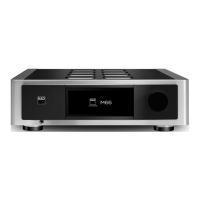
IDENTIFICATION OF CONTROLS
FRONT PANEL
3
2
4
5
1


 To Next Page