12
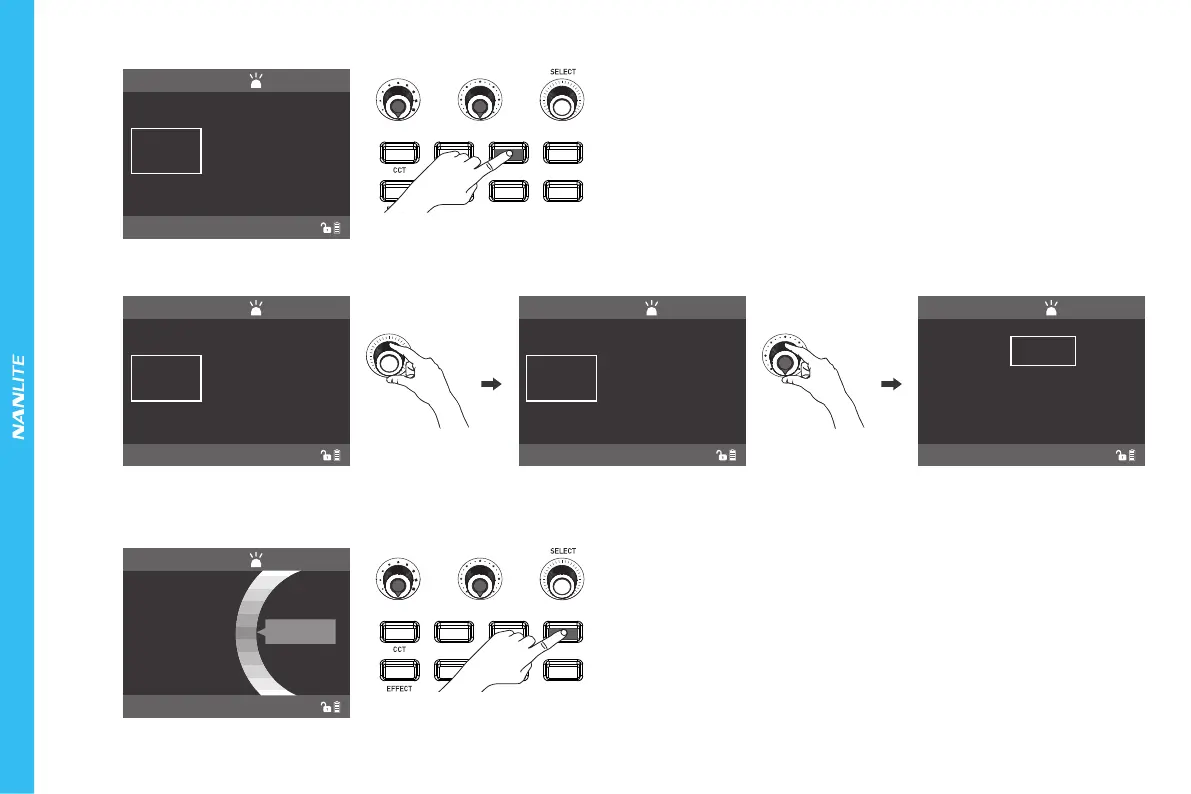
④RGBW Key: Press the RGBW key to enter the operation interface of the RGBW mode.
000%
WHITE
HSI RGBW GEL
PRESET
MENU
LOCK
000
R
000
G
000
B
000%
WHITE
000
R
000
G
000
B
100%
WHITE
000
R
000
G
000
B
000%
WHITE
255
R
000
G
000
B
Rotate the "SELECT knob"
to select R,G,B or WHITE
Rotate the "Function knob" to adjust
the ration of R, G,B,WHITE
Rotate the "Function knob" to adjust
the ration of R, G,B,WHITE
⑤GEL Key: Press the GEL key to enter the operation interface of the GEL mode.
HSI RGBW GEL
PRESET
MENU
LOCK
000%
DIM
5600K
CCT
RGBW
CH:512
NORMAL
RGBW
CH:512
NORMAL
RGBW
CH:512
NORMAL
RGBW
CH:512
NORMAL
GEL
CH:512
NORMAL
DOUBLE CTB
(1)Rotate the " SELECT knob" to select R, G, B or WHITE, then rotate the " Function knob" to adjust the ratio of R, G, B, WHITE values for mixing color. The range of
adjusting R, G, B is from 000-255, and the range of adjusting WHITE is from 000%-100%.








 To Next Page