21
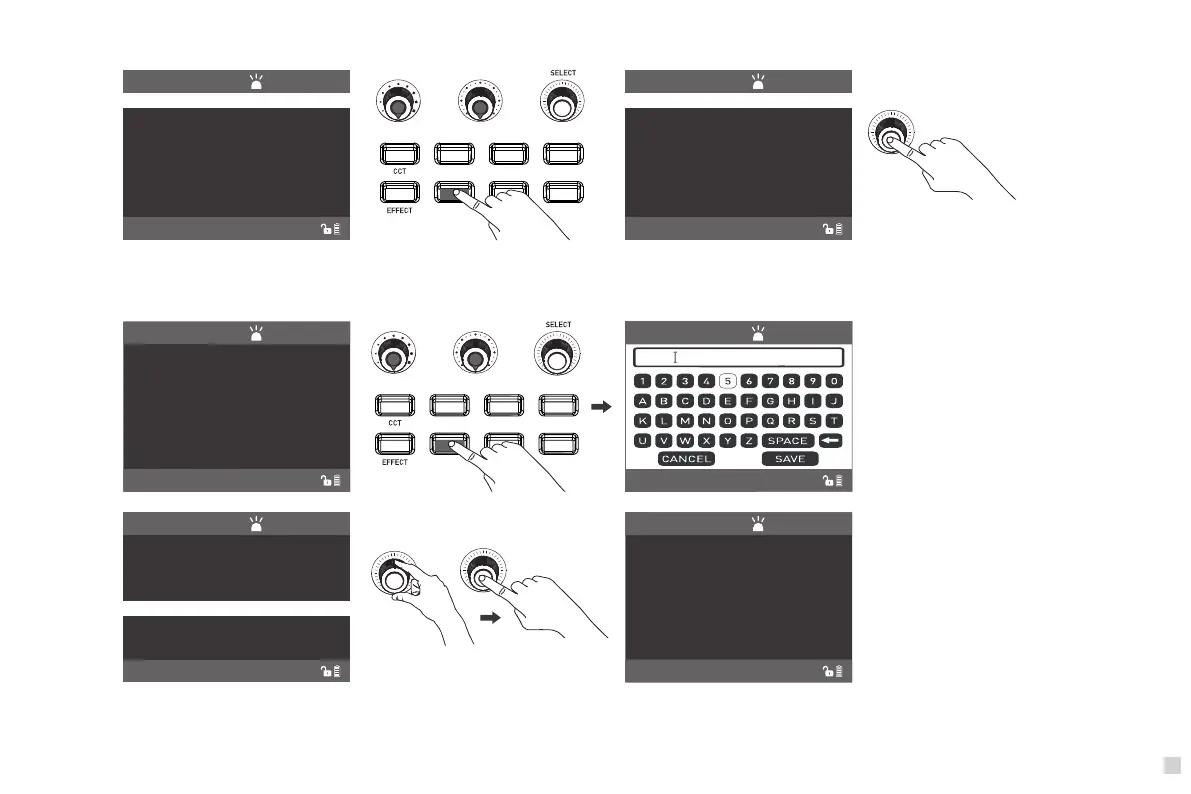
⑦PRESET Key: When pressing the PRESET key to enter the MANAGE PRESET interface.
HSI RGBW GEL
PRESET
MENU
LOCK
PRESET
LONG PRESS”PRESET”TO SAVE CURRENT LIGH
CH:512
NORMAL
MANAGE PRESET...
PRESET
LONG PRESS”PRESET”TO SAVE CURRENT LIGH
CH:512
NORMAL
EXIT MANAGE
Press "SELECT knob" to switch to
MANAGE PRESET or EXIT MANAGE.
·Long press the "PRESET" to save current lighting setting, enter the MANAGE PRESET interface to name and save the current lighting mode.
100% 2700K +45
DI
M
C
C
T
G/
M
CCT-SOFT
P
R
ES
S “
C
CT
” T
O C
H
A
N
G
E T
O HARD LI
GH
T
CH:
51
2
NORMAL
HS
I
RG
B
W
G
E
L
PR
E
SE
T
M
ENU
LO
C
K
PRESET
C
H
:
5
12
NORMAL
555
PRESET
LONG PRESS”PRESET”TO SAVE CURRENT LIGH
CH:512
NORMAL
MANAGE PRESET...
2
5
444
555
Select the saving lighting setting and press
the "SELECT knob" to trigger the function.
100%
2700K
+45
DI
M
C
CT G/
M
CC
T-SOFT
P
R
E
S
S “C
CT” T
O C
H
AN
GE T
O HA
R
D L
I
G
HT
C
H:
5
1
2
NORMAL
The display shows the saved lighting setting.







 To Next Page