23
MixPanel 60:
NORMAL MODE: Output power is 45W.
SILENT MODE: Output power is 30W.
BOOST MODE: Output power is 60W.
MixPanel 150:
NORMAL MODE: Output power is 112W.
SILENT MODE: Output power is 75W.
BOOST MODE: Output power is 150W.
MENU
PRESS”MENU”TO RETURN
CH:512
NORMAL
SCREEN BRIGHTNESS
BUTTON BACKLIGHT
LANGUAGE
DMX/CHANNEL
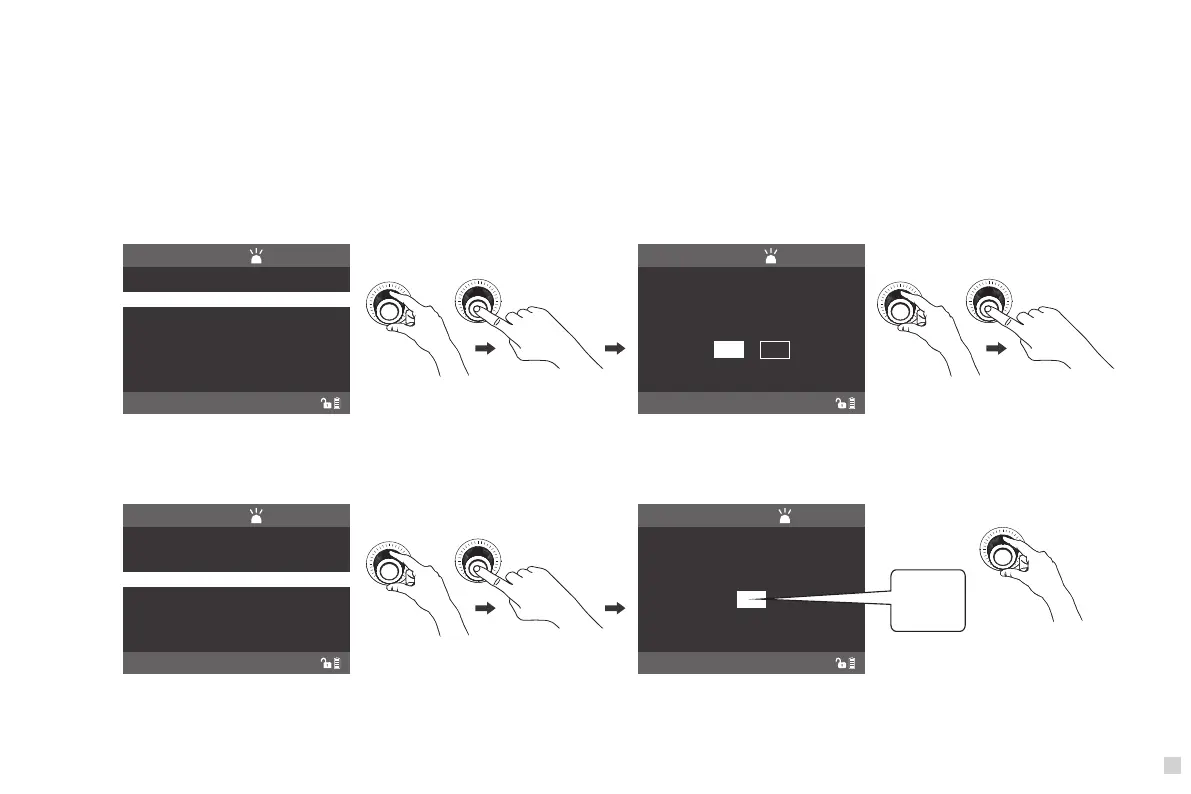
Rotate "SELECT Knob" to ROTATE SCREEN, press
"SELECT Knob" to enter the corresponding secondary menu.
Rotate "SELECT Knob" to select the screen rotate mode, press
"SELECT Knob" to confirm or cancel.
LIGHTING MODE
ROTATE SCREEN
ROTATE SCREEN
PRESS”MENU”TO RETURN
CH:512
NORMAL
DO YOU WANT TO ROTATE
SCREEN?
NO YES
MENU
PRESS”MENU”TO RETURN
CH:512
NORMAL
BUTTON BACKLIGHT
LANGUAGE
DMX/CHANNEL
SCREEN BRIGHTNESS
PRESS”MENU”TO RETURN
CH:512
NORMAL
SCREEN BRIGHTNESS
1
Rotate "SELECT Knob" to SCREEN BRIGHTNESS, press
"SELECT Knob" to enter the corresponding secondary menu.
Rotate "SELECT Knob" to set the brightness of the screen.
LIGHTING MODE
ROTATE SCREEN
SCREEN BRIGHTNESS
1
2
3
(2)ROTATE SCREEN SETTING
(3)SCREEN BRIGHTNESS SETTING



 To Next Page