19
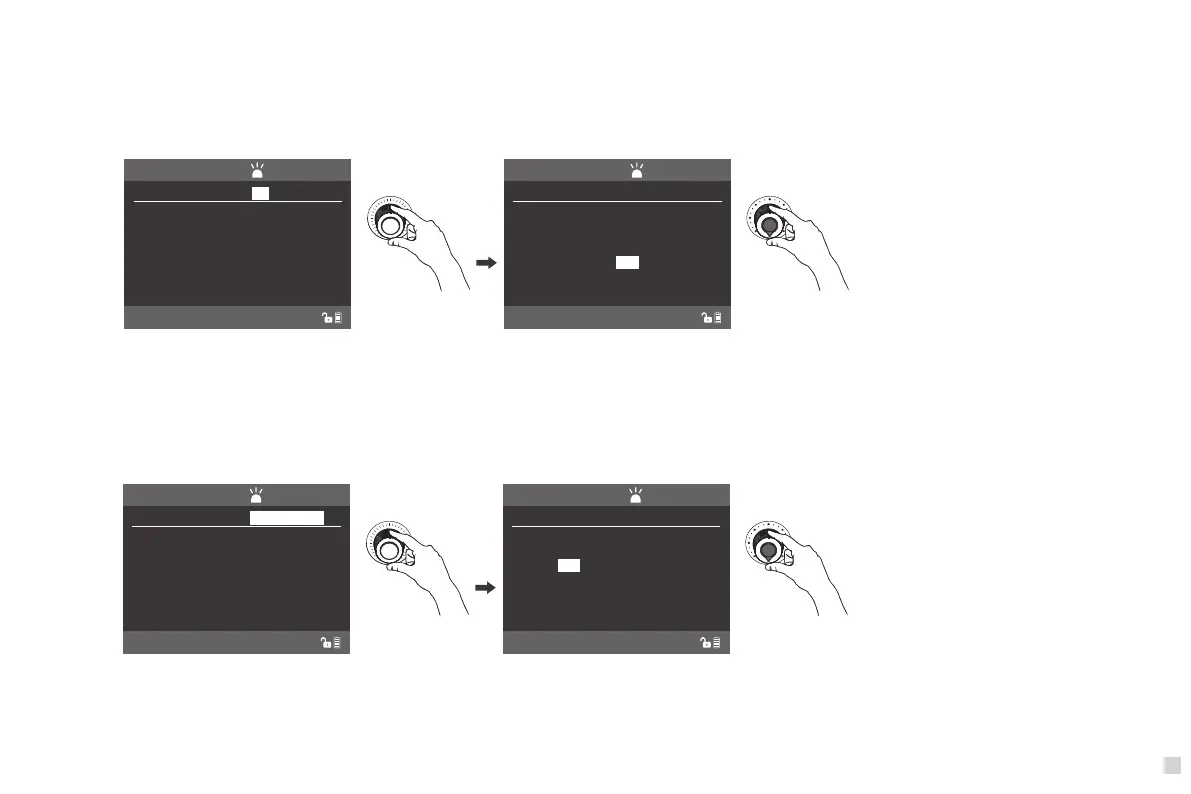
Rotate "SELECT knob" to adjust the selection.
DIM: 000%
CCT: 6600K
SPEED: 001
EFFECT
CH:512
NORMAL
EFFECT: PAPARAZZI
Rotate "Function knob" to set up the options and parameter.
DIM: 000%
CCT: 6600K
EFFECT
CH:512
NORMAL
EFFECT: PAPARAZZI
SPEED: 005
Rotate "SELECT knob" to adjust the selection. Rotate "Function" to set up the options and parameter.
DIM: 000%
CCT: 6200K
SPEED: 001
EFFECT
CH:512
NORMAL
EFFECT: TV
DIMMING RANGE: 000%-000%
G/M: +50
DIM: 50%
CCT: 6200K
SPEED: 001
EFFECT
CH:512
NORMAL
EFFECT: TV
G/M: +50
DIMMING RANGE: 40%-50%
(7)TV
·Rotate "Dimmer knob", to adjust the brightness, rotate "SELECT knob" to select CCT, G/M, SPEED(TV flash speed, range is 001-100), DIMMING RANGE(brightness
range, 000%-90%…000%-100%, 000%-100% same as Dimmer brightness percentage), then rotate "Function knob", to set up the options and parameter according
to demands.
(8)PAPARAZZI
·Rotate "Dimmer knob", to adjust the brightness, rotate "SELECT knob" to select CCT, SPEED(camera shooting flash speed, range is 001-100), then rotate "Function
knob", to set up the options and parameter according to demands.



 To Next Page