© National Instruments | 3-5
NI PXI-6683 Series User Manual
Ethernet Speed LED
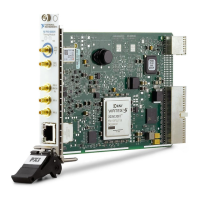
The Ethernet Speed LED indicates the NI PXI-6683 Series Ethernet link speed. Refer to
Figure 3-3 for the Ethernet Speed LED location.
Table 3-3 summarizes what the Ethernet Speed LED indicates.
Note When there is no Ethernet link the Ethernet Speed LED is off.
Ethernet ACT/LINK LED
The Ethernet ACT/LINK LED indicates the NI PXI-6683 Series Ethernet link condition. Refer
to Figure 3-3 for the Ethernet ACT/LINK LED location.
Table 3-4 summarizes what the Ethernet ACT/LINK LED indicates.
Connectors
This section describes the connectors on the front panel of the NI PXI-6683 Series. Refer to
Figure 3-3 for the location of the connectors.
• GPS ANT—GPS antenna RF input and DC power output for active GPS antenna. This
connector provides 5 VDC for an active antenna. This connector also serves as the input for
the RF signal coming in from the GPS antenna.
• CLKOUT—Clock Output. This connector is used to source a 10 MHz clock that can be
routed programmatically from the temperature-compensated crystal oscillator (TCXO) or
backplane clock (PXI_CLK10).
Table 3-3. Ethernet Speed LED Description
Color Status
Off 10 Mbps
Green 100 Mbps
Amber 1000 Mbps
Table 3-4. Ethernet ACT/LINK LED Color Description
Color Status
Off No Ethernet link
Green Ethernet link established
Blink Ethernet activity occurring


 To Next Page
 Loading...