© National Instruments | v
Contents
About This Manual
National Instruments Documentation ............................................................................... vii
Related Documentation .................................................................................................... vii
Chapter 1
Introduction
What You Need to Get Started ......................................................................................... 1-1
Unpacking......................................................................................................................... 1-2
Software Programming Choices....................................................................................... 1-2
Safety Information............................................................................................................ 1-3
Chapter 2
Installing and Configuring
Installing the Software...................................................................................................... 2-1
Installing the Hardware .................................................................................................... 2-1
Verifying the Installation.......................................................................................... 2-2
Configuring the Module ................................................................................................... 2-2
Chapter 3
Hardware Overview
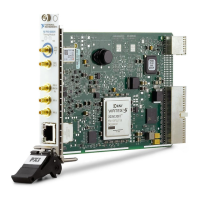
NI PXI-6683 Series Front Panel....................................................................................... 3-3
GPS LED .................................................................................................................. 3-4
1588 LED ................................................................................................................. 3-4
Ethernet Speed LED ................................................................................................. 3-5
Ethernet ACT/LINK LED ........................................................................................ 3-5
Connectors ................................................................................................................ 3-5
Hardware Features............................................................................................................ 3-6
Clock and Event Generation............................................................................................. 3-8
TCXO, PXI_CLK10, and Clock Disciplining.......................................................... 3-8
Time-Synchronized Clock and Event Generation .................................................... 3-9
PXI_CLK10 Synchronization Design Recommendations ....................................... 3-9
Routing Signals................................................................................................................. 3-9
Determining Sources and Destinations..................................................................... 3-10
I/O Considerations............................................................................................................ 3-11
Using the Ethernet Port............................................................................................. 3-11
Using Front Panel PFI Terminals as Outputs ........................................................... 3-11
Using Front Panel PFI Terminals as Inputs.............................................................. 3-12
Note Regarding PFI0 ................................................................................................ 3-13
Brief Overview of PXI Synchronization Features.................................................... 3-13
Using the PXI Triggers............................................................................................. 3-14


 To Next Page
 Loading...