NV30/NV40 Operations and Maintenance Manual Operating the transmitter
Page 2-20 Issue 3.3 2014-12-10
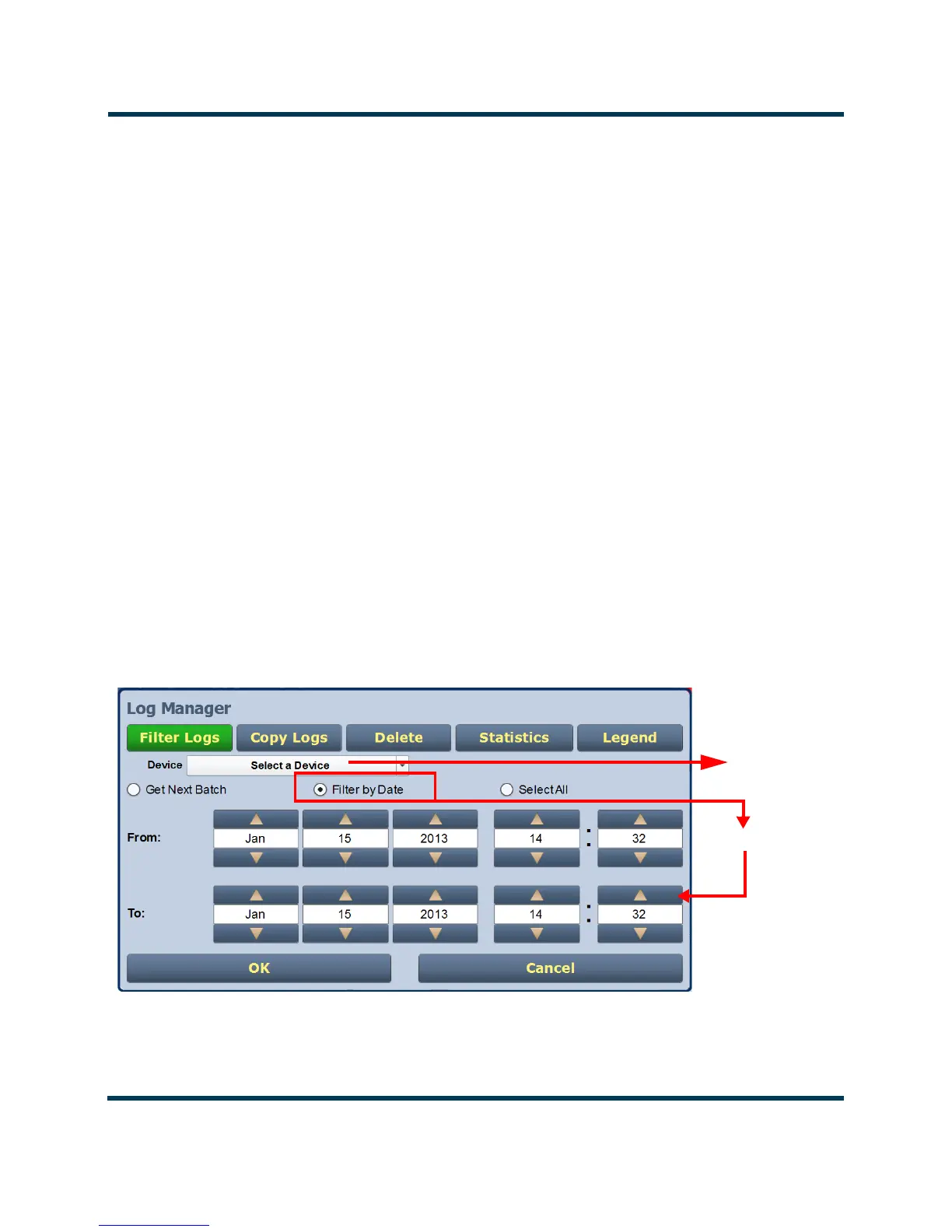
Filtering logs
You can filter transmitter events based on their device or date by clicking the Filter Logs button in the
Log Manager (see Figure 2.10).
Select a Device by pressing the Select a Device button to reveal the following event monitoring op-
tions in a drop-down menu:
– No Selection - displays all transmitter events (shown as Select a Device)
– Controller - displays controller events only
– Exciter A - displays exciter A events only
– Exciter B - displays exciter B events only
–
RF Module # - displays applicable RF Module # events only
Activate a log mode option by selecting the radio button besides it:
–
Get Next Batch - allows users to see log events in batches of 2000
– Filter by Date - activates the calendar portion of the screen and allows users to select a
date range
– Select All - selects all logs for display
Press OK to accept the configuration or press Cancel to close and return to Transmitter Log.
Figure 2.10: Log Manager - Filtering Logs
By Date Range
Controller
Exciter A
Exciter B
RF Module #



 To Next Page