NV30/NV40 Operations and Maintenance Manual Operating the transmitter
Page 2-32 Issue 3.3 2014-12-10
Equalizer screens
The NV30/NV40’s exciter includes a fixed equalizer to optimize audio performance. There are three
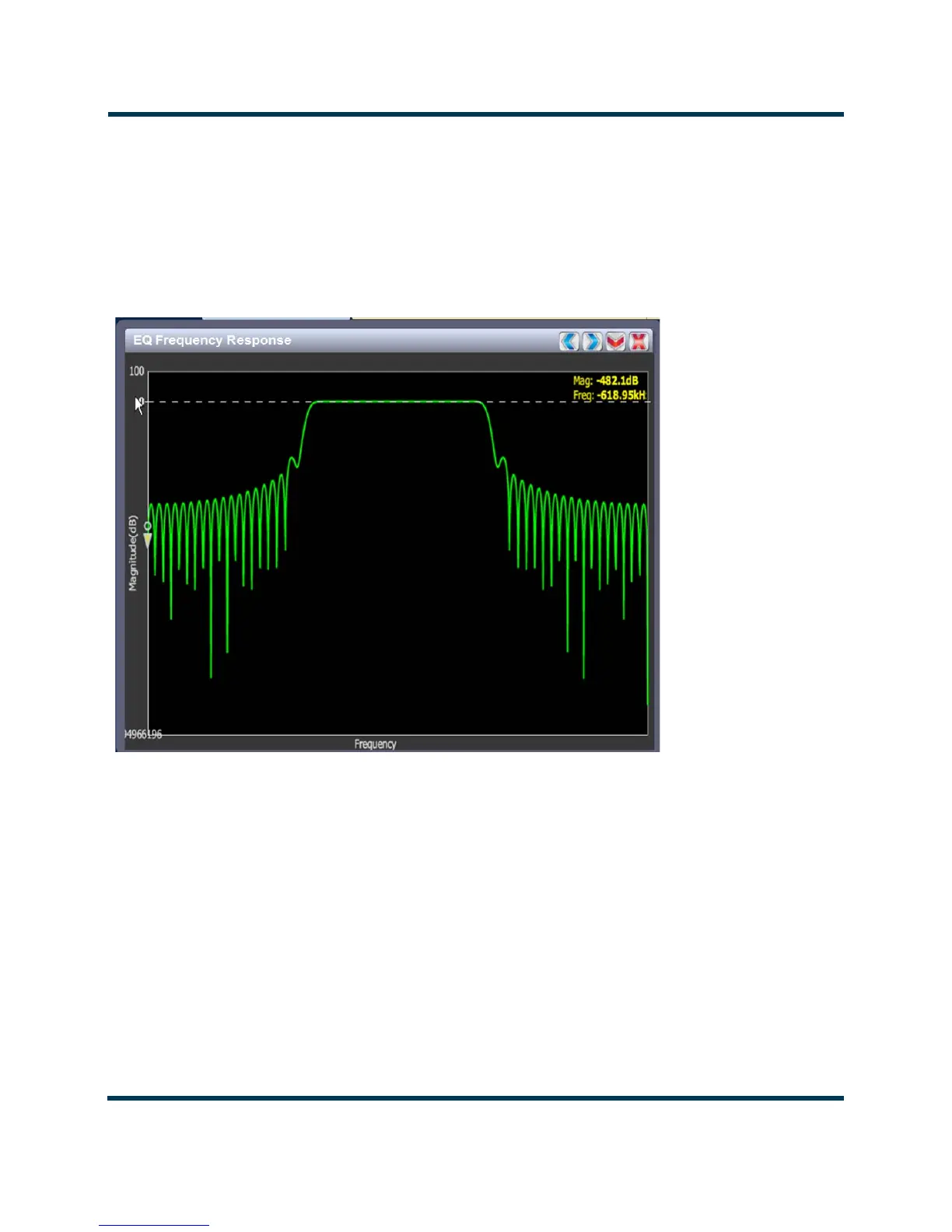
EQ instrument panels available in the Tool Menu - EQ Frequency (see Figure 2.22), EQ Impulse
Response
(see Figure 2.23 on page 2-33) and EQ Filter Delay (see Figure 2.24 on page 2-34).
Coefficients are selected based on channel frequency. All frequencies shown are relative to the
channel frequency.
Figure 2.22: EQ Frequency Response
EQ frequency response
See Figure 2.22. This panel displays the frequency response of the active exciter’s EQ filter. The panel
displays the gain of the filter with respect to the magnitude and frequency of the modulating signal. A
dashed line is displayed at the 0 dB level.
This tool is useful for installations featuring filter coefficients loaded to compensate for a channel
combiner response.
Touch on the panel to display a cursor in the approximate area. The cursor position (magnitude and
amplitude) is noted in the upper, right-hand corner of the panel. Touch in other areas of this
instrument panel to provide a coarse adjustment of the cursor position.
Use the left and right buttons as fine adjustments. Use the maximize or minimize buttons as required.



 To Next Page