NV5/NV3.5 Troubleshooting Manual Responding to alarms
Issue 3.2 2014-12-10 Page 1-43
Fan, IPA and Module Power Supply Replacement
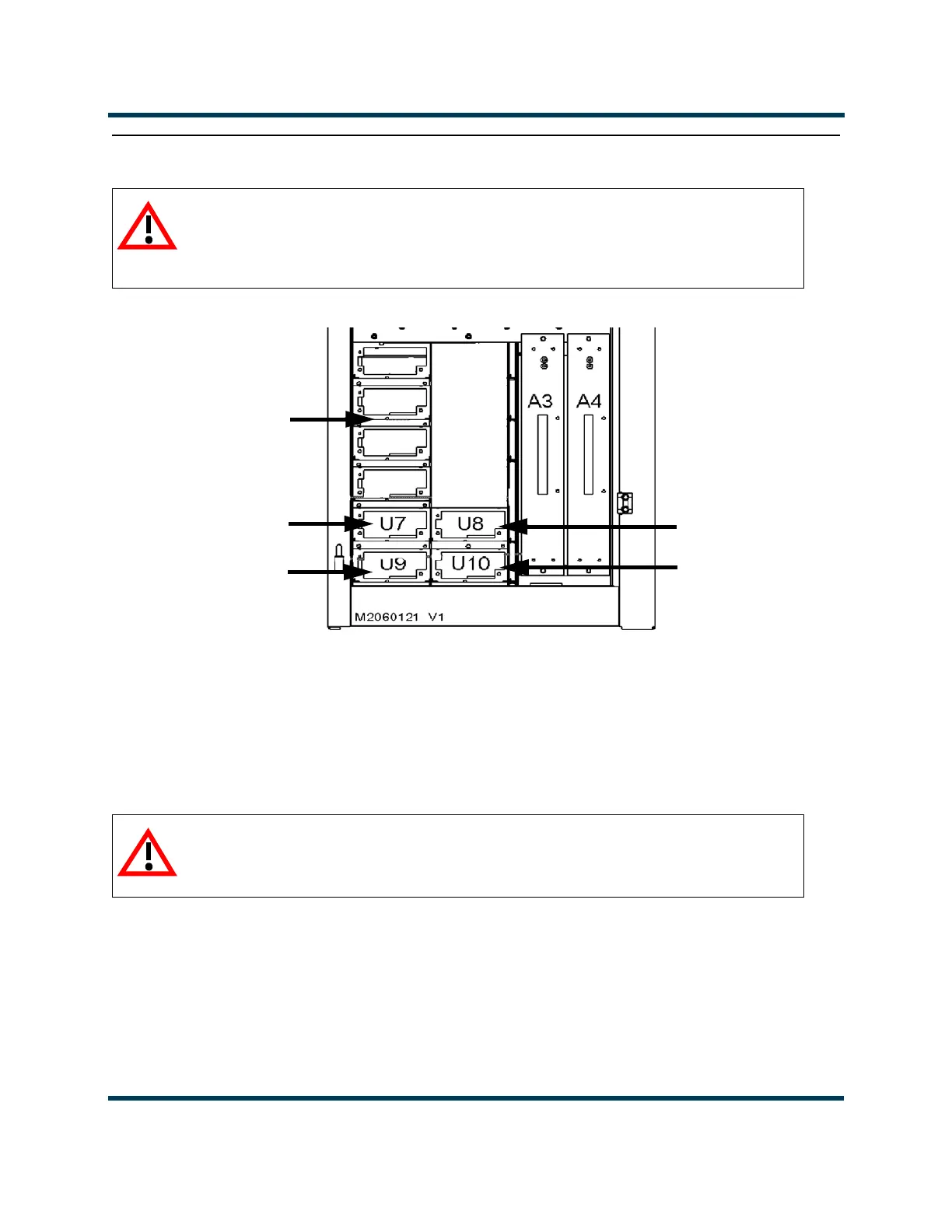
Figure 1.7: Location of Various Power Supply Modules
1. Open the front door and locate the suspect power supply module. See Figure 1.7.
2. From the front of the transmitter, remove the power supply module from the transmitter. If
necessary, use a slotted screwdriver to turn the
LATCH knob at the front of the power supply
module counterclockwise to unlatch the module from its support bracket.
WARNING:
Lethal voltages exist inside the transmitter when power is on. Follow
replacement instructions carefully to ensure safety for maintenance
personnel during power supply replacement.
WARNING:
Rotating parts are present at the back of the power supply module.
Take care when removing the module.
Front Door Removed for Clarity
Fan Power
Supply Module A
Fan Power
Supply Module B
IPA Power
Supply A
IPA Power
Supply B
1A
1B
2A
2B
Module Power Associated RF
Supply Power Module
1A (U12), 1B (U13) 1 (A18)
2A (U14), 2B (U15) 2 (A21)
Module Power
Supplies



 To Next Page