15
Nautilus® Commercial Free Weights Adjustable Tower Assembly Manual
Step 5: Install Weight Plates
Locate the following for this step:
Parts:
• 10 lb Weight Plate, CFW Qty. 23
• Top Weight Assembly from Step 3
Hardware:
• None
Tools:
• None
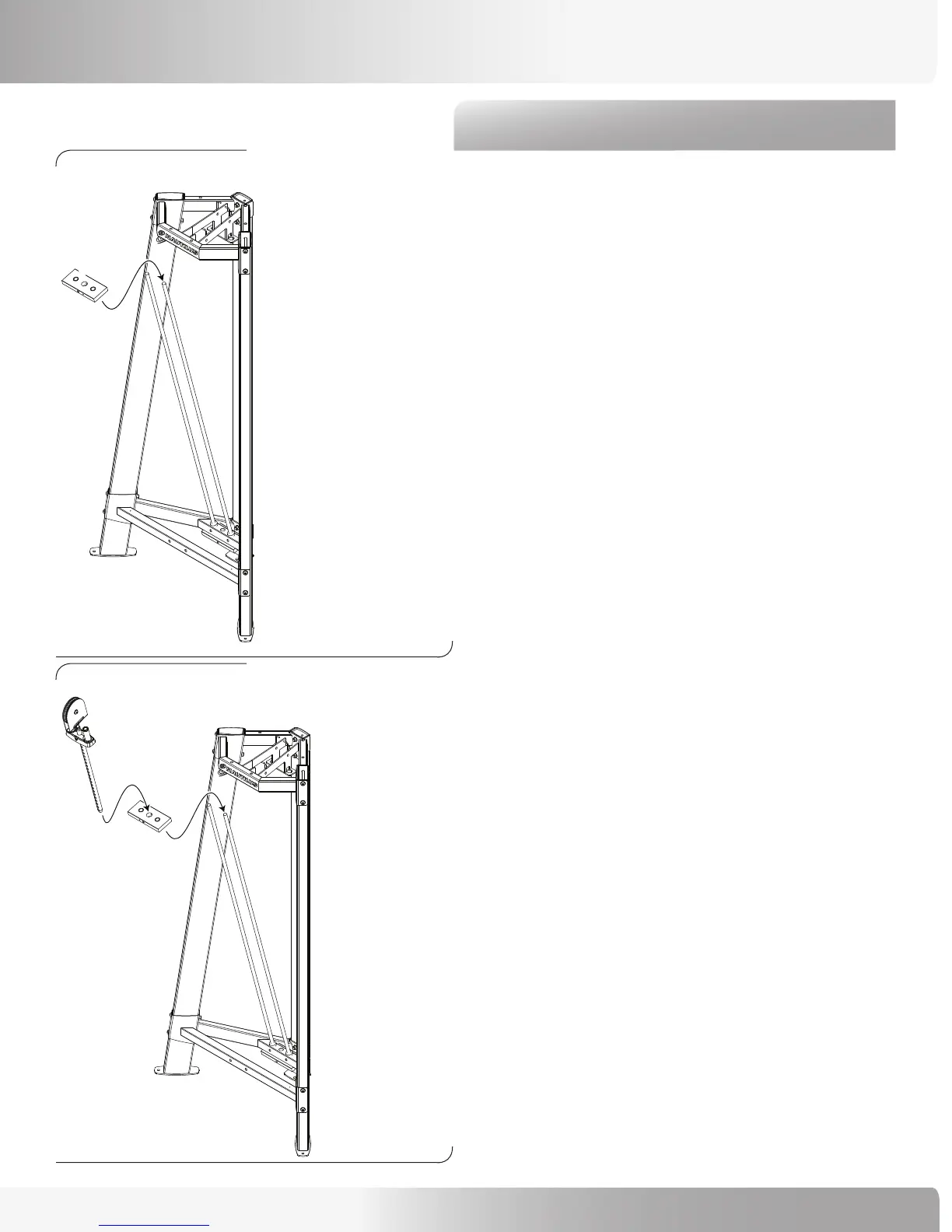
Refer to Figures 6 and 7:
5-1 Locate and set aside the 10 lb Weight with the extra
hole in the front to retain the Weight pin. This is
the “Second Plate” and is the last plate you place
before adding the Top Weight Assembly (Figure 6).
Note: Make sure that the extra hole in the “Second
Plate” is facing to the left (as you face the machine).
5-2 Carefully slide all the Weight plates onto the Guide
Rods, finishing with the ”Second Plate” and the Top
Weight Assembly (Figure 7).
Figure 6:
ASSEMBLY GUIDE
Figure 7:







 To Next Page