Assembly Continued
The following instructions provide direction on the assembly of the Nautilus® K2
™
Vertical Climber. All instructions in the
manual are given with the orientation of standing on a level surface and facing the machine.
Step 4: Install Handrails
Tools & Hardware:
* 5/16 Allen wrench
* 7/32 Allen wrench
* 3/8 x 2 button head bolt (4 x p/n 01-4064)
* 3/8 x 1 button head connector (4 x p/n 01-4113)
* Handrail Boot (2 X 57-0356)
4-1 Install the Handrail Boots onto the Handrails by
sliding them up onto the handrail assembly.
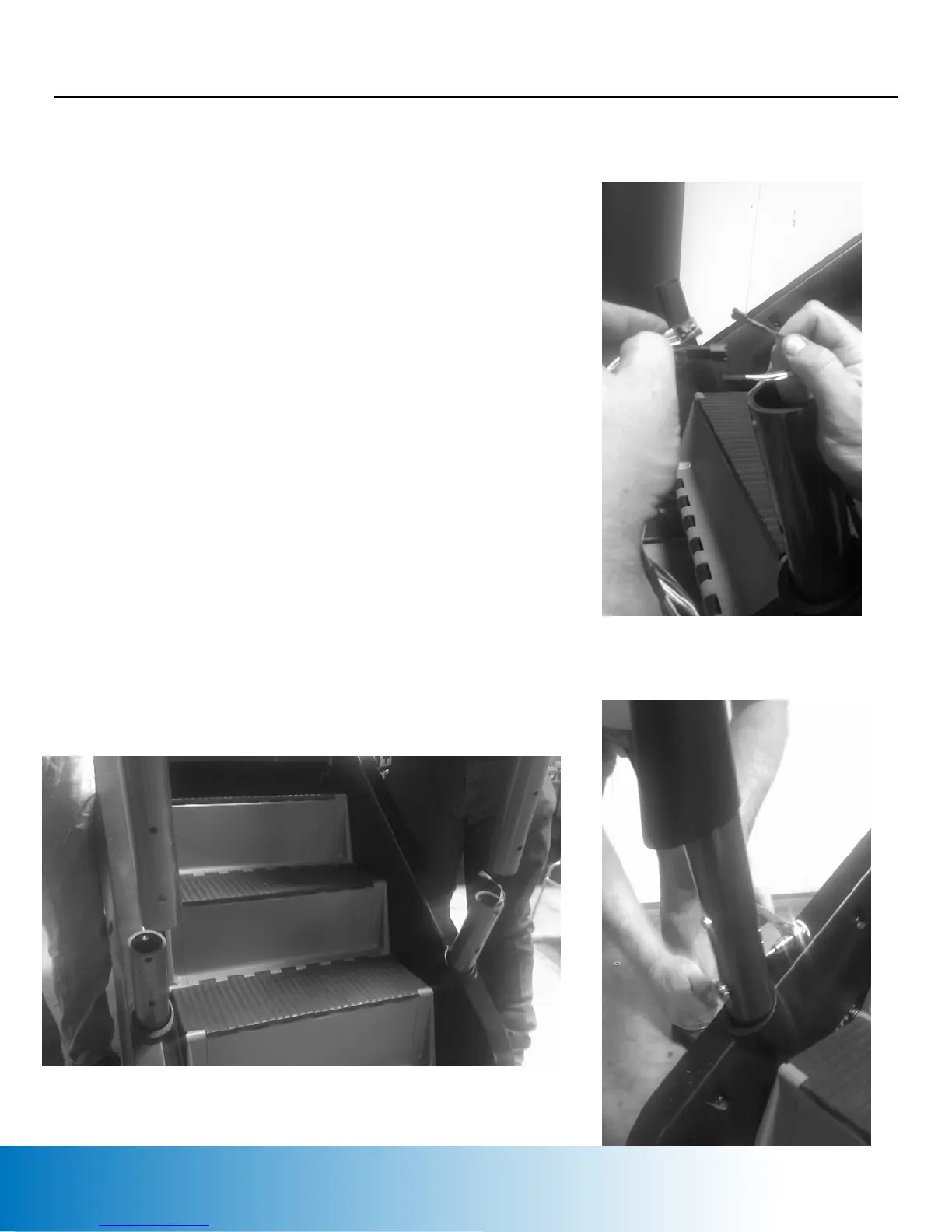
4-2 Gently stretch the cables from the handrail
assembly and connect the wire harnesses (Figure 6)
4-3 With the help of a second person, lift the
Handrail assembly up and onto the two posts at the
base of the K2
™
. Ensure that the wires are not
damaged during handrail installation (Figure 7)
4-4 Insert the two bolts thru the handrail assembly
and tighten using the two Allen wrenches. (Figure 8)
Figure 6
4-5 Repeat the bolt installation process on the
opposite side.
Figure 7
4-6 Slide the Handrail Boots down until they rest
against the top shroud assembly.
Call toll-free 1-800-235-2233 for assembly questions 12
Figure 8






 To Next Page