AE- 1 5 0 s y s t e m – U s e r M a n u a l
29
Enter the transformer information (Transformer tab).
Set the communication (Communication tab).
Set the AE-150 location on the transformer tank to X=0, Y=0, Z=0 (AE-
150 position tab).
Set each sensor location from the origin point (AE-150 position tab).
Click the Controls tab.
In the Pre-set Configuration menu, select the PrPD setting of choice.
Click the AUTO-SET button. The AE-150 will set the acoustic channels
gain automatically. This process can take a few seconds.
Click on the Monitoring tab and then check the Enable checkbox.
Set the interval between two acquisitions in the Interval-Hours-Minutes
fields.
Set the Start Time and End Time.
Click the START MONITORING button to start the acquisition process.
Tip: It is recommended to let the instrument run for at least 24 hours
in monitoring mode (typically for a week). The operation requires
connecting the battery charger to the AE-150.
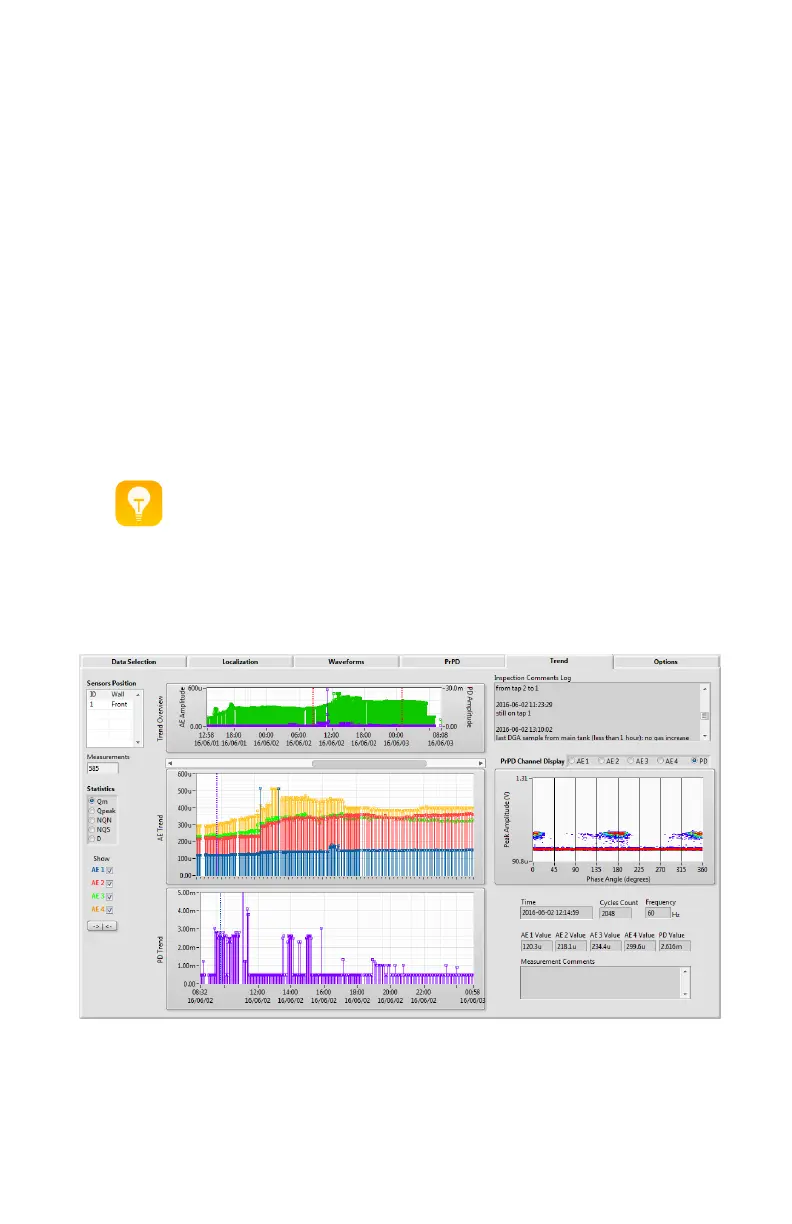
Monitoring results
The acquired PrPDs acquisitions will be present in the Data Analysis > Trend tab.
In the Sensors Position list, select the acquisition to be analysed.


 To Next Page