AE- 1 5 0 s y s t e m – U s e r M a n u a l
22
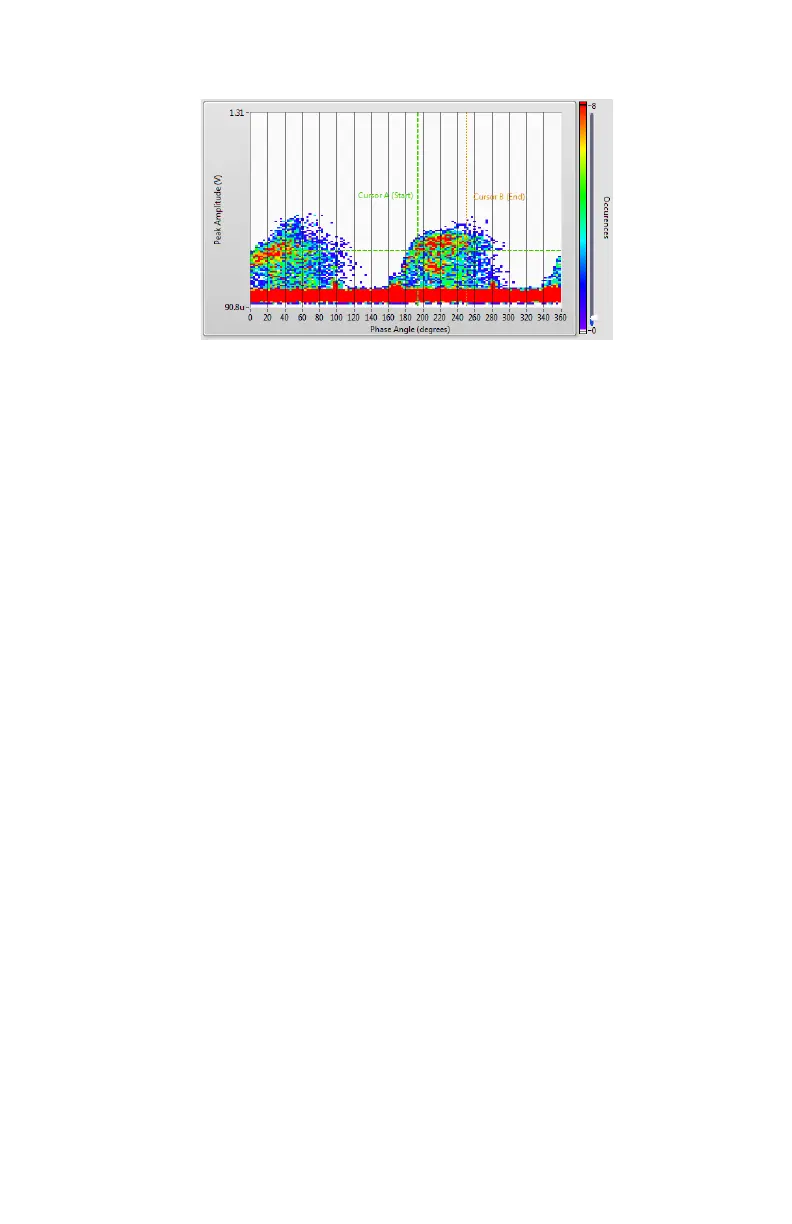
Click the Set Trigger Window button. The trigger window values will be
transferred to Data Analysis tab > Controls tab.
Once a trigger window is set on an identified PrPD pattern of interest,
waveform acquisition can now be performed.
Waveform acquisition
Acquisition
Waveform acquisition is required to measure acoustic and PD waves created by
the partial discharge source inside the transformer tank. The time of arrival of
each wave (PD and acoustic) is critical as it will be used for partial discharge
source localization.
Click the AE-150 CONTROL side tab, and then, the Controls tab.
Note: At this step, the gain adjustment (Auto-Set button) should have been
done already. See PrPD Acquisition section of this manual.
Confirm the presence of the trigger window values previously defined
in the PrPD section.
Click the Pre-set Configuration dropdown menu.
Select between Waveform (64PD) (recommended for faster transfer
speeds) or Waveform (1024PD) (recommended for high resolution
results).
Click the START button to start the waveform acquisition.
Click the DATA ANALYSIS side tab, and then, the Waveforms tab.


 To Next Page