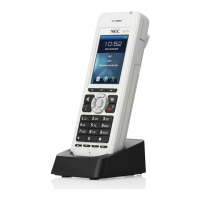
The Basics
Basic Operation
2
◆
Chapter 1: Installation
DS1000/2000 Cordless Telephone User Guide
The Basics
Basic Operation
Using the Basic Features
Answering Calls
■
Outside calls:
Ring with 2 short rings followed by a long ring.
■
Intercom calls:
Ring with 1 long ring.
■
To answer a call:
Press
TALK
or the flashing line key.
-
If your handset is in the charger, lifting the handset answers the incoming call.
Placing Calls
■
Intercom calls
: Press
TALK
+ Dial co-worker’s extension or
*8
for Voice Mail.
■
Outside calls:
Press
TALK
+ Dial trunk access code + Dial outside number, or
Press line key + Dial outside number
Hanging Up
■
Press
TALK
or place the handset in the charger.
Changing Channels
If the installation site has more than one DS1000/2000 900 Mhz Cordless Telephone, set up each telephone
to operate on its own channel.
■
While on a call, press
CH
.
-
The
TALK
icon flashes briefly while the handset changes channels. There are 30 channels max.
-
If you select a channel that is already in use, you see
SYSTEM BUSY
.
Standby Mode
■
When the handset is out of the charger, it will go into Standby Mode after about 5 minutes. Standby
mode blanks the display to conserve power.
■
Placing or answering a call automatically cancels Standby Mode.
Traveling Out Of Range
■
If you try to place a call while out of range (beyond the range of your handset):
-
ACQUIRING LINK
flashes in your display.
-
You hear five quick beeps.
-
NO SERVICE
flashes in your display.
■
If you travel out of range while on a call:
-
You hear five quick beeps.
-
Your handset goes into standby mode.
-
The call disconnects.
Using the Base
Cordless
and
Desk
Buttons
■
While on a call at your cordless handset
: Press
Desk
to transfer the call to your desk extension.
■
While on a call at your desk extension
: Press
Cordless
to transfer the call to your cordless handset.
■
While idle at your cordless handset
: Press
Desk
to call your desk extension on the Intercom.
■
While idle at your desk extension
: Press Cordless to beep (locate) for cordless handset.
Low Battery
If the
LOW
icon displays:
■
If on a call, press
TALK
to hang up as soon as possible so your call is not interrupted.
■
Recharge or replace the battery before placing or answering another call.


 To Next Page