EasyManua.ls Logo

NEC GT210 - User Manual

NEC GT210
27 pages
Print Icon
To Next Page IconTo Next Page
Loading...
GVT-055600-001
Issue 3.0
April, 2020
Before using this product and document, please read the following document carefully.
Also, please keep this document to the place where you can see any time.
- Safety Precautions and Regulatory Notices for GT Series
Standard SIP Terminal
IP Phone GT210
User Guide
Question and Answer IconNeed help?

Do you have a question about the NEC GT210 and is the answer not in the manual?

Summary

DOCUMENT PURPOSE

FIRMWARE VERSION CHECK

Provides clear, step-by-step instructions to check the firmware version of the GT210 phone.

PRODUCT OVERVIEW

Model Line Up of GT210 Series

Lists the specific model names and their corresponding descriptions for the GT210 IP phone series.

Feature Highlights

Details the key features and capabilities of the GT210 IP phone, such as display, keys, and audio performance.

Supporting Communication Servers

Lists the compatible communication servers that the GT210 phone can integrate with.

Technical Specifications

INSTALLATION

Equipment Packaging

Lists all the items that are included in the GT210 IP phone package for user reference.

Connecting Your Phone

Explains how to connect the essential components of the GT210 IP phone, including handset and network.

Stand Installation

Provides instructions for installing the GT210 phone using its base stand for desktop placement.

Wall Mount Installation

Provides step-by-step instructions for mounting the GT210 phone on a wall using the provided hardware.

OPERATION

Idle Screen

Describes the elements displayed on the GT210 phone's idle screen and the context-sensitive softkey functions.

Using the Keypad

Explains the functions of the GT210 phone's keypad, including line, soft, and navigation keys for interaction.

Making Phone Calls

Explains how to make phone calls using the GT210, covering handset, speaker, and headset modes, and call completion methods.

Making Calls Using IP Addresses

Explains how to make direct IP calls using IP addresses and the Quick IP Call mode for peer-to-peer communication.

Answering Phone Calls

Details how to answer incoming calls on the GT210, covering single and multiple call scenarios.

Do Not Disturb

Explains how to enable/disable the Do Not Disturb feature to manage incoming calls and avoid interruptions.

During A Phone Call

Covers essential call management features during an active call, such as hold, mute, group listening, and call transfer.

Conferencing

Explains how to set up, manage, and end conference calls on the GT210, including standard and easy modes.

Easy Conference Mode

Details the Easy Conference Mode for simplified conference call setup and management on the GT210 phone.

Voicemail

Explains how to access and retrieve voicemail messages on the GT210 phone, including accessing the voicemail box.

CONNECTING TO DEVICES

EHS Headset

Details how to connect and configure an EHS headset with the GT210 phone for enhanced call handling.

RESTORE FACTORY DEFAULT SETTINGS

Restore to Factory Default via Keypad Menu

Guides users through the process of resetting the phone to factory defaults using the device's keypad menu.

Restore to Factory Default via Web GUI

Guides users through the process of resetting the phone to factory defaults using the phone's web interface.

Overview

The NEC Standard SIP Terminal IP Phone GT210 is a user-friendly and feature-rich VoIP phone designed for various communication environments. This user guide covers its installation, basic call operations, and maintenance features, ensuring a comprehensive understanding for users.

Function Description

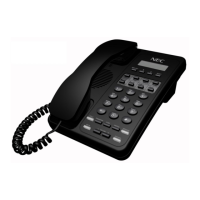
The GT210 is an IP Telephone with two line buttons, supporting one SIP account. It is designed for standard SIP terminal usage, offering a range of telephony features for efficient communication. The phone can operate in handset, speaker, or headset mode, providing flexibility for different user preferences. It supports direct IP calls and quick IP call mode for direct communication without a SIP proxy, ideal for LAN/VPN environments. The device also includes advanced call management features such as call hold, mute, transfer (blind, attended, and auto-attended), and 3-way conferencing. For messaging, it features a message waiting indicator and voicemail access.

Important Technical Specifications

  • Protocols/Standards: SIP RFC3261, TCP/IP/UDP, RTP/RTCP, HTTP/HTTPS, ARP/RARP, ICMP, DNS (A record, SRV, NAPTR), DHCP, PPPoE, SSH, TFTP/FTP/FTPS, NTP, STUN, SIMPLE, LLDP-MED, LDAP, 802.1x, SRTP, TLS.
  • Network Interfaces: Dual switched 10/100 Mbps ports, integrated PoE (IEEE802.3af class 1).
  • Graphic Display: 132x48-pixel graphical LCD display.
  • Feature Keys: 2 dual-color line keys, 3 XML programmable context-sensitive soft keys, 5 navigation/menu keys, and 13 dedicated function keys for PAGE/INTERCOM, PHONEBOOK, MESSAGE, HOME, HOLD, MUTE, HEADSET, TRANSFER, CONFERENCE, SEND, REDIAL, SPEAKERPHONE, and VOLUME.
  • Voice Codecs: Support for G.711μ/a, G.722 (wide-band), G.729 A, in-band and out-of-band DTMF (In audio, RFC2833, SIP INFO).
  • Telephony Features: Hold, transfer, 3-way conference, downloadable phone book (LDAP, up to 500 items), call waiting, call history (up to 200 records), off-hook auto dial, auto answer, click-to-dial, flexible dial plan, Hot Desking, personalized music ringtones, server redundancy & fail-over.
  • Headset Jack: RJ9 headset jack (allowing EHS with Plantronics headsets).
  • Base Stand: Allows for two angle positions and is wall-mountable.
  • QoS: Layer 2 QoS (802.1Q, 802.1P) and Layer 3 (ToS, DiffServ, MPLS) QoS.
  • Security: User and administrator level access control, MD5 and MD5-sess based authentication, 256-bit AES encrypted configuration file, TLS, SRTP, HTTPS, 802.1x media access control.
  • Multi-language Support: English, German, Italian, French, Spanish, Portuguese, Russian, Croatian, simplified and traditional Chinese, Korean, Japanese, and more.
  • Upgrade/Provisioning: Firmware upgrade via TFTP / HTTP / HTTPS / FTP / FTPS, mass provisioning using AES encrypted XML configuration file.
  • Operation Temperature: 0°C to 40°C.
  • Storage Temperature: -10°C to 60°C.
  • Humidity: 10% to 90% Non-condensing.
  • Dimensions: 209mm (L) x 184.5mm (W) x 76.2mm (H) (with handset).
  • Unit Weight: 0.78kg.
  • Package Weight: 0.99kg.
  • Compliance: FCC Part 15 (CFR 47) Class B, CE (EN55022 Class B, EN55024, EN61000-3-2, EN61000-3-3, EN60950-1), RCM (AS/NZS CISPR22/24; AS/NZS 60950; AS/NZS 60950.1).

Usage Features

The GT210 offers a variety of usage features designed for ease and efficiency. The idle screen displays the current date and time, network status, and registration status, with context-sensitive softkeys that change based on the phone's status. Users can navigate menus using arrow keys and dedicated function buttons.

  • Making Calls: Calls can be made via on-hook dialing, off-hook dialing, redialing from call history, selecting contacts from the phonebook, speed dial from line keys, or call return. The predictive dialing feature suggests numbers based on entered digits.
  • Answering Calls: Single incoming calls are indicated by a flashing red line key and a ring tone, answerable by lifting the handset, using speaker/headset, or pressing the flashing line key. Multiple incoming calls produce a call waiting tone, with the active call automatically put on hold when answering the new call.
  • Call Management:
    • Call Hold: Place an active call on hold by pressing the HOLD key, and resume by pressing the blinking LINE key.
    • Mute: Mute/unmute the microphone during an active call using the MUTE key.
    • Group Listening: Enable speaker listening along with handset or headset during a call.
    • Call Transfer: Supports blind, attended, and auto-attended transfers. Blind transfer involves dialing the target number after pressing TRANSFER. Attended transfer involves establishing a second call before transferring. Auto-attended transfer allows for a "Split" softkey to cancel the transfer and return to the first call.
    • Conferencing: Host up to a 3-way conference call. Initiate by establishing two calls, then pressing CONFERENCE and selecting the desired line on hold. Conferences can be canceled or put on hold and re-established. An "Easy Conference Mode" simplifies the process.
  • Do Not Disturb (DND): Enable or disable DND from the keypad menu to reject incoming calls.
  • Voicemail: A blinking red LED indicates new voicemail. Access voicemail by pressing the MESSAGE key and following voice prompts.
  • Headset Support: Supports normal RJ9 headsets and Plantronics EHS headsets. The headset mode can be activated by pressing the HEADSET key and persists across power cycles.

Maintenance Features

The GT210 provides options for restoring factory default settings, which can be useful for troubleshooting or reconfiguring the device.

  • Firmware Version Check: Users can check the firmware version (1.0.4.152) through the phone's menu: Status → System Status → Software Version → Prog.
  • Restore Factory Default Settings:
    • Via Keypad Menu: Access the "Config" menu, select "Factory Reset," and confirm. The phone will reboot after confirmation.
    • Via Web GUI: Log in to the Web GUI and click the "Factory Reset" key at the top right corner of the page.
    • Warning: Restoring factory defaults will erase all configuration information. Users are advised to back up or print settings before proceeding.

The GT210 is designed for robust performance and ease of use, making it a reliable communication tool for various business needs.
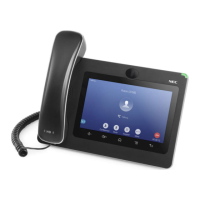
NEC GT210 Specifications

General IconGeneral
BrandNEC
ModelGT210
CategoryIP Phone
LanguageEnglish

Related product manuals