4. Multi-Screen Projection
58
❷ Using a single projector to project two or four types of
videos at the same time [PICTURE BY PICTURE]
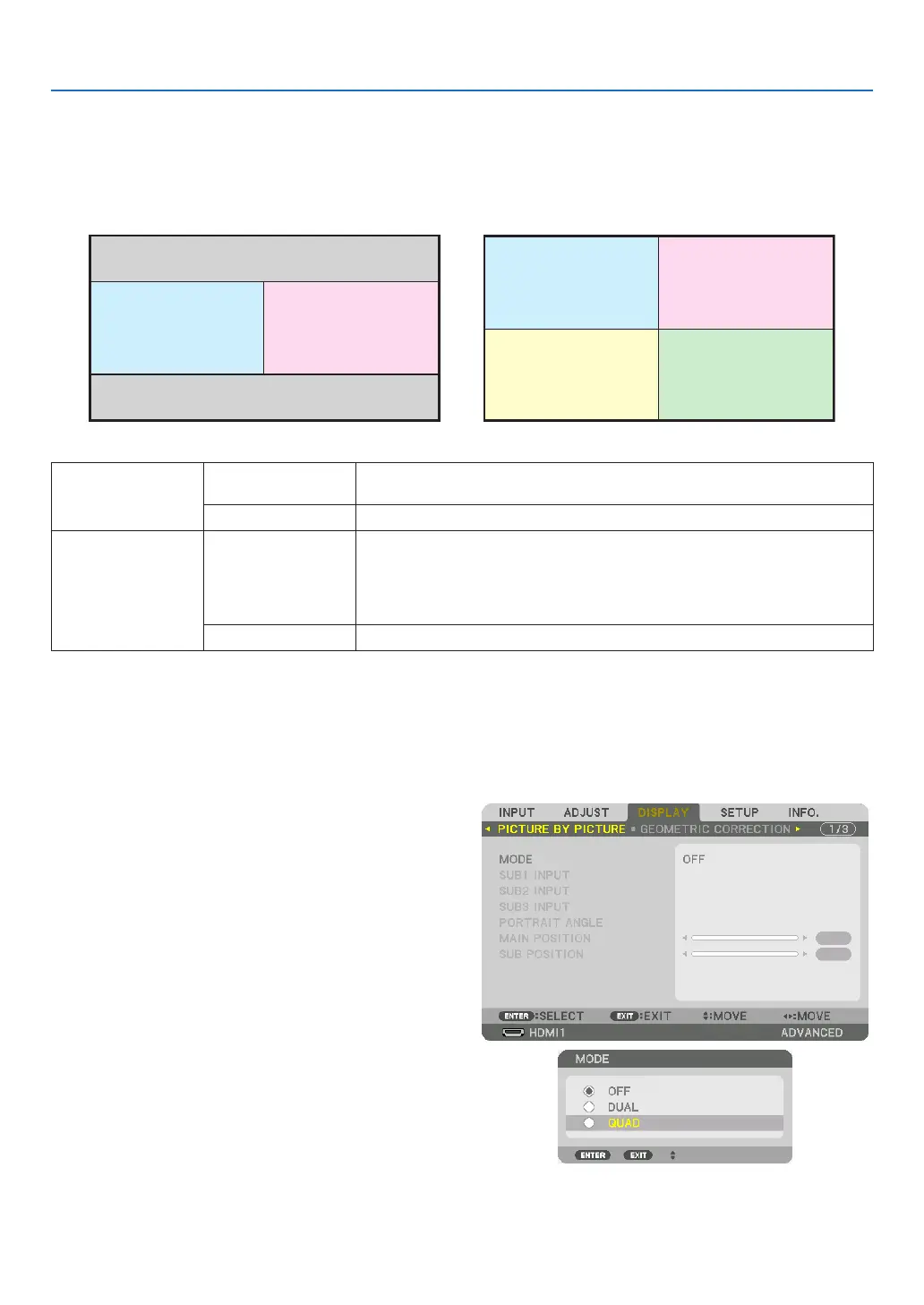
• The projection video in the rst screen display is known as the MAIN display while the projection video
that is called out subsequently is known as the SUB1, SUB2 and SUB3 display.
MAIN SUB1
MAIN
SUB2
SUB1
SUB3
• The PICTURE BY PICTURE function supports the following input terminals and input signals.
Input terminals Two screens SDI1, SDI2, SDI3, SDI4, HDMI1, HDMI2, DisplayPort1, DisplayPort2,
HDBaseT, SLOT
Four screens SDI1, SDI2, SDI3, SDI4, HDMI1, HDMI2, DisplayPort1, DisplayPort2
Input signals Two screens
• When [PORTRAIT ANGLE] is set to [0°],
Signals up to 4K 30 Hz (excluding Deep Color)
• When [PORTRAIT ANGLE] is set to [90°] or [270°],
Progressive signals up to WXGA ++ 60 Hz
1920 × 1080p 24/25/30 Hz signal
Four screens Progressive signals up to 1920 × 1080 60 Hz
Projecting four screens
This section provides procedures for projecting four types of images at the same time.
Preparation:
Connect the projector to devices that output four types of images and turn on the power of all the devices.
1. Press the MENU button to display the on-screen
menu and select [DISPLAY] → [PICTURE BY PIC-
TURE].
2. Select [MODE] using the ▼/▲ buttons, and press the
ENTER button.
This displays the [MODE] screen.
3. Select [QUAD] using the ▼/▲ buttons, and press the
ENTER button.
The display returns to the PICTURE BY PICTURE
screen.



 To Next Page