16
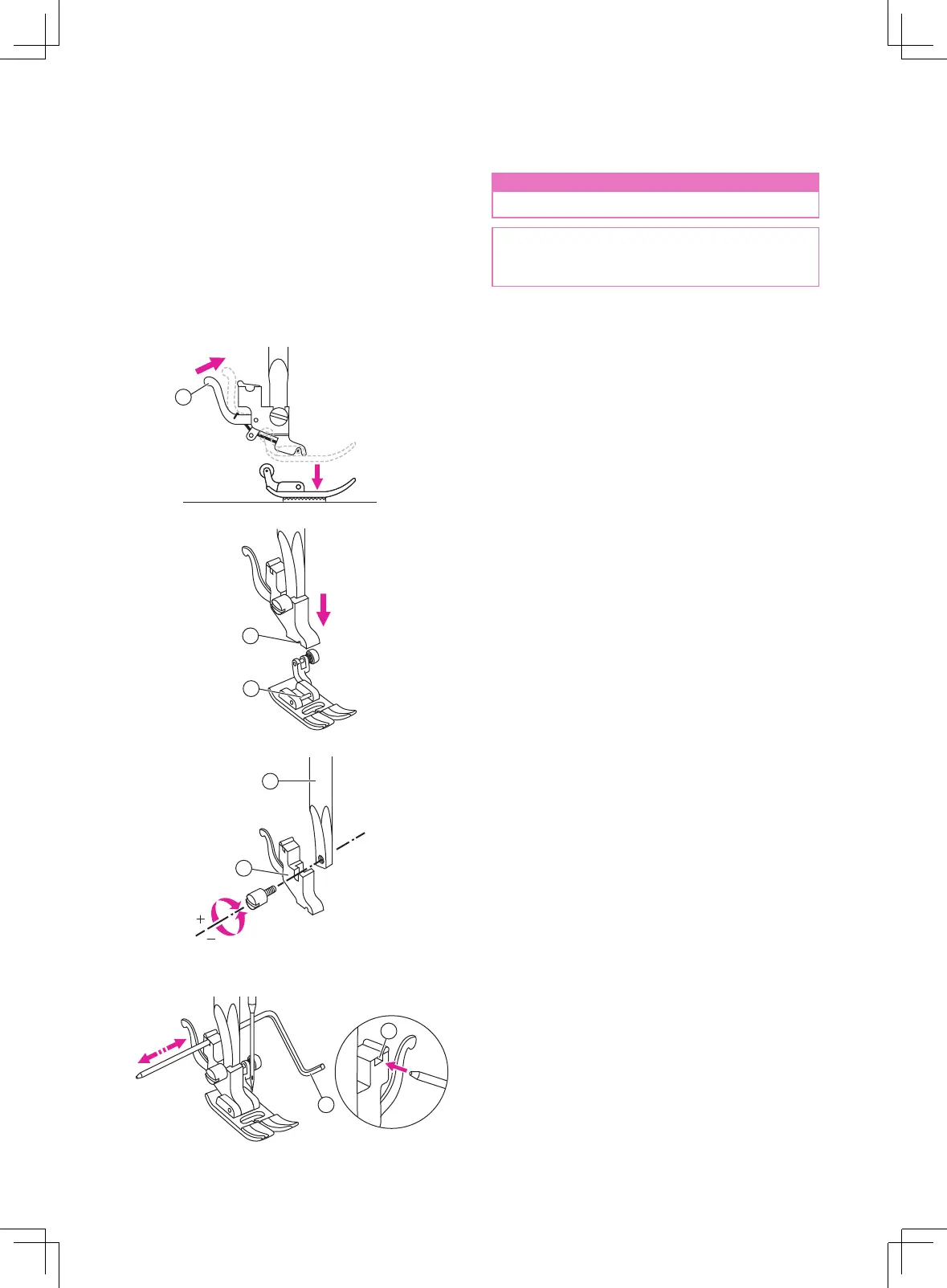
Changing the presser foot
v
Remove the presser foot
Raise the presser foot lifter. Press the back
lever to release the presser foot.
①
Lever
v
Attach the presser foot
Lower the presser foot lifter until the cut-out
meets the pin.
The presser foot will attach to the presser foot
holder automatically.
①
Cut-out
②
Pin
v
Remove and insert the presser
foot holder
Raise the presser foot lifter. Align the presser
foot holder with the lower left side of the
presser bar. Hold the presser foot holder,
then tighten the screw using the enclosed
screwdriver.
①
Presser foot bar
②
Presser foot holder
v
Insert the edge/quilting guide
Insert the edge/quilting guide in the slot as
illustrated. Adjust the needed width according
to your sewing applications.
①
Slot
②
Edge/quilting guide
n
Attention
Turn the power switch to off ("O").
Always use the proper foot for the selected
stitch. The wrong foot can cause the
needle to break.
1
2
1
2
1
2


 To Next Page