Meat thermometer en
19
--------
Note: If your appliance is equipped with the Home
Connect function, you will find the Home Connect
settings at the end of the basic settings for your
appliance. ~ Page 23
The Home Connect settings begin with •’.
Changing the basic settings
The function selector must be set to the "Off" position.
1. Press and hold the ! button for approx.
four seconds.
The first basic setting appears in the display,
e.g. ™‹‹ ‹.
2. Use the temperature selector to change the setting
as required.
3. Use the ) or ( button to continue going through all
the basic settings, and use the temperature selector
if you want to change any of these settings.
4. When you have finished, press and hold the ! button
again for approx. four seconds to confirm the
settings.
This applies all of the basic settings.
You can change the basic settings again at any time.
@Meat thermometer
Meat thermomet er
The meat thermometer makes precise cooking
possible. It measures the temperature inside the food.
Once the set temperature has been reached, the
appliance automatically switches itself off.
Types of heating
Not all types of heating are suitable for operation with
the meat probe.
Suitable heating functions include:
■ ‚ CircoTherm hot air
■ ¼ CircoTherm gentle
■ „ Pizza setting
■ ‡ Circo-roasting
■ ƒ Top/bottom heating
Note: If the meat probe is being used and you select an
unsuitable type of heating, a signal will sound.
Temperature
The meat thermometer measures the temperature on
the inside of the food between 30 °C and 99 °C. You
can set the desired core temperature in the display.
Inserting the meat probe into the food
Insert the meat probe into the food before placing your
dish in the cooking compartment.
Use only the meat probe supplied. You can purchase
one as a spare part from our after-sales service.
:Warning – Risk of electric shock!
The insulation of an incompatible meat thermometer
may be damaged. Only use the meat thermometer
which is recommended for this appliance.
Insertion
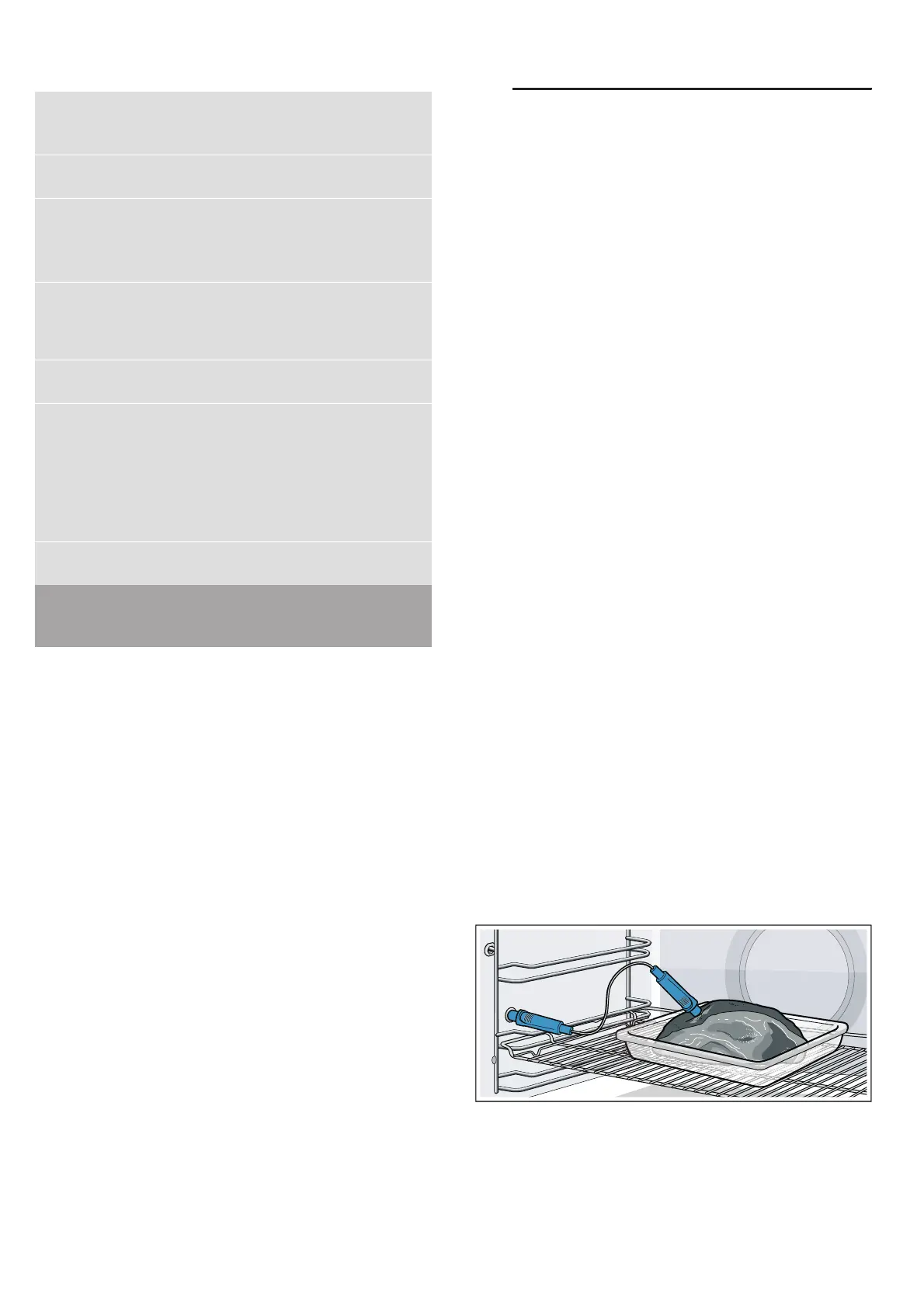
Insert the meat probe into the thickest part of the meat.
Make sure that the end of the probe is roughly in the
centre of the meat. It must not be inserted in the fat or
be touching the ovenware or bones.
Place the meat (preferably in an item of cookware) in
the centre of the wire shelf.
Caution!
Ensure that the meat probe's cable does not become
trapped.
To prevent the meat probe from being damaged by
excessive heat, there must be a gap of a few
centimetres between the grill element and the meat
™‹‡ Enable childproof lock activa-
tion?
‹ = no
‚ = yes*
ƒ = yes, with locked door**
™‹ˆ Interior lighting on when
appliance in operation?
‹ = no
‚ = yes*
™‹‰ Cooling fan run-on time ‚ = short
ƒ = medium*
„ = long
… = extra long
™‹Š Telescopic rails retrofitted?** ‹ = no* (for rails and single
pull-out system)
‚ = yes (for double and triple
pull-out systems)
™‚‹ Sabbath mode available? ‹ = no*
‚ = yes
™‚‚ Water hardness** ‹ = softened
‚ = soft (up to 1.3 mmol/l)
ƒ = medium (1.3 - 2.5 mmol/
l)
„ = hard (2.5 - 3.8 mmol/l)
… = very hard* (above
3.8 mmol/l)
™‚ƒ Reset all values to factory set-
tings?
‹ = no*
‚ = yes
* Factory setting (factory settings may vary depending on the appli-
ance model)
** Not available for all appliance types.



 To Next Page