9Chapter 2 .
Basics
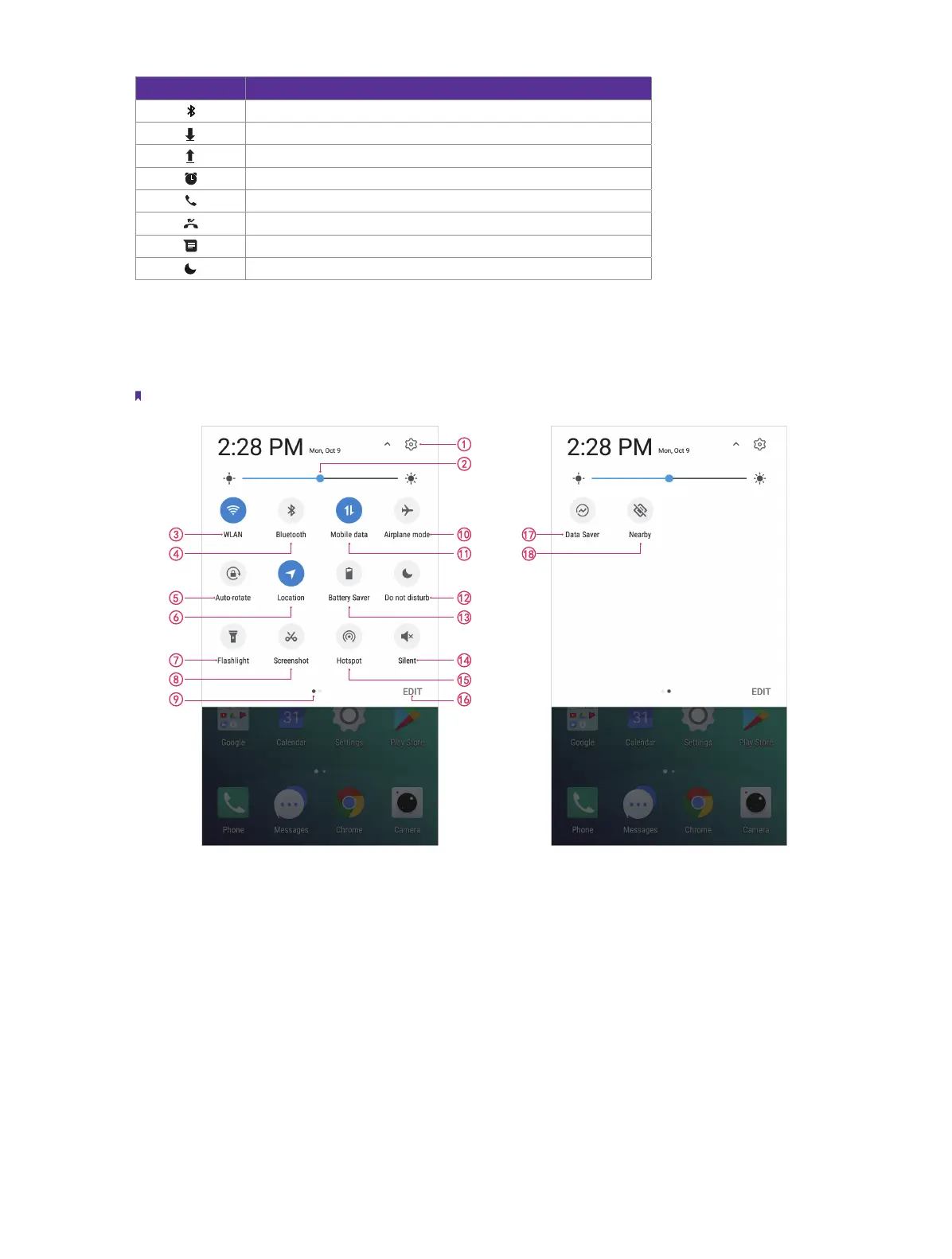
Status icons Indications
Bluetooth enabled
Download status
Uploading data
Alarms enabled
Call in progress
Missed calls
New messages
Do not disturb
2. 4 Quick Settings Panel
Swipe down from the top of any screen to open the Quick Settings Panel.
Note: On the Lock screen, swipe only once to open the Quick Settings Panel.
Touch the shortcut switches on the Quick Settings Panel to enable or disable the functions.
1. Settings: Tap to go to Settings.
2. Brightness slider: Use this slider to adjust the brightness of the screen.
3. WLAN: Tap to enable WLAN.
4. Bluetooth: Tap to enable Bluetooth.
5. Auto-rotate: Tap to open auto-rotate which can switch the touchscreen from portrait to landscape when
you rotate your phone.
6. Location: Tap to enable location service.
7. Flashlight: Tap to enable flashlight.
8. Screenshot: Tap to make a full-screen shot or a area of the current page.
9. Screen indicator: Tap to change to next screen to view other options.



 To Next Page