GB-10
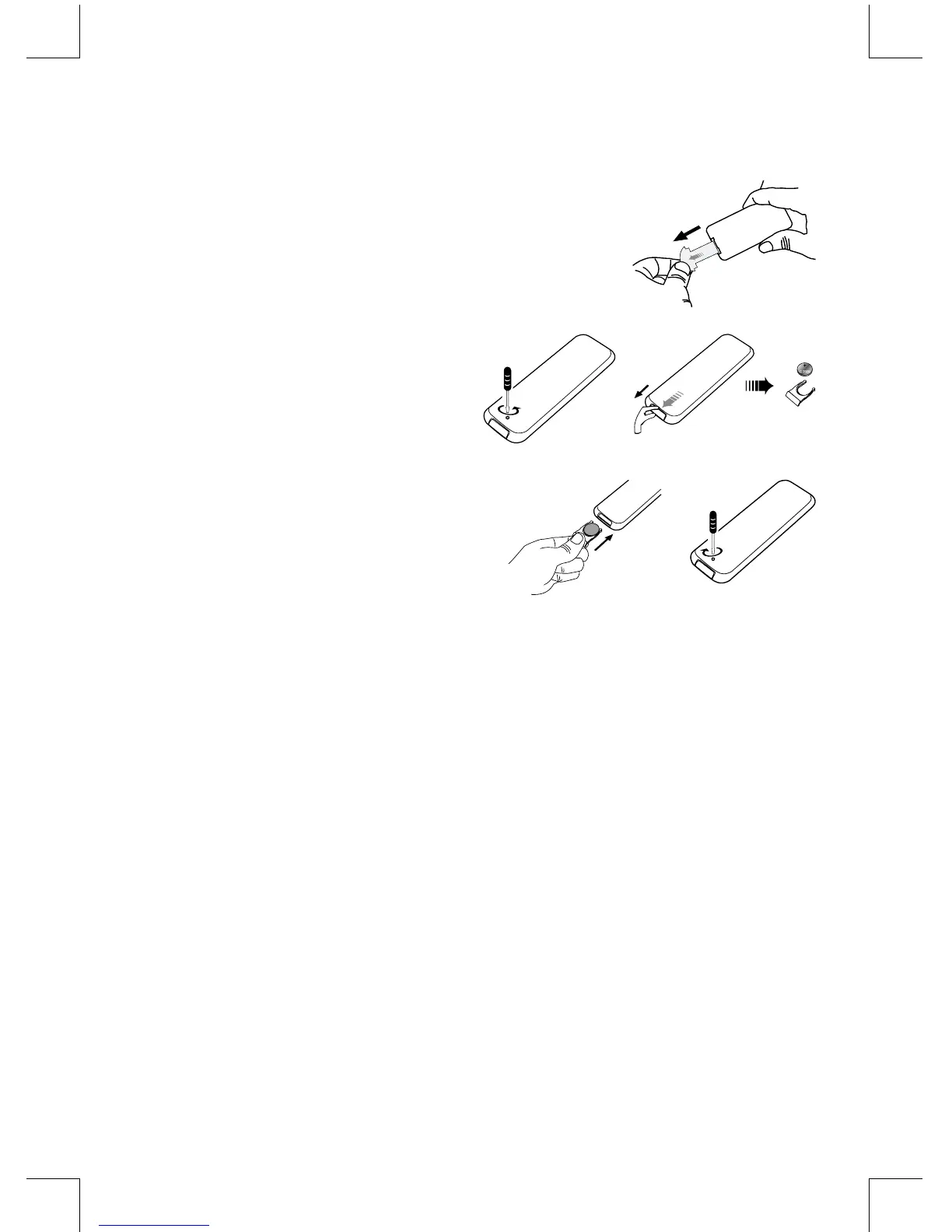
Installation of Battery
1. Remove the insulating mylar strip from the battery.
It is located at the bottom back side of the remote
control.
2. Loosen the screw on the battery compartment
cover with a screwdriver. Pull out the battery
compartmentwithyourngernails.
3. Replace a new battery (size 2025) correctly and
fully insert the battery compartment back to the
original position. Tighten the screw with a
screwdriver.
Handling the Remote Control
•
Remove the batteries if the remote control is not going to be used for an extended period of
time.
•
To avoid possible failure, read the following instructions and handle the remote control
properly.
•
Do not drop or cause impact to the remote control.
•
Do not spill water or any liquid on the remote control.
•
Do not place the remote control on a wet object.
•
Do not place the remote control under the direct sunlight or near sources of excessive heat.
•
Do not use caustic cleaners ( porcelain, stainless steel, toilet, or oven cleaner etc. ) on the
remote, as it may suffer damage.
Note:
Remove the battery from remote control handset when it is not to be used for a long period.
Otherwise it can be damaged due to leakage of battery.


 To Next Page